Introduction
In today’s fast-paced digital travel industry, customer expectations are higher than ever. The ability to book a hotel room quickly, securely, and reliably is no longer a luxury—it’s a necessity. Traditional, linear booking systems often lead to frustrating user experiences: slow response times, abandoned carts, and inventory lockups due to incomplete payments.
This case study explores the transformation of a generic Travel Plan Management process into a specialized, high-performance Hotel Reservation Management System using Business Process Model and Notation (BPMN). By leveraging advanced BPMN constructs such as parallel processing, event-based gateways, and sub-processes, we demonstrate how to design a resilient, scalable, and user-centric booking workflow.
1. Process Overview: From Request to Confirmation
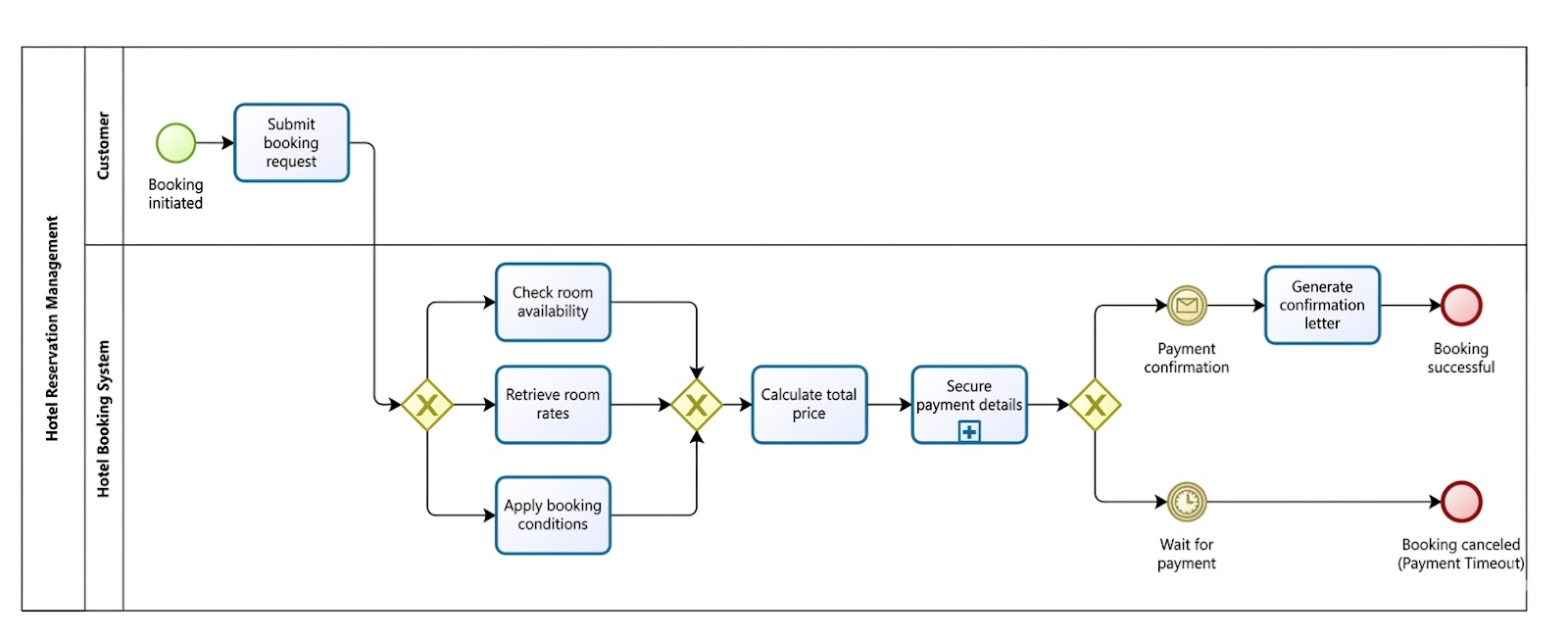
The BPMN diagram captures a seamless, event-driven journey from customer initiation to final reservation confirmation. The process spans two primary Pools—Customer and Hotel Booking System—with clear separation of responsibilities and communication flows.
Process Flow Breakdown
-
Trigger: Booking Request Submission
The process begins when a customer submits a reservation request via a web or mobile interface. This includes key details such as check-in/check-out dates, room type, number of guests, and preferred rate. -
Parallel Execution: Concurrent Validation
Upon receiving the request, the system immediately activates three parallel tasks:-
Check Availability – Query the hotel’s inventory database for the requested room(s) during the specified dates.
-
Retrieve Current Rates – Fetch real-time pricing data, including seasonal adjustments, package deals, or promotional rates.
-
Apply Booking Conditions – Evaluate rules such as cancellation policies, early-bird discounts, loyalty benefits, or blackout dates.
This parallel execution ensures that no single task becomes a bottleneck, dramatically reducing end-to-end processing time.
-
-
Consolidation: Total Price Calculation
Once all three parallel branches complete successfully, an AND Gateway merges the results. The system then calculates the total price, factoring in taxes, fees, and any applicable discounts. -
Sub-Process: Secure Payment Details
The next step is a sub-process labeled “Secure Payment Details.” This encapsulates complex, multi-step actions behind a single task symbol:-
Tokenization of payment card data
-
3D Secure authentication (e.g., Verified by Visa, Mastercard SecureCode)
-
Integration with third-party payment gateways (Stripe, PayPal, etc.)
-
Encryption and audit logging
The use of a sub-process keeps the main diagram clean while preserving full traceability and modularity.
-
-
Event-Based Decision: Wait for Payment Outcome
The process now reaches an Event-Based Gateway—a critical innovation in this design. Instead of relying on data conditions, the system waits for one of two external events:-
Payment Confirmation (Message Event): A successful response from the payment processor.
-
Payment Timeout (Timer Event): A predefined time limit (e.g., 15 minutes) elapses without payment.
The flow branches accordingly:
-
If Payment Confirmation arrives first → proceed to Generate Confirmation & Release Reservation.
-
If Payment Timeout occurs first → trigger Cancel Booking & Release Inventory.
-
2. Key BPMN Concepts in Action
The power of this model lies in its strategic use of BPMN standards to model real-world complexity with precision and clarity.
| BPMN Concept | Purpose & Implementation |
|---|---|
| Pools and Lanes | Clearly separates the Customer (external actor) from the Hotel Booking System (internal process). Lanes within the system pool can further distinguish roles like Frontend, Inventory Service, Pricing Engine, and Payment Gateway. |
| Parallel Gateway (AND) | Ensures that all validation tasks must complete before proceeding. Prevents premature price calculation and avoids race conditions. |
| Sub-Process (Plus Icon) | Hides complexity. The “Secure Payment Details” sub-process can be expanded into its own detailed BPMN diagram for development teams, while the main flow remains readable. |
| Event-Based Gateway | Enables true asynchronous behavior. The system doesn’t poll or wait in a loop—it listens for external triggers. This is essential for handling time-sensitive operations like payment timeouts. |
| Message Flow (Dashed Line) | Used to show actual data exchange between Customer and System (e.g., “Payment Confirmation” message). Distinguishes from sequence flows, which represent control flow. |
✅ Best Practice Tip: Use dashed message flows to depict real-time data exchanges (e.g., customer payment response) rather than solid sequence flows, which imply internal process logic.
3. Implementation Guidelines: Bridging Design to Code
Translating this BPMN model into a production-ready system requires careful attention to architecture, state management, and resilience.
1. State Management for Long-Running Processes
-
The Event-Based Gateway introduces a long-running process that may remain in a “Pending” state for up to 15–30 minutes.
-
Solution: Implement a process instance registry using a database or message queue (e.g., Apache Kafka, RabbitMQ).
-
Each booking is assigned a unique
bookingIdand stored with status (Pending,Confirmed,Cancelled). -
Use event-driven polling or message listeners to detect incoming events (payment success/failure, timeout).
2. Idempotency: Preventing Double Billing
-
A customer might accidentally submit payment twice due to slow network response or repeated clicks.
-
Solution: Design payment processing to be idempotent.
-
Assign a unique
paymentIdper transaction. -
Store a record of all processed payments.
-
If a duplicate
paymentIdis received, return the original result without reprocessing.
-
🔐 Example: Use a
paymentIdderived from a hash ofbookingId + timestamp + amount.
3. Data Synchronization with Parallel Tasks
-
Parallel execution increases speed but introduces risk of partial completion.
-
Solution: Use a synchronization mechanism such as:
-
A semaphore or countdown latch that waits for all three tasks to return.
-
A callback pattern where each service calls back to a central orchestrator upon completion.
-
-
Only after all three tasks succeed does the system proceed to calculate the total price.
⚠️ Warning: Never allow the price calculation to proceed if any one of the parallel branches fails. Implement error handling at the gateway level.
4. Professional BPMN Best Practices: Tips & Tricks
To ensure clarity, maintainability, and stakeholder alignment, follow these industry-proven practices:
✅ Labeling Consistency
Use the [Verb] + [Noun] format for all tasks:
-
✅ “Check Room Availability”
-
✅ “Apply Loyalty Discount”
-
✅ “Generate Confirmation Email”
-
❌ Avoid vague labels like “Process” or “Validate”
This creates a natural, readable narrative: “The system checks availability, applies discounts, and generates a confirmation.”
✅ Happy Path vs. Exception Path
-
Keep the main (happy path) flow straight and horizontal.
-
Only deviate downward or upward for exceptions (e.g., payment failure, rate change).
-
This improves readability and helps developers and business analysts quickly identify the ideal user journey.
✅ Timer Precision with ISO 8601 Duration Format
Define timeouts using standard ISO 8601 notation:
<timerEventDefinition>
  <timeDuration>PT15M</timeDuration>
</timerEventDefinition>
-
PT15M= 15 minutes -
PT1H30M= 1 hour 30 minutes -
P1D= 1 day
This ensures unambiguous interpretation across teams and tools.
✅ Use Message Flows for External Communication
-
Use dashed lines (Message Flow) to show data exchange between pools.
-
Example:
-
Customer → System:
Payment Confirmation (with paymentId) -
System → Customer:
Booking Confirmation (with bookingRef)
-
-
This distinguishes external communication from internal process control.
5. Strategic Value: Why This Model Wins
This redesigned Hotel Reservation Management System delivers significant business and technical advantages:
🚀 Enhanced User Experience
-
Faster response times via parallel validation (e.g., availability, pricing, conditions checked in under 1 second).
-
Reduced perceived latency — customers see a “processing” status but don’t wait for sequential steps.
💰 Maximized Revenue & Inventory Efficiency
-
Automatic cancellation after payment timeout prevents inventory from being locked indefinitely.
-
Released rooms can be offered to other customers, reducing lost revenue from abandoned carts.
-
Dynamic pricing and real-time availability improve yield management.
🔐 Improved System Resilience & Security
-
Idempotent payments eliminate double charges.
-
Sub-processes allow modular updates (e.g., switching payment providers without affecting the main flow).
-
Clear separation of concerns reduces bugs and simplifies testing.
📊 Scalability & Maintainability
-
The BPMN model serves as a single source of truth for both business and technical teams.
-
Changes to pricing logic or payment flows can be modeled visually and tested before implementation.
-
Supports integration with Workflow Engines like Camunda, Activiti, or Flowable.
6. Tooling: Leveraging Visual Paradigm for BPMN Design & Implementation
While BPMN provides a powerful language for modeling business processes, the true value is unlocked when paired with the right design and execution tools. One of the most effective and widely adopted tools for this purpose is Visual Paradigm—a comprehensive, enterprise-grade platform that supports the full lifecycle of BPMN modeling, from initial design to deployment and monitoring.
This section explores how Visual Paradigm can be used to implement and manage the Hotel Reservation Management System described in this case study, and how it enhances collaboration, accuracy, and technical execution.
Why Visual Paradigm?
Visual Paradigm stands out in the BPMN tooling landscape due to its:
-
Full BPMN 2.0 Compliance – Ensures models are standardized and interoperable.
-
Integrated Development Environment (IDE) – Supports model-driven development with code generation.
-
Collaboration Features – Enables real-time teamwork across business analysts, developers, and architects.
-
Simulation & Validation – Allows testing of process flows before deployment.
-
Export & Integration Capabilities – Exports to XML, integrates with workflow engines like Camunda and Activiti.
These features make it ideal for translating the abstract BPMN diagram into a functional, production-ready system.
Step-by-Step: Using Visual Paradigm to Model the Hotel Reservation System
Step 1: Create a New BPMN Diagram
-
Launch Visual Paradigm.
-
Navigate to New → Business Process → BPMN Diagram.
-
Name the diagram:
Hotel_Reservation_Management_Process.
Step 2: Define Pools and Lanes
-
Drag the Pool icon onto the canvas.
-
Add two Lanes within the pool:
-
Customer (left side)
-
Hotel Booking System (right side)
-
-
This establishes the clear separation of responsibilities from the start.
Step 3: Add the Initial Event & Parallel Gateway
-
Place a Start Event (circle with a dot) in the Customer lane.
-
Add a Sequence Flow to the Hotel Booking System lane.
-
Insert an AND Gateway (diamond with a “+”) immediately after the start event.
-
Connect three Task nodes to the gateway:
-
Check Room Availability
-
Retrieve Current Rates
-
Apply Booking Conditions
-
✅ Tip: Use the “Auto Arrange” feature to align parallel tasks neatly and improve readability.
Step 4: Use Sub-Processes for Complex Logic
-
Right-click on the “Secure Payment Details” task.
-
Select “Convert to Sub-Process” (the plus icon).
-
Double-click the sub-process to open a new, nested BPMN diagram.
-
Model the detailed payment flow:
-
Tokenize card data
-
Trigger 3D Secure challenge
-
Call payment gateway API
-
Log transaction
-
-
Save and return to the main diagram—the sub-process now appears as a single, collapsible element.
Step 5: Implement the Event-Based Gateway
-
Add an Event-Based Gateway (diamond with a “?”) after the sub-process.
-
Attach two Event Sub-Processes:
-
Message Event: Label it
Payment Confirmation (Message)→ connect to a Message Flow (dashed line) back to the Customer pool. -
Timer Event: Set duration to
PT15M(15 minutes) → use the Timer Event Definition panel to input the ISO 8601 format.
-
🔍 Visual Paradigm validates the timer syntax in real time and warns of invalid durations.
Step 6: Simulate the Process
-
Click the Play button (▶️) in the toolbar to simulate the process.
-
Visual Paradigm walks through each step, highlighting:
-
Which tasks are active
-
Which path is being taken (payment success vs. timeout)
-
Potential bottlenecks or dead ends
-
-
Use the Trace feature to see how data flows between tasks.
🧪 Use simulation to test edge cases: What happens if the payment timeout occurs before confirmation? Does the system release inventory correctly?
Step 7: Generate Code & Integrate with Workflow Engine
-
Select the entire diagram.
-
Go to Tools → Generate → Code.
-
Choose Camunda BPMN XML or Java (Spring Boot) as the output format.
-
Visual Paradigm generates:
-
A valid BPMN 2.0 XML file
-
Corresponding Java classes (if using Spring Boot)
-
REST API endpoints for external triggers (e.g., payment confirmation)
-
🛠️ This XML can be deployed directly into Camunda Engine or Flowable, enabling immediate execution.
Step 8: Share, Collaborate & Version Control
-
Use Visual Paradigm Online to:
-
Share the diagram with stakeholders (product owners, developers, QA teams).
-
Add comments and annotations.
-
Track changes with version history.
-
-
Export the diagram as PDF, PNG, or SVG for documentation and presentations.
How Visual Paradigm Enhances the BPMN Process
| Feature | Benefit in the Hotel Reservation System |
|---|---|
| Real-Time Collaboration | Business analysts and developers can co-edit the model, reducing miscommunication. |
| BPMN Validation | Automatically flags invalid gateways, missing events, or incorrect flow types. |
| Model-Driven Development (MDD) | Reduces manual coding errors by generating boilerplate code from the model. |
| Process Simulation | Tests the “Payment Timeout” logic without deploying to production. |
| Integration with Camunda/Flowable | Enables seamless deployment of the BPMN process into a production workflow engine. |
| Audit Trail & Compliance | Tracks every change to the model—critical for regulated industries like finance and travel. |
Pro Tips for Maximizing Visual Paradigm
-
Use Custom Properties
Add metadata to tasks (e.g.,timeout=PT15M,service=payment-gateway-v2) for better traceability and automation. -
Leverage Templates
Save the Hotel Reservation template for reuse across different properties or brands. -
Automate Documentation
Generate full process documentation (PDF, HTML) with a single click—ideal for onboarding and compliance. -
Link to Requirements & Test Cases
Use Visual Paradigm’s traceability matrix to link BPMN tasks to user stories, test cases, or API contracts.
Visual Paradigm is not just a diagramming tool—it’s a unifying platform that bridges the gap between business vision and technical reality. For the Hotel Reservation Management System, it transforms a complex, multi-step process into a visual, testable, and executable blueprint.
By using Visual Paradigm, teams can:
-
Design processes with precision and consistency,
-
Simulate real-world scenarios before deployment,
-
Accelerate development through code generation,
-
Ensure alignment across stakeholders,
-
And maintain full traceability and auditability.
In short, Visual Paradigm turns BPMN from a static diagram into a living, evolving system—making it an indispensable tool for modern digital transformation in hospitality and beyond.
Conclusion: A Blueprint for Modern Booking Systems
The transformation from a linear travel plan process to a parallel, event-driven hotel reservation system exemplifies how BPMN is not just a diagramming tool—but a strategic design language.
By embracing:
-
Parallel processing for speed,
-
Event-based gateways for responsiveness,
-
Sub-processes for abstraction,
-
And strict implementation guidelines for reliability,
organizations can build booking systems that are not only faster and more secure but also more adaptable to future changes.
This model is not just suitable for hotels—it’s a blueprint for any service-based industry where real-time availability, dynamic pricing, and customer-centric workflows are critical: airlines, car rentals, event venues, and more.
Next Steps for Implementation
-
Model the Sub-Process in detail (e.g., payment flow with 3D Secure).
-
Select a BPMN Engine (Camunda, Flowable, or custom orchestration layer).
-
Design the Booking State Machine in your database.
-
Integrate with External Systems (payment gateways, CRM, PMS).
-
Test with Real-World Scenarios: Payment timeout, network failure, duplicate submissions.
Final Thought:
“The best processes aren’t just efficient—they’re intelligent. They anticipate delays, handle failures gracefully, and keep the customer at the center. This Hotel Reservation Management System does all three.”
🌟 Final Recommendation:
For any organization building or optimizing a reservation, booking, or transactional system, Visual Paradigm is the go-to tool for designing, validating, and deploying BPMN-based processes with confidence, speed, and clarity.
Next Step:
👉 Download the free trial of Visual Paradigm and start modeling your own Hotel Reservation Management System today.
🔗 https://www.visual-paradigm.com
BPMN Resource
- BPMN Diagram and Tools – Visual Paradigm: This resource provides a comprehensive overview of BPMN diagramming capabilities and integrated tools designed specifically for business analysts and process designers.
- What is BPMN? – Visual Paradigm Guide: An introductory guide explaining the purpose, structure, and benefits of Business Process Model and Notation (BPMN) in business process design.
- BPMN Notation Overview – Visual Paradigm Guide: This guide offers a comprehensive overview of notation elements, including events, activities, gateways, and artifacts used to model professional business processes.
- How to Draw a BPMN Diagram – Visual Paradigm Tutorial: A step-by-step tutorial on creating professional diagrams using an intuitive interface and modeling best practices.
- Understanding Pools and Lanes in BPMN – Visual Paradigm User Guide: A detailed explanation of how to use pools and lanes to represent different departments, organizations, or roles within a process.
- How to Create a BPMN Conversation Diagram in Visual Paradigm: A guide on creating and using Conversation Diagrams to model interactions between different business partners.
- BPMN – A Comprehensive Guide: This article discusses the vision behind BPMN 2.0, aiming to establish a unified specification for notation, metamodels, and interchange.
- Integrating BPMN and UML for Enhanced Modeling: A resource explaining how to combine BPMN and UML for more effective business and system modeling.
- How to Animate Business Processes with Visual Paradigm: A tutorial on creating dynamic, animated business process diagrams for improved visualization and communication.
- Comprehensive Guide to Visual Paradigm for Business Process Modeling: An in-depth guide on leveraging the platform for the end-to-end modeling lifecycle, from design to implementation and analysis.