In enterprise architecture, clarity is currency. When stakeholders review an architecture, they expect to see logical connections between business strategy and technical implementation. These connections are visualized through ArchiMate Viewpoints. However, models often suffer from fragmentation. Elements that should link together appear disconnected, or relationships contradict the intended narrative. This guide explores the mechanics of these failures and provides a structured approach to resolution.
When a viewpoint fails to connect, it is rarely a software bug. It is usually a semantic or structural issue within the model itself. Understanding the root cause requires a deep dive into the ArchiMate specification, relationship semantics, and the specific constraints of the viewpoint definition. We will walk through the diagnostic process to identify gaps, validate consistency, and restore the integrity of your architecture.
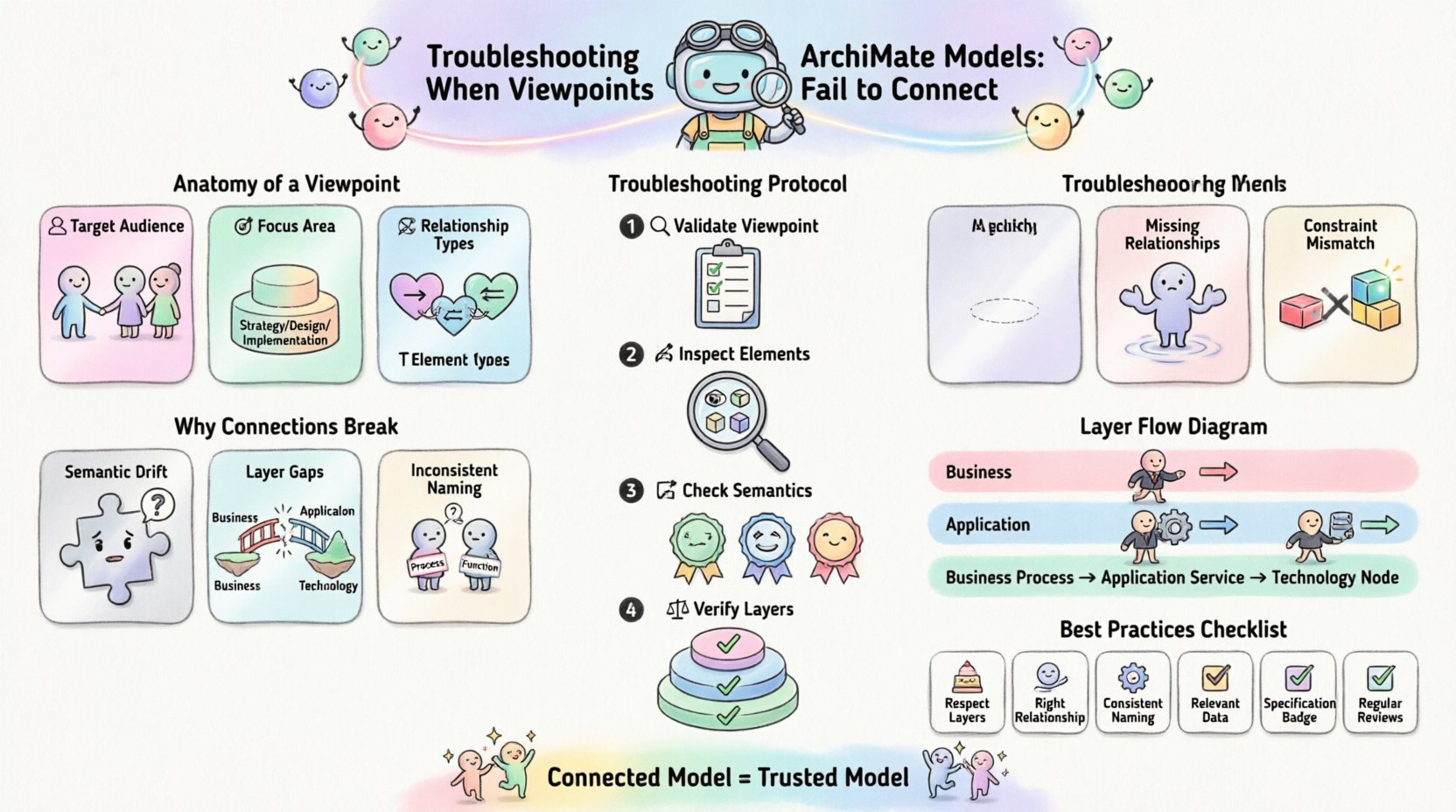
🧩 Understanding the Anatomy of a Viewpoint
Before troubleshooting, one must understand what is being built. A Viewpoint defines the concerns of a specific stakeholder group and the perspective from which the architecture is viewed. A View is the actual representation of the model that conforms to that viewpoint.
Think of the model as a database of truth. The viewpoint is the query language. If the query (viewpoint) returns empty or confusing results, the issue might be the query definition, or the data itself might be inconsistent.
- Target Audience: Who is looking at the diagram? (e.g., Developers, Business Managers, Security Auditors)
- Focus Area: Which layers are active? (Business, Application, Technology, Strategy)
- Relationship Types: Which connections are visible? (Association, Dependency, Flow, Access)
- Element Types: Which specific objects are included? (Processes, Services, Applications)
When these definitions do not align with the actual data in the model, the viewpoint fails to connect. This often manifests as broken lines, missing elements, or logical contradictions in the diagram.
⚠️ Why Connections Break: Common Failure Modes
Connectivity issues in ArchiMate models stem from several distinct categories. Identifying the category is the first step in the troubleshooting process. Below are the primary reasons viewpoints struggle to maintain connections.
1. Semantic Drift
Elements may exist in the model, but their labels or types do not match the relationship requirements. For example, a Business Process cannot directly trigger an Application Function without an appropriate interface or mediator. If the modeler attempts to link these directly without an intermediary, the relationship is invalid according to the specification.
2. Layer Gaps
ArchiMate relies on specific layers. Connections often fail because a modeler tries to bridge the Business Layer and the Technology Layer without passing through the Application Layer. This violates the principle of abstraction. A business process does not run on a server directly; it runs on an application that runs on a server.
3. Inconsistent Naming
While not strictly a technical error, inconsistent naming breaks the logical flow. If a business service is named Order Processing in one view and Order Management in another, stakeholders will assume they are different entities. This perception breaks the connection of understanding, even if the underlying ID is the same.
4. Missing Relationships
The most obvious failure is the absence of a link. This happens when a modeler creates the elements but forgets to draw the line. In complex models, this is common as the number of elements grows. The relationship simply was never created, leaving the viewpoint with isolated islands of information.
5. Viewpoint Constraint Mismatch
Viewpoints have filters. If a viewpoint is configured to show only Deployment Relationships, but the model contains only Association Relationships, the diagram will appear empty or disconnected. The data exists, but the filter excludes it.
🔍 The Troubleshooting Protocol
When you encounter a disconnected viewpoint, follow this systematic protocol. Do not guess. Verify each layer of the model against the specification.
Step 1: Validate the Viewpoint Definition
Review the configuration of the viewpoint itself. Does it allow the relationship types you expect? Check the following parameters:
- Element Filters: Are the correct element types included? (e.g., Is Business Object allowed?)
- Relationship Filters: Are the specific relationships visible? (e.g., Is Realization enabled?)
- Layer Visibility: Are all necessary layers turned on? (e.g., Is the Application layer hidden?)
Step 2: Inspect the Source and Target Elements
Select the elements that should be connected. Verify their types. Ensure they are compatible for the relationship you intend to use. For instance, check if the source is an Application Component and the target is a Business Service. If the types do not support the relationship, the connection cannot exist.
Step 3: Check the Relationship Semantics
ArchiMate defines strict semantics for relationships. Ensure you are using the correct one.
- Association: General link between elements.
- Dependency: One element relies on another for existence.
- Flow: Movement of information or material.
- Access: Interaction between Application and Business.
- Realization: Implementation of one element by another.
Using a Flow relationship where a Dependency is required will break the logical connection. This is a common error when modeling data movement versus structural reliance.
Step 4: Verify Cross-Layer Consistency
Ensure the flow of logic respects the layers. If a Business Process triggers an Application Function, verify that the Application Function is deployed on a node, and that node supports the underlying Technology. If the chain is broken at the bottom, the top will appear disconnected.
📊 Common Issues and Resolution Strategies
The table below summarizes frequent connectivity problems and their technical resolutions. Use this as a quick reference during model audits.
| Issue | Symptom | Root Cause | Resolution |
|---|---|---|---|
| Missing Interface | Business Process cannot reach Application | Direct link between layers | Insert an Interface or Application Service as a mediator |
| Broken Relationship | Line disappears or turns red | Invalid relationship type | Change relationship to a supported type (e.g., Association) |
| Hidden Elements | Diagram is empty or sparse | Viewpoint filter excludes elements | Adjust Viewpoint configuration to include specific types |
| Orphaned Nodes | Elements appear isolated | Missing relationship definition | Create the explicit relationship between source and target |
| Layer Skip | Business connects directly to Technology | Violation of abstraction | Route through the Application Layer |
| Context Loss | Stakeholders cannot trace value | Missing value flow | Add Value nodes and Flow relationships |
🌐 Layer-Specific Challenges
Different layers present unique challenges when trying to establish connections. Understanding these nuances helps prevent errors before they occur.
The Business Layer
In the Business Layer, connections often involve Processes, Roles, and Objects. A common failure is linking a Business Process to a Business Role without specifying the interaction. Use the Assignment relationship to show who performs the process. If you use Association, it implies a looser link that might confuse the reader regarding responsibility.
The Application Layer
This layer is often the most complex. It involves Components, Services, and Data Objects. Connections here frequently fail due to circular dependencies or unmanaged interfaces. Ensure that Application Services are clearly defined as the interface points. Avoid connecting Application Functions directly to Business Services unless there is a clear mapping layer.
The Technology Layer
Connections in the Technology Layer typically involve Nodes, Devices, and Software. The Deployment relationship is key here. A frequent error is deploying a Process directly onto a Node. The model must go through the Application layer first. Verify that the deployment chain is continuous from Application to Technology.
🧱 Validation and Consistency Checks
Once you have manually fixed the connections, you need to validate the entire model. Manual checks are prone to human error. Systematic validation is required.
- Consistency Rules: Define rules that prevent invalid relationships. For example, a rule that states a Business Process cannot be deployed to a Technology Node.
- Traceability: Ensure that every requirement has a supporting architecture element. If a requirement traces to a view, that view must have valid connections.
- Version Control: When updating the model, ensure that old relationships are not left dangling. Renaming an element should update all associated references.
- Impact Analysis: Before removing an element, check which relationships depend on it. Removing a central node without redirecting flows will break the viewpoint.
🤝 Stakeholder Alignment
A viewpoint is useless if it does not communicate the intended message. Sometimes the model is technically correct, but the viewpoint fails to connect because it does not address the stakeholder’s question.
- Define the Question: What is the stakeholder trying to solve? If they want to know about security, the viewpoint must highlight Security Policy and Access Control.
- Limit Scope: Do not show everything. A cluttered viewpoint hides connections. Filter out irrelevant elements to emphasize the critical paths.
- Use Color Coding: While this is often a visual preference, using distinct colors for different layers or relationship types can help the eye trace the connections more easily.
- Documentation: Provide a legend or text description explaining the relationship types used. This bridges the gap between the visual diagram and the semantic model.
🛡 Governance and Maintenance
Preventing connection failures is better than fixing them. Establish governance practices to maintain model health over time.
- Modeling Standards: Create a style guide. Define standard naming conventions for processes and services. This reduces semantic drift.
- Regular Audits: Schedule periodic reviews of the model. Look for orphaned elements and broken relationships. Fix them before they accumulate.
- Training: Ensure all modelers understand the ArchiMate specification. Many connection errors stem from a lack of understanding of the metamodel rules.
- Change Management: When business requirements change, update the architecture systematically. Do not patch the model with ad-hoc connections.
🔄 Iterative Refinement
Architecture is not a one-time activity. Viewpoints evolve as the organization evolves. You may find that a viewpoint that worked last year no longer connects because the business structure has shifted. This is normal. Treat the model as a living artifact.
When a viewpoint fails to connect after a change, do not assume the model is broken. Assume the model needs to be updated to reflect the new reality. Revisit the definitions. Adjust the filters. Add the missing layers. The goal is not to force the model to look like the old one, but to ensure it accurately represents the current state.
📝 Summary of Best Practices
To maintain high connectivity in your ArchiMate models, adhere to these core principles:
- Always respect the layering rules (Business → Application → Technology).
- Use the correct relationship type for the specific interaction being modeled.
- Keep element names consistent across all views.
- Configure viewpoints to show only the data relevant to the stakeholder.
- Validate relationships against the specification constraints.
- Document the rationale for complex connections.
- Review the model regularly to prevent technical debt.
By following this structured approach, you can ensure that your viewpoints serve their primary purpose: enabling clear communication and decision-making. A connected model is a trusted model. When stakeholders can trace the flow from strategy to technology without gaps, the architecture delivers value.
Take the time to diagnose the root cause of disconnection. It is often a simple semantic error that can be resolved with a few clicks, or a structural gap that requires planning. Address it systematically, and the integrity of your enterprise architecture will improve.