


In an era where cloud complexity is accelerating faster than ever, Visual Paradigm’s AI Cloud Architecture Studio—launched in February 2026—emerges as a transformative leap in cloud infrastructure design. This web-based, AI-driven platform redefines how teams conceptualize, visualize, and validate cloud architectures, turning natural language into production-ready diagrams with unprecedented speed and accuracy.
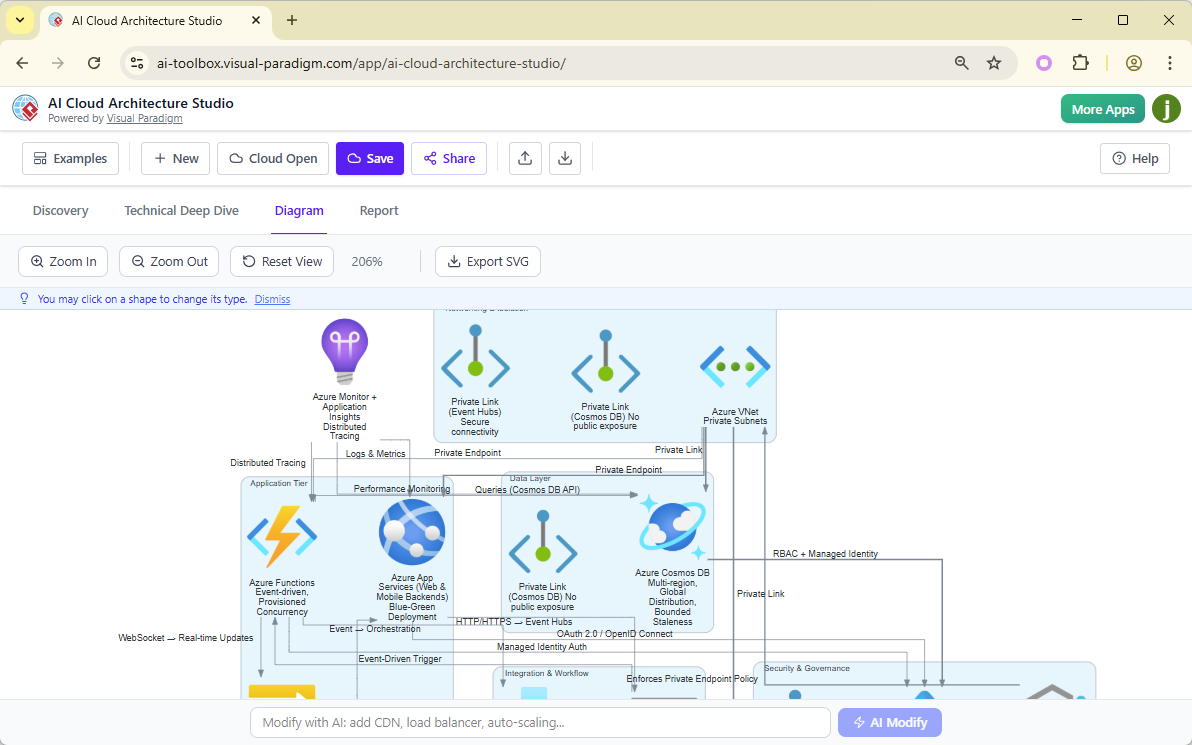
No longer constrained by manual drag-and-drop tools or fragmented design workflows, architects, developers, and product managers can now collaborate on cloud designs with the intelligence of an experienced cloud consultant—powered entirely by artificial intelligence.
From Idea to Architecture: A Smart, Guided Design Workflow
The AI Cloud Architecture Studio follows a structured, intelligent workflow that ensures every design decision aligns with business goals, technical best practices, and cloud provider standards.
1. Discovery Phase: Speak Your Vision in Plain English
The journey begins in the Discovery tab, where users describe their cloud requirements in natural language—no jargon required.
For example:
“I need a real-time food delivery app that connects customers, restaurants, and drivers with location tracking and instant order updates.”
The AI instantly parses the intent, identifies key components (e.g., real-time messaging, geolocation, order processing), and begins mapping the foundational architecture.
2. Strategy Selection: Align Architecture with Business Goals
To ensure architectural decisions support strategic objectives, users choose from four proven design strategies:
| Strategy | Focus Area |
|---|---|
| Low Cost / MVP | Rapid prototyping, minimal infrastructure, cost efficiency |
| High Availability | Fault tolerance, redundancy, disaster recovery, SLA compliance |
| Enterprise Grade | Security, compliance (GDPR, HIPAA), audit trails, scalability |
| Edge Optimized | Low-latency processing, distributed computing (ideal for IoT, AR/VR, live streaming) |
This choice guides the AI’s recommendations, ensuring the architecture is not just functional—but fit for purpose.
3. Cloud Provider Selection: Multi-Cloud by Design
Users can select from over 10 leading cloud platforms, including:
-
AWS (Amazon Web Services)
-
Microsoft Azure
-
Google Cloud Platform (GCP)
-
Alibaba Cloud
-
Kubernetes (K8s)
-
DigitalOcean
The platform dynamically adapts to the selected provider’s service catalog, using official icons and naming conventions to ensure technical accuracy and consistency.
4. Technical Deep Dive: AI as Your Digital Consultant
The AI doesn’t stop at interpretation—it engages in intelligent dialogue.
It asks targeted questions to refine the design, such as:
-
“Will your database require ACID compliance or high scalability?”
-
“Should the application layer be containerized or run on virtual machines?”
-
“What level of encryption and access control is required?”
When users are uncertain, they can select “Suggest by AI”—a feature that leverages decades of cloud best practices to recommend optimal configurations.
5. Instant Diagram Generation: Professional, Production-Ready Output
Click “Generate Cloud Architecture”, and the AI instantly renders a fully interactive, professional-grade diagram using:
-
Official cloud provider icons
-
Logical service relationships (e.g., API Gateway → Lambda → DynamoDB)
-
Auto-arranged layout with clear component grouping
The result? A polished, shareable architecture diagram ready for stakeholder review, technical documentation, or deployment planning.
Refinement & Customization: Design That Evolves with You
Once generated, the diagram is not static. It’s a living, dynamic artifact designed for iteration and collaboration.
✅ AI-Powered Modifications via Natural Language
Change the architecture with simple chat-style prompts:
-
“Add a Web Application Firewall (WAF) and CloudWatch monitoring.”
-
“Enable auto-scaling for the backend microservices.”
-
“Move the database to a multi-AZ deployment.”
The AI interprets the request, updates the diagram in real time, and even explains the impact of the change.
✅ Interactive Editing & Symbol Swapping
Users retain full control through intuitive editing:
-
Zoom, pan, and navigate complex diagrams effortlessly
-
Click any component to view detailed properties (e.g., instance type, region, pricing)
-
Swap service types instantly (e.g., replace RDS with DynamoDB, or switch from EC2 to ECS)
This hybrid intelligence + manual control ensures precision and flexibility.
✅ Multi-Cloud Comparison Mode
One of the Studio’s most powerful features: Compare architectures across providers side-by-side.
For example, visualize how the same food delivery app would be architected on:
-
AWS (using Lambda, S3, DynamoDB, CloudFront)
-
Azure (using Functions, Blob Storage, Cosmos DB, CDN)
-
GCP (using Cloud Functions, Cloud Storage, Firestore, CDN)
This enables informed decision-making for governance, cost optimization, and vendor diversification.
Documentation & Collaboration: Turning Vision into Action
The Studio doesn’t just create diagrams—it transforms them into actionable project assets.
📄 Professional Export Options
-
SVG Export: Resolution-independent, ideal for presentations, documentation, and web integration
-
PDF & PNG: High-fidelity exports for reports, wikis, and stakeholder handouts
All exports preserve interactivity and clarity—no pixelation, no loss of detail.
📊 AI-Analyzed Technical Reports
In the Report tab, the AI generates comprehensive, AI-validated reports in Markdown or PDF format, covering:
-
Security posture: Encryption, IAM policies, network segmentation
-
Scalability analysis: Horizontal/vertical scaling, load distribution
-
Cost estimation: Monthly TCO based on instance types, data transfer, and storage
-
Risk assessment: Single points of failure, compliance gaps, and mitigation strategies
These reports serve as critical inputs for technical reviews, board presentations, and audit readiness.
🔗 Project Management & Collaboration
-
Save projects to your Visual Paradigm account for versioned, cloud-based storage
-
Share secure, password-protected links with team members, stakeholders, or auditors
-
Enable real-time feedback and comment threads directly on the diagram
Team alignment has never been this seamless.
Seamless Integration with the Visual Paradigm Ecosystem
The AI Cloud Architecture Studio is not an isolated tool—it’s the centerpiece of a broader, intelligent modeling ecosystem.
🖥️ VP Desktop: From Cloud Diagram to Full-Scale System Model
Import generated diagrams into Visual Paradigm Desktop for advanced modeling:
-
Link cloud components to UML classes, sequence diagrams, or SysML models
-
Connect to code repositories (GitHub, GitLab) for traceability
-
Integrate with version control systems (Git) for auditability and collaboration
Perfect for enterprise teams building end-to-end digital systems.
📚 OpenDocs: Build Interactive Knowledge Wikis
Embed Studio diagrams into OpenDocs, Visual Paradigm’s knowledge management platform:
-
Create interactive architecture documentation
-
Enable zoomable, clickable diagrams linked to source designs
-
Support collaborative editing and real-time updates
Ideal for onboarding new engineers or maintaining living architecture documentation.
💬 AI Visual Modeling Chatbot: Brainstorm at Speed
Use the AI Visual Modeling Chatbot for early-stage ideation:
-
Generate use case diagrams, data flow diagrams, or component diagrams
-
Use these insights to inform or refine your cloud architecture
-
Iterate rapidly between conceptual models and technical designs
This creates a feedback loop from idea → flow → infrastructure.
Conclusion: The Future of Cloud Architecture is Intelligent, Collaborative, and Instant
Visual Paradigm’s AI Cloud Architecture Studio is more than a diagramming tool—it’s a digital co-pilot for cloud design. By combining natural language understanding, multi-cloud intelligence, and real-time collaboration, it empowers teams to:
-
Design faster
-
Align with business strategy
-
Reduce errors and rework
-
Communicate complex systems clearly
Whether you’re launching an MVP, building an enterprise-grade platform, or optimizing for edge performance—this tool ensures your cloud architecture is not just visually impressive, but technically sound and strategically aligned.
Ready to Transform Your Cloud Design Process?
Would you like us to create a customized report or a presentation-ready slide deck summarizing this guide for your team?
We can tailor it to:
-
Executive leadership (high-level benefits, ROI, risk mitigation)
-
Engineering teams (technical depth, integration steps)
-
DevOps & Cloud Architects (best practices, multi-cloud comparison)
👉 Let us know your preferred format, and we’ll deliver it within 24 hours.
Resource
- AI AWS Architecture Diagram Generator: Visual Paradigm’s Complete Ecosystem: This article explores how the specialized AI Cloud Architecture Studio simplifies AWS design by transforming natural language into professional diagrams that follow cloud best practices.
- AI Alibaba Cloud Diagram Generator: Unlock Professional Cloud Designs with Visual Paradigm: A guide focused on the studio’s ability to generate Alibaba Cloud architectures, highlighting its multi-cloud agnostic nature and interactive refinement tools.
- AI Cloud Architecture Studio | Visual Paradigm: The official platform page detailing how the tool revolutionizes cloud design through AI-guided discovery, ready-made blueprints, and comparison modes for different vendors.
- AI Cloud Architecture Studio: AI AWS & Azure Diagram Generator by Visual Paradigm: An overview of how the studio accelerates the infrastructure planning process across major platforms like Azure, Kubernetes, and DigitalOcean using intelligent component placement.
- AI Google Cloud Architecture Diagram Generator: Discover Visual Paradigm’s Power: Focuses on the studio as the primary hub for Google Cloud diagrams, emphasizing the reduction of manual work through iterative AI modifications.
- Announcing AI Cloud Architecture Studio: Design Your Cloud with AI Brilliance!: The launch announcement detailing key innovations, such as strategic architectural guidance (e.g., High Availability vs. Low Cost) and effortless SVG documentation.
- Revolutionizing Cloud Design: A Deep Dive into Visual Paradigm’s AI Cloud Architecture Studio – Cybermedian: A deep dive into the platform’s AI-driven reporting capabilities and project management features, including a step-by-step walkthrough for building production-ready architectures.
- Transform Your Cloud Design in Minutes — Meet AI Cloud Architecture Studio by Visual Paradigm! – ArchiMetric: Highlights the tool’s status as a game-changer for developers and architects, offering auto-generated reports on security, cost, and scalability.
- Visual Paradigm AI Cloud Architecture Studio Comprehensive Guide: A comprehensive summary of the studio’s core design workflow, from initial discovery and strategy selection to full integration with the wider Visual Paradigm ecosystem.