Requirements engineering forms the bedrock of any successful software project. Among the various techniques available, the Use Case description remains one of the most effective methods for capturing functional requirements from the perspective of the user. A well-written use case bridges the gap between business needs and technical implementation, ensuring all stakeholders share a unified understanding of system behavior.
However, ambiguity in these descriptions often leads to development errors, scope creep, and testing failures. This guide provides a structured approach to crafting precise, actionable use case descriptions using the Unified Modeling Language (UML) standards. By following established patterns, teams can create documentation that serves as both a design blueprint and a verification checklist.
🔍 Understanding the Core Components
Before drafting the narrative text, it is essential to define the structural elements that make up a complete use case. These components ensure that the scenario is bounded and measurable.
1. The Actor 🧍
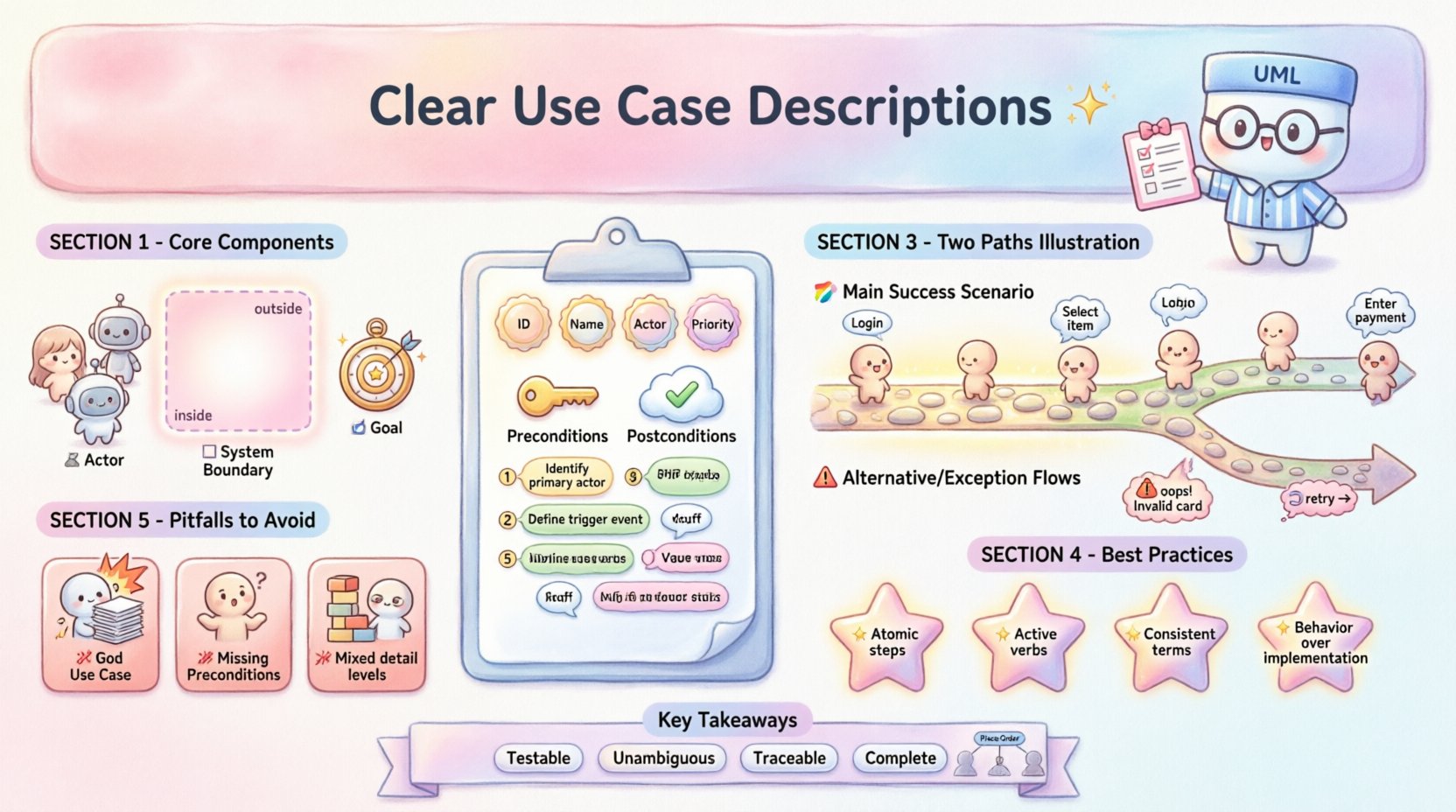
An actor represents a role played by an entity that interacts with the system. Actors are external to the system boundary. They can be:
- Human Actors: Real people, such as a customer, administrator, or technician.
- External Systems: Other software or hardware interfaces that trigger or receive data.
- Time-Based Actors: Events triggered by a clock or timer, such as a scheduled backup process.
When defining an actor, assign a specific role rather than a specific job title. For example, use “Registered User” instead of “John Doe.” This ensures the requirement remains valid even if personnel change.
2. The System Boundary ⬜
The system boundary defines what is inside the software and what is outside. It clarifies responsibility. Everything within the box is the system; everything outside is the environment. This distinction is critical for determining who is responsible for a specific error or action.
3. The Goal 🎯
Every use case represents a single goal that the actor wishes to achieve. If a description contains multiple, unrelated goals, it should be split into separate use cases. A single goal ensures the use case remains testable and manageable.
📋 Anatomy of a Use Case Description
A comprehensive description goes beyond a simple diagram. It requires a textual specification that details the interaction flow. Below is the standard structure used in professional requirements documentation.
Metadata and Identification
- Use Case ID: A unique identifier (e.g., UC-001) for tracking.
- Use Case Name: A verb-noun phrase describing the action (e.g., “Submit Order”).
- Primary Actor: The main user initiating the action.
- Secondary Actors: Any supporting systems or users.
- Priority: Critical, High, Medium, or Low.
Preconditions
Preconditions define the state of the system before the use case begins. If these conditions are not met, the use case cannot start. This helps testers understand the setup required.
- The user must be logged into the system.
- The shopping cart must contain at least one item.
- The payment gateway must be online.
Postconditions
Postconditions describe the state of the system after the use case completes successfully. They serve as the acceptance criteria for the feature.
- A new order record is created in the database.
- An email confirmation is sent to the user.
- Inventory levels are updated.
Flow of Events
This is the heart of the description. It outlines the sequence of steps taken by the actor and the system. It is typically divided into the Main Success Scenario and Extensions.
🚀 The Main Success Scenario (Happy Path)
The Main Success Scenario describes the ideal path where everything goes right. There are no errors, interruptions, or alternative decisions. Each step must be atomic, meaning it is a single action that cannot be broken down further without losing meaning.
When writing these steps, follow these guidelines:
- Number the steps: Use 1, 2, 3… to indicate sequence.
- Identify the source: Clearly state who initiates the step (Actor or System).
- Use active verbs: Start with action words like “Select,” “Enter,” “Display,” or “Validate.”
- Avoid technical jargon: Describe what the user sees, not the database query behind it.
🛑 Alternative and Exception Flows
Real-world usage rarely follows a perfect path. Extensions handle deviations from the main flow. These are crucial for robust requirement gathering.
Alternative Flows
These occur when the actor makes a different choice than the main path. They still lead to the same goal, just via a different route.
- Example: The user chooses to apply a discount code during checkout.
Exception Flows
These occur when something goes wrong. The system must handle errors gracefully. The goal of the use case might fail, or it might be recovered.
- Example: The payment gateway returns an error message.
- Example: The user has insufficient funds.
Extensions should reference the specific step number in the Main Success Scenario where the deviation occurs.
📝 Practical Example: “Process Payment”
To illustrate these concepts, consider a generic payment processing scenario. This example demonstrates how to translate abstract ideas into concrete steps.
| Step | Actor/System | Action | Response |
|---|---|---|---|
| 1 | Actor | Selects “Pay Now” button. | – |
| 2 | System | Displays payment form. | Form appears with card fields. |
| 3 | Actor | Enters card details. | – |
| 4 | System | Validates card data. | Checks for format and expiry. |
| 5 | System | Submits transaction to gateway. | – |
| 6 | Gateway | Returns authorization. | Success or Error code. |
| 7 | System | Confirms payment. | Shows success screen. |
Alternative Flow A (Invalid Card):
- At Step 4, if validation fails, display error message.
- Allow user to re-enter data.
Alternative Flow B (Timeout):
- At Step 5, if gateway does not respond within 10 seconds, display timeout message.
- Allow user to retry or cancel.
🛠 Best Practices for Clarity and Precision
Writing requirements is a skill that improves with practice. Adhering to specific standards reduces misinterpretation between business analysts, developers, and testers.
1. Maintain Granularity
Do not combine multiple actions into one step. If a step requires the user to click a button and then type text, split it into two steps. Granularity ensures that test cases can be written for each specific interaction.
2. Avoid Assumptions
Never assume the user knows technical terms. Avoid words like “parse,” “commit,” or “cache” unless the interface explicitly displays them. Describe the outcome, not the mechanism.
3. Consistency in Terminology
Use a controlled vocabulary. If you call it a “Product” in one section, do not call it an “Item” in another. Inconsistency confuses developers and leads to database mapping errors.
4. Focus on Behavior, Not Implementation
Describe what the system does, not how it does it. For example, write “The system checks inventory” instead of “The system queries the SQL inventory table.” The former allows the implementation team to choose the best technology.
⚠️ Common Pitfalls to Avoid
Even experienced writers make mistakes. Recognizing these patterns early prevents rework later in the development lifecycle.
Pitfall 1: The “God Use Case”
This occurs when a single use case tries to do too much. If a use case has 50 steps, it is likely covering multiple goals. Break it down into smaller, focused use cases.
Pitfall 2: Missing Preconditions
Skipping preconditions leaves testers guessing about the initial state. This often results in flaky tests that fail randomly because the environment wasn’t set up correctly.
Pitfall 3: Vague Verbs
Avoid words like “manage,” “handle,” or “process.” These are too broad. Instead, use “Update,” “Delete,” “Calculate,” or “Send.” Precision eliminates ambiguity.
Pitfall 4: Mixing Levels of Detail
Do not mix high-level business goals with low-level UI clicks. Keep the Main Success Scenario at a logical level. UI details can be documented separately in wireframes or UI specifications.
🔗 Integration with Other Specifications
Use cases do not exist in isolation. They connect to other artifacts in the requirements documentation.
- Traceability: Each use case should map to specific user stories or business objectives. This ensures every feature serves a purpose.
- Test Cases: The steps in the Main Success Scenario directly translate into positive test cases. Extensions translate into negative test cases.
- UI Design: The actors and steps inform the navigation structure and screen layouts.
- Database Design: The data mentioned in the steps (e.g., “Enter Credit Card”) informs the data model requirements.
📊 Comparison: Effective vs. Ineffective Descriptions
The difference between a good requirement and a bad one often lies in the level of detail and clarity. The table below highlights these distinctions.
| Feature | ❌ Ineffective Description | ✅ Effective Description |
|---|---|---|
| Actor | “The user” | “Registered Admin” |
| Step | “Handle the login” | “Enter username and password” |
| Outcome | “System checks access” | “System validates credentials against database” |
| Exception | “If it fails” | “If credentials are incorrect, show error message and reset field” |
| Scope | “Manage everything” | “View and edit user profile” |
Notice how the effective description provides specific actions and clear boundaries. This reduces the cognitive load on the developer implementing the feature.
🧩 Handling Complex Scenarios
Not all requirements fit a simple linear flow. Some scenarios involve parallel processes or conditional logic.
Inclusion and Extension Relationships
In UML, use cases can relate to each other. An Inclusion relationship occurs when one use case always requires another to function. For example, “Place Order” always includes “Validate Payment.” This reduces redundancy in descriptions.
An Extension relationship allows a use case to add behavior to another under specific conditions. For example, “Apply Discount” extends “Place Order” only if the user has a coupon code.
Concurrent Processes
For complex systems, a single flow may not suffice. Use sub-flows or separate diagrams to represent parallel activities. Ensure that the interaction points between these flows are clearly defined.
🔍 Review and Validation
Once a description is written, it must be validated. A document is not complete until it has been reviewed by the relevant stakeholders.
- Walkthrough: Conduct a walkthrough with the business owner. Ask them to read the steps and confirm they match their mental model.
- Feasibility Check: Consult with the lead developer. Ensure the steps are technically achievable within the project constraints.
- Completeness: Check for missing error paths. What happens if the internet disconnects? What if the database is full?
- Consistency: Ensure terms match across the entire requirements document.
🛠 Tools and Formats
The format of the use case description can vary based on the project needs. Common formats include:
- Structured Text: A numbered list format suitable for Word or Google Docs.
- Table Format: A tabular layout for quick scanning, often used in spreadsheets.
- Database Entries: Stored in requirements management tools for traceability.
- Wiki Pages: Collaborative pages that allow version history and linking.
Regardless of the medium, the content structure remains the same. The goal is accessibility and clarity, not the specific file type.
🔗 From Requirements to Testing
The ultimate value of a use case description lies in its utility during the testing phase. Testers use the Main Success Scenario to define the “Happy Path” tests. They use the Extensions to define “Negative Path” tests.
If a use case description is vague, test cases will be incomplete. This leads to gaps in coverage and bugs reaching production. Clear descriptions act as a contract between the business and the engineering team.
📈 Measuring Quality
How do you know if your use cases are good quality? Look for these indicators:
- Testability: Can a tester write a test case from this text alone?
- Unambiguity: Is there only one possible interpretation?
- Traceability: Can you link this back to a business goal?
- Completeness: Are all major paths and exceptions covered?
🏁 Summary of Key Takeaways
Creating effective use case descriptions requires discipline and attention to detail. It is not merely about documenting what the system does, but defining the boundaries of its behavior. By focusing on atomic steps, clear preconditions, and robust exception handling, teams can reduce ambiguity and improve delivery quality.
Key elements to remember include:
- Define actors and system boundaries clearly.
- Use a structured format with ID, Name, and Flow.
- Separate the Main Success Scenario from Alternative and Exception flows.
- Use active verbs and specific terminology.
- Validate descriptions with stakeholders before development begins.
Investing time in writing clear requirements pays dividends throughout the project lifecycle. It reduces rework, clarifies expectations, and ensures the final product meets the actual needs of the users.