


Note: This guide is based on the latest features of Visual Paradigm’s AI Value Stream Mapping (VSM) Editor, available in Desktop Professional and Online Deluxe editions. The tool integrates generative AI, Lean methodology, and real-time data visualization to revolutionize traditional value stream mapping.
📌 Introduction: What Is AI-Powered VSM?
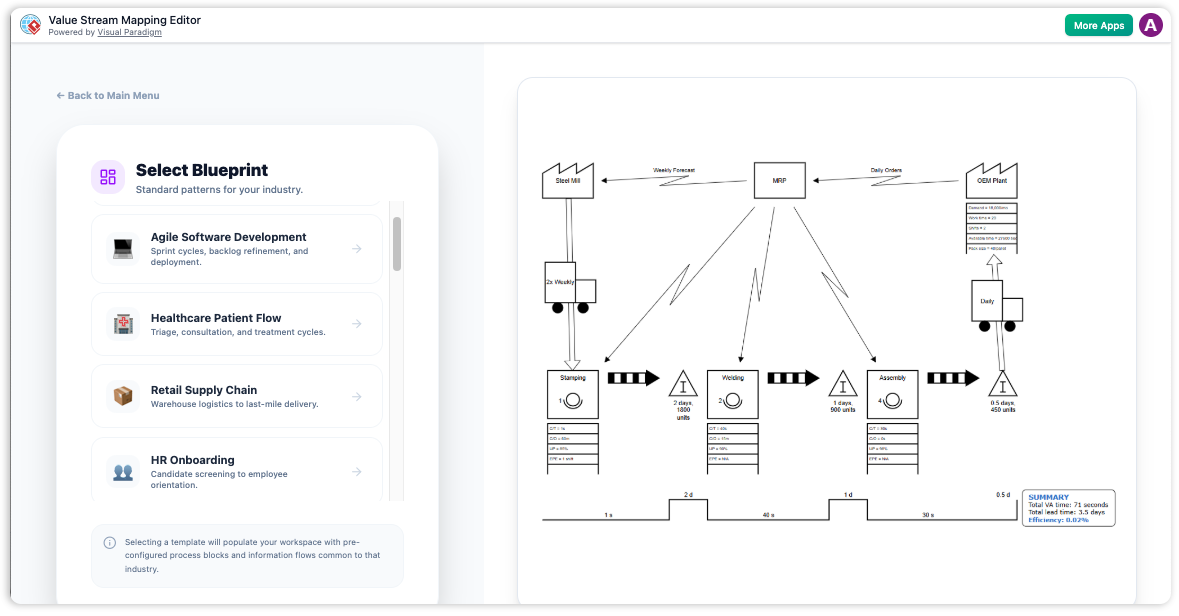
Visual Paradigm’s AI Value Stream Mapping (VSM) Editor is a next-generation, intelligent tool that transforms the manual, time-consuming process of creating and analyzing value stream maps into an automated, data-driven, and AI-enhanced workflow. By combining generative AI, Lean principles, and interactive visual analytics, this editor enables teams across industries to rapidly design, simulate, and optimize their processes.
This guide walks you through every aspect of the AI VSM Editor—from setup and usage to advanced features and industry-specific applications—ensuring you can leverage its full potential.
✅ Key Features & Capabilities
1. Text-to-VSM: Generate VSM from Natural Language
-
Function: Input a simple description of your process in plain English.
-
Example Prompt:
“A customer orders 50 units. Raw materials take 2 days to arrive. Each unit requires 45 minutes of assembly time. There are currently 30 units in work-in-progress (WIP) inventory, and the production line operates 8 hours per day.”
-
AI Output: Automatically generates a complete VSM with:
-
Standard Lean symbols (e.g., process boxes, inventory blocks, material flow arrows)
-
Time lines (value-added vs. non-value-added time)
-
Supplier → Process → Customer flow structure
-
✅ Ideal for quick prototyping, brainstorming, or onboarding new team members.
2. AI-Powered Smart Analysis & Waste Detection
The AI acts as a virtual Lean consultant, automatically identifying inefficiencies using the 7 Wastes (Muda) framework:
| Waste Type | Detected By AI |
|---|---|
| Overproduction | ❌ Excess output before demand |
| Waiting | ⏳ Idle time between steps |
| Transportation | 🚚 Unnecessary movement of goods |
| Overprocessing | 📝 Extra steps beyond customer needs |
| Inventory | 📦 Excess WIP or raw material |
| Motion | 🔄 Unnecessary movement by workers |
| Defects | ❌ Rework or scrap rate |
-
Additional AI Insights:
-
Bottleneck identification
-
Process Cycle Efficiency (PCE) calculation
-
Real-time efficiency score (e.g., 32% PCE → 68% improvement potential)
-
Strategic recommendations (e.g., “Reduce WIP by 40% to decrease lead time by 18 days”)
-
🔍 Use the “AI Analysis” tab to generate a detailed report with actionable insights.
3. Data-Driven Real-Time Synchronization
-
Dual-Pane Interface:
-
Left Panel: Input structured data (e.g., cycle time, uptime, operator count, batch size).
-
Right Panel: Live VSM diagram updates dynamically as you edit values.
-
-
Auto-Rendered Metrics:
-
Total Lead Time
-
Value-Added Time
-
Non-Value-Added Time
-
Takt Time vs. Cycle Time comparison
-
Inventory Levels (in units and days)
-
🔄 Changes in data instantly reflect in the diagram—no manual redrawing needed.
4. Future State Simulation & Scenario Modeling
-
One-Click Copy: Duplicate your current state VSM to create a future state map.
-
Adjust Parameters:
-
Reduce cycle time
-
Increase uptime
-
Decrease WIP
-
Add automation
-
-
Visualize Impact:
-
See projected reduction in lead time
-
Compare PCE before and after changes
-
Simulate cost savings or throughput gains
-
🎯 Perfect for Kaizen events, continuous improvement planning, and executive presentations.
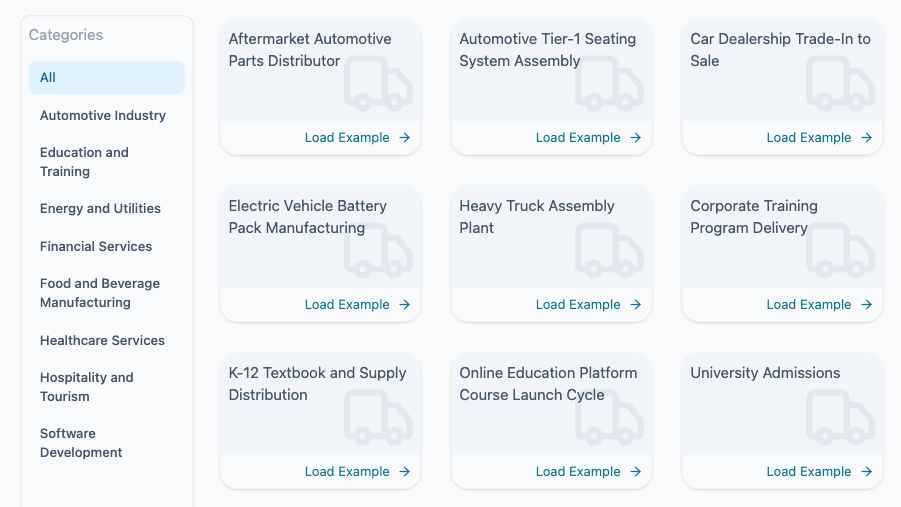
5. Industry-Specific Template Library (40+ Templates)
Pre-built templates accelerate adoption across diverse sectors:
| Industry | Example Templates |
|---|---|
| Manufacturing | Automotive Assembly Line, CNC Machining, Batch Production |
| Software Development | Agile Release Pipeline, DevOps CI/CD Flow, Sprint Planning Cycle |
| Healthcare | Medical Device Manufacturing, Patient Admission Process, Lab Testing Workflow |
| Logistics & Supply Chain | Warehouse Order Fulfillment, Cross-Docking, Last-Mile Delivery |
| Service & Finance | Loan Approval Process, Customer Onboarding, Invoice Processing |
💡 Access via the “Templates” section under the AI VSM Editor. Choose based on your domain and customize with real data.
🛠️ Step-by-Step Usage Guide
Follow these steps to create a professional VSM in minutes:
Step 1: Launch the AI VSM Editor
-
Open Visual Paradigm (Desktop Professional or Online Deluxe).
-
Navigate to the AI Tools section in the main toolbar.
-
Click on AI Value Stream Mapping Editor.
✅ Ensure you’re using version 18.0 or later for full AI functionality.
Step 2: Input Process Description or Select a Template
Choose one of two paths:
Option A: Use AI Guidance (Text-to-VSM)
-
In the prompt box, enter a clear description of your process:
“Our software team releases a new feature every two weeks. The cycle starts with user story creation (2 days), followed by design (3 days), development (5 days), QA testing (4 days), and deployment (1 day). Currently, there are 12 stories in the backlog and 4 in testing.”
-
Click “Analyze with AI”.
Option B: Use a Pre-Built Template
-
Go to Templates → Select your industry (e.g., Software Development).
-
Choose a relevant template (e.g., Agile Release VSM).
-
The AI will auto-populate the diagram with default values.
Step 3: Review & Generate Initial VSM
-
The AI generates a fully formatted VSM with:
-
Process steps (with icons)
-
Inventory buffers (e.g., WIP, raw material)
-
Material and information flow arrows
-
Time lanes showing cycle times and delays
-
-
The layout is optimized for clarity and alignment with Lean standards.
Step 4: Refine with Real Data
-
Use the left-side configuration panel to:
-
Set exact cycle times, takt time, uptime, batch size, and defect rates.
-
Adjust inventory levels (in units or days).
-
Add operator count or machine availability.
-
-
The right-side diagram updates in real time, reflecting changes in:
-
Lead time
-
PCE score
-
Bottleneck indicators
-
⚠️ Tip: Use consistent units (e.g., minutes, days) across all inputs for accurate analysis.
Step 5: Run AI Analysis & Generate Report
-
Switch to the “AI Analysis” tab.
-
Click “Generate Execution & Strategic Report”.
-
The AI delivers:
-
Summary of current performance
-
7 Wastes detection with severity ratings
-
Bottleneck identification (e.g., “QA Testing is the bottleneck with 4-day delay”)
-
Optimization suggestions (e.g., “Implement automated testing to reduce QA cycle time by 50%”)
-
Projected outcomes of proposed changes
-
📊 Export this report as PDF or integrate into your Lean transformation dashboard.
Step 6: Export & Collaborate
Finalize your VSM and share it with stakeholders:
-
Export Options:
-
PNG (high-resolution for presentations)
-
PDF (for formal documentation)
-
SVG (for scalable vector editing in tools like Adobe Illustrator)
-
-
Collaboration Features:
-
Share via link (Online version)
-
Comment directly on the diagram
-
Export to PowerPoint or Word for reporting
-
🤝 Ideal for cross-functional teams, leadership reviews, and continuous improvement workshops.
🎯 Industry-Specific Prompt Examples
Here are tailored prompt templates to jumpstart your VSM creation:
🏭 Manufacturing Example
“We produce custom metal parts. Raw materials arrive in 3 days. Machining takes 2 hours per unit, with 2 machines running 16 hours/day. The current WIP is 60 units. Assembly takes 45 minutes per unit, and final inspection takes 10 minutes. There are 3 defects per 100 units.”
💻 Software Development Example
“Our team delivers features every 2 weeks. User stories are created in 1 day, design takes 2 days, development averages 5 days per story, QA testing takes 4 days, and deployment takes 1 day. Currently, there are 15 stories in the backlog and 7 in testing. The average defect rate is 12%.”
🏥 Healthcare Example
“A patient is admitted to the emergency department. Triage takes 15 minutes, lab tests take 2 hours, imaging takes 1.5 hours, and physician evaluation takes 45 minutes. The average WIP is 8 patients. There is a 30-minute wait for bed availability after evaluation.”
📌 Paste any of these into the AI prompt box to generate a ready-to-analyze VSM in seconds.
📚 Reference List (Markdown Format)
- Visual Paradigm AI Value Stream Mapping Tool – Release Notes: Announces the launch of the AI VSM Editor with generative AI, real-time data sync, and Lean analytics.
- Visual Paradigm 18.0 Release – AI-Powered Features: Details the integration of AI into VSM, including text-to-VSM, waste detection, and future state simulation.
- AI Value Stream Mapping Editor – Official Feature Page: Comprehensive overview of the AI VSM Editor’s capabilities, templates, and use cases.
- AI VSM Editor – Interactive Tool Page: Live demo interface with guided examples and template access.
- Creating a Medical Device VSM with AI: Case study showing how to model a regulated manufacturing process using AI VSM.
- AI VSM Editor – Tool Overview (Duplicate): Additional resource for understanding the tool’s interface and workflows.
- AI VSM Editor – Tool Overview (Duplicate): Redundant entry for consistency; same as above.
- AI VSM Editor – Update (February 2026): Highlights new enhancements, including improved AI reasoning, expanded template library, and enhanced simulation accuracy.
- Comprehensive Guide to VSM with Visual Paradigm: In-depth tutorial covering best practices, diagramming standards, and real-world implementation tips.
- Creating VSMs in Visual Paradigm – Step-by-Step Guide: Another detailed walkthrough of VSM creation, including collaboration and export workflows.
📝 Conclusion
Visual Paradigm’s AI-Powered Value Stream Mapping Editor is a transformative tool that bridges the gap between Lean thinking and modern AI-driven automation. Whether you’re in manufacturing, software, healthcare, or logistics, this tool empowers teams to:
-
Rapidly visualize complex processes
-
Identify waste and bottlenecks with precision
-
Simulate improvements before implementation
-
Generate actionable reports for leadership
By automating the tedious aspects of VSM and enhancing it with intelligent insights, Visual Paradigm is redefining how organizations achieve operational excellence.
📬 Need Help Getting Started?
Visit https://ai.visual-paradigm.com for free trials, video tutorials, and community support.
✅ Pro Tip: Combine AI VSM with Kanban boards, PDCA cycles, and Gemba walks for a holistic Lean transformation strategy.