


Introduction: The End of “Documentation Debt” for Agile Teams
If you work in agile software development, you know the pain. You spend hours crafting a perfect system architecture diagram or a detailed user journey map. Then comes the inevitable question: “Where do we put this?”
Usually, it ends up as a static PNG exported to a shared drive, uploaded to a wiki, and forgotten. Two sprints later, the code has changed, but the diagram hasn’t. The documentation is now “debt”—outdated, misleading, and requiring significant effort to fix.
I recently integrated Visual Paradigm Pipeline into our team’s workflow, and it fundamentally shifted how we handle visual knowledge. It’s not just a file transfer tool; it’s a secure, cloud-based asset transit hub that acts as the connective tissue between your modeling tools and your living documentation. By eliminating manual exports and enabling live embedding, Pipeline ensures that your diagrams remain editable, versioned, and always in sync with your project’s reality.
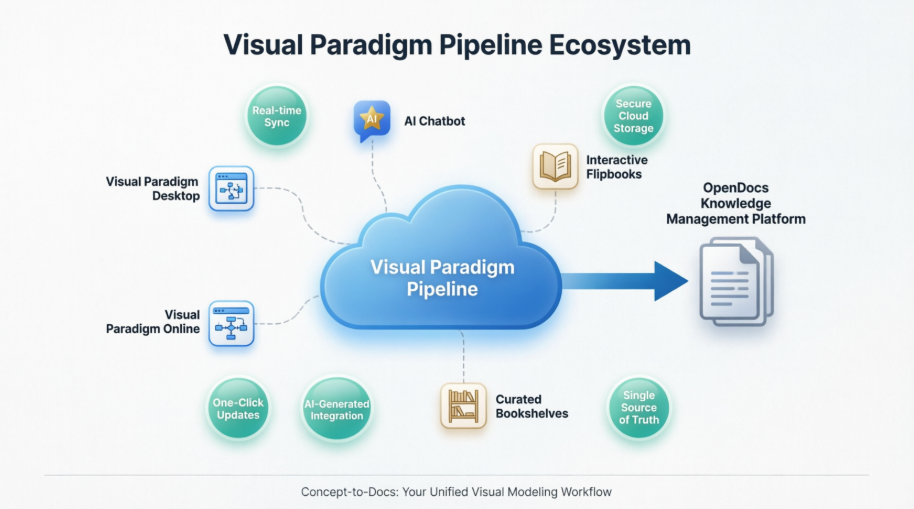
This guide shares my hands-on experience setting up and using the Pipeline across our distributed agile team, showing how we moved from fragmented, static files to a cohesive, collaborative knowledge ecosystem.
What Is the Pipeline? A Bridge for Visual Assets
At its core, the Visual Paradigm Pipeline is a centralized cloud repository that bridges dynamic visual modeling tools with Visual Paradigm OpenDocs, a living documentation platform. Instead of exporting flat, uneditable images, you send your artifacts directly to the Pipeline. From there, they can be embedded into documentation while retaining their source editability.
Core Benefits We Experienced
- Single Source of Truth: Engineering, architecture, and business teams all reference the same canonical artifact. No more arguing over which version of the diagram is current.
- Preserved Editability: Embedded graphics remain high-fidelity vector formats. If a stakeholder needs a change, you don’t redraw the image; you edit the source diagram and push an update.
- Frictionless Syncing: Updates made to a source diagram can be pushed through the pipeline to instantly refresh the documentation. This reduced our documentation maintenance time by approximately 70% on our last major release.
- Automatic Version Tracking: The Pipeline maintains an organized cloud repository with full version history, comments, and access controls, providing a clear audit trail for compliance and review.
The Connection Pathways: Five Ways to Feed Your Knowledge Base
The Pipeline functions across five main ecosystem environments, funneling assets into Visual Paradigm OpenDocs. Here is how we utilized each pathway in our daily workflows.
1. Visual Paradigm Desktop → OpenDocs: For Heavyweight Architecture
For our backend engineers and architects who rely on advanced UML, SysML, or ERD modeling, the Desktop-to-OpenDocs pipeline eliminated the “export-and-forget” pattern.
Our Workflow:
- Open your microservices architecture diagram in Visual Paradigm Desktop during sprint planning.
- Right-click the diagram canvas and select Export > Send to OpenDocs Pipeline.
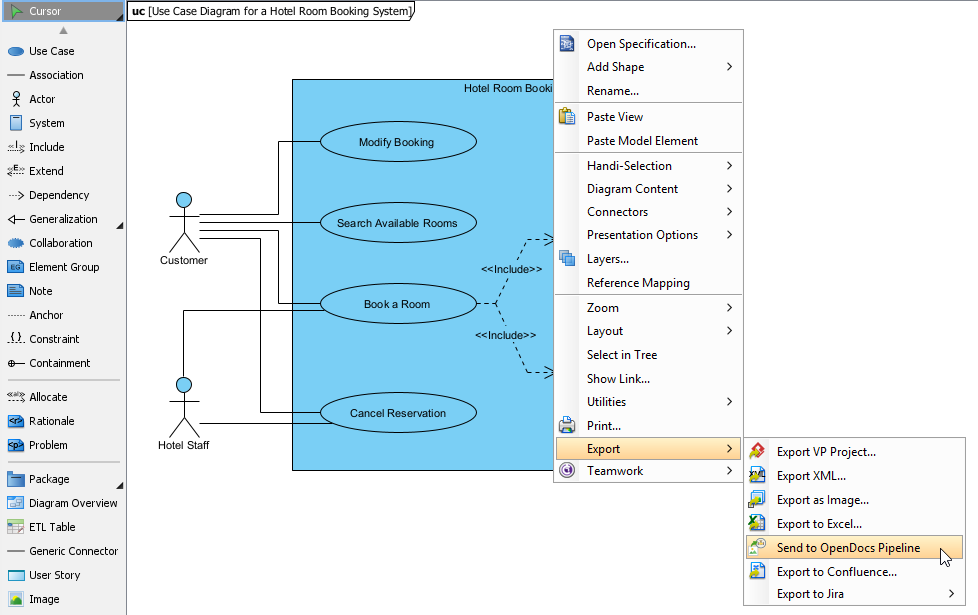
- Add a descriptive note: “Checkout flow v3.2 – Added guest user path.”
- Confirm export. The asset appears in the team’s Pipeline library immediately.
- In OpenDocs, insert via Insert > Pipeline and position within your product requirements document.
During a recent distributed sprint planning, we updated a service dependency map and had it reflected in our shared documentation before the Zoom call ended—no follow-up emails required.
3. AI Chatbot → OpenDocs: From Ideation to Executable Specs
This connection transforms brainstorming sessions into actionable documentation. When exploring architectural options, we prompt the AI Chatbot: “Generate a container diagram for a serverless event-driven system.”
From Idea to Embedded Spec:
- Once the AI-generated visual appears, click Export > Send to OpenDocs Pipeline directly from the chat interface.
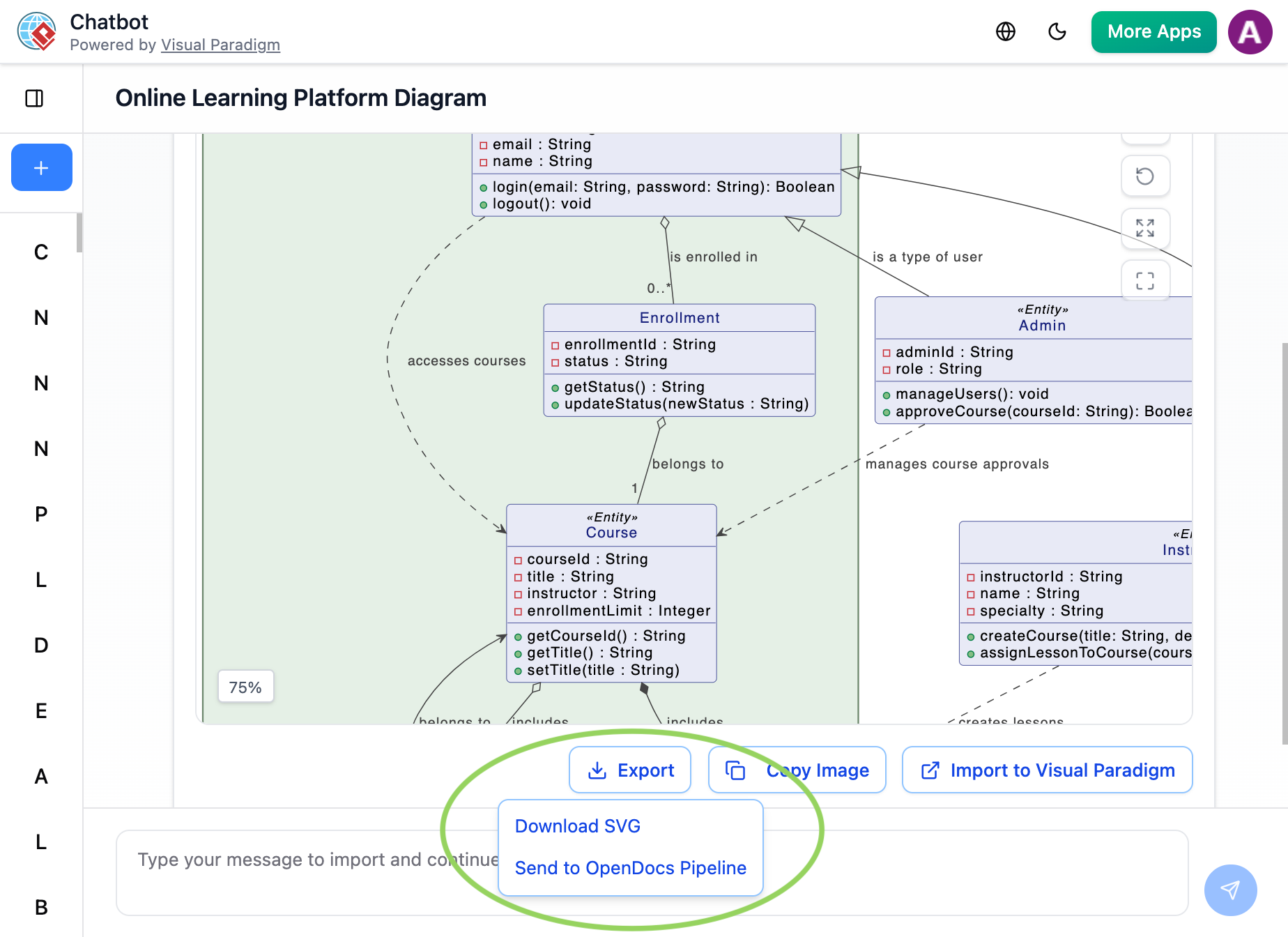
- The AI-generated artifact lands in the team’s Pipeline library, ready for refinement by the architecture guild.
- In OpenDocs, embed it into an Architecture Decision Record (ADR) and add contextual rationale.
This isn’t just about speed—it’s about capturing ephemeral architectural discussions before they evaporate. Pipeline ensures AI-assisted visuals become persistent, versioned knowledge assets, not lost chat history.
4. Flipbooks → OpenDocs: Interactive Runbooks for On-Call Teams
Recently, our SRE team needed to embed an interactive incident response playbook into our internal knowledge base. Sending the Flipbook through Pipeline preserved its interactivity within OpenDocs. This was a huge win for on-call engineers who need to quickly navigate procedures under pressure. There were no iframe hacks or external hosting dependencies required.
5. Bookshelves → OpenDocs: Scaling Knowledge Across Squads
When organizing onboarding materials across multiple product squads, sending entire Bookshelves to OpenDocs via Pipeline created a centralized, searchable library. This scaled beautifully for a recent enterprise platform launch, reducing new engineer ramp-up time by enabling self-service discovery of architecture patterns, API contracts, and deployment guides.
How to Use the Pipeline Workflow
Setting up the pipeline is straightforward. Here is the general three-step process we followed.
Step 1: Send Your Artifacts to the Pipeline
- From VP Desktop / Online: Open your target diagram or graphic canvas.
- Trigger Export: Click Export in the top right or side menu and select Send to OpenDocs Pipeline.
- Comment & Push: Add optional revision notes and confirm with OK to upload the asset.
Step 2: Embed into Your Documentation
- Open Document: Launch your web-based documentation interface in Visual Paradigm OpenDocs.
- Place Cursor: Enter editor mode and position your cursor exactly where the graphic belongs.
- Insert Asset: Click Insert on the toolbar, select Pipeline, and choose your diagram from the asset sidebar.
Step 3: Manage Revisions & Updates
- Live Adjustments: Click the edit icon on any embedded artifact to launch its source editor, tweak components, and re-send.
- Swap Versions: Select the asset in OpenDocs and use the built-in revision panel to switch between old iterations or update to the latest push.
Workflow Evolution: Before vs. After Pipeline
| Traditional Agile Documentation Workflow | Pipeline-Enabled Collaborative Workflow |
|---|---|
| Export diagram as PNG → Upload to wiki → Manual version tracking | One-click “Send to Pipeline” → Auto-versioned, instantly available in OpenDocs |
| “Can someone resend the latest diagram?” Slack messages | “Update to latest revision” in OpenDocs → always current, with change comments |
| Static images that become outdated after next sprint | Deep-linked, editable artifacts that evolve with the codebase |
| Files scattered across GitHub wikis, Google Drive, email | Centralized cloud repository with search, comments, and role-based access |
| Public docs manually recreated from internal specs | Same source asset embedded internally and published externally with selective visibility |
The time savings are measurable, but the bigger win is reduced cognitive load. Engineers spend less energy managing documentation logistics and more energy on system design and code quality.
Application Areas: Where Agile IT Teams See Maximum Impact
Based on our implementation, Pipeline delivers exceptional value in several key areas:
- Microservices Architecture: Modeling service boundaries, API contracts, and data flows. Real-time sync keeps technical docs aligned with evolving codebases, supporting trunk-based development practices.
- DevOps & SRE: Creating runbooks, deployment diagrams, and incident response flows. Pipeline ensures on-call documentation always references the latest operational design.
- Product Discovery: Embedding user journey maps, story maps, and feature flag configurations directly into product briefs. Product managers and engineers collaborate on the same living artifact.
- Security & Compliance: Integrating threat models, data flow diagrams, and audit trails into compliance documentation. Version history and access controls support regulated environments.
- Developer Experience: Publishing internal API catalogs, SDK guides, and integration patterns that can be selectively exposed to partner developers via public WordPress posts.
WordPress Integration: Publishing Mixed Internal/Public Knowledge Bases
A unique strength for agile teams is the ability to maintain a single source of truth while publishing selectively to public audiences.
Direct Page Export to WordPress
- Use the WordPress Integration to export selected OpenDocs pages directly as fully functional WordPress Pages.
- Setup requires a one-time connection using a WordPress Application Password (found in your WordPress user profile).
- Embedded Pipeline artifacts retain their interactivity and auto-update capabilities even after publication.
Embedding via Iframe for Flexible Publishing
- Use the Embed Code feature in OpenDocs to generate an
<iframe>snippet. - Paste this code into a Custom HTML block in the WordPress editor.
- Display your knowledge hub content on any public post while maintaining the ability to update the source diagram in Visual Paradigm.
Strategic Publishing Patterns
- Internal-only: Technical deep-dives, security models, and sprint retrospectives visible only to authenticated team members.
- Partner-facing: API documentation, integration guides, and architecture overviews shared with external developers.
- Public community: High-level product architecture, technology blog posts, and open-source contribution guides published to your company blog.
Pro tip: Use OpenDocs’ permission layers to control visibility at the artifact level—same diagram, different audiences.
Self-Hosting Options for Security-Conscious Teams
For teams in regulated industries or with strict data residency requirements, Visual Paradigm offers self-hosting options:
- Publication Server: Set up a private Publication Server (e.g., on-premises Mac/Linux server) to host flipbooks, slideshows, and diagrams on your own infrastructure.
- Benefits: Full control over data location, integration with existing IAM systems, and compliance with air-gapped environment policies.
- Trade-off: Requires additional DevOps overhead for maintenance and updates.
Important Considerations for Agile Adoption
A few practical notes based on our cross-team implementation experience:
- Subscription requirements: Pipeline access requires Visual Paradigm Online Combo Edition or Professional Edition. Verify licensing during sprint planning to avoid workflow interruptions.
- Onboarding velocity: Initial setup took our team ~30 minutes, but adoption was rapid because the mental model (“send to cloud, insert anywhere”) aligns with agile principles of simplicity and feedback.
- Connectivity dependencies: As a cloud-centric feature, Pipeline requires internet connectivity. For highly regulated environments with air-gapped systems, evaluate the self-hosting option early in your sprint 0 planning.
- Change management: Frame Pipeline adoption as reducing “documentation drag”—a metric agile teams already care about—rather than adding new process.
Conclusion: Building a Documentation Culture That Scales
After implementing Visual Paradigm Pipeline across our agile teams, the consistent outcome wasn’t just efficiency gains. It was a fundamental shift in how we think about documentation.
Pipeline transforms documentation from a compliance artifact into a collaborative workspace. When your architecture diagrams, process flows, and AI-generated prototypes can evolve in real-time within your knowledge base—and selectively publish to public channels—you create a living ecosystem that grows with your product.
For agile IT teams specifically, the value compounds:
- Reduced sprint drag: Less time managing files, more time building features.
- Improved knowledge retention: New team members onboard faster with searchable, visual-first documentation.
- Stronger stakeholder alignment: Product, engineering, and security teams collaborate on the same canonical artifacts.
- Confident public communication: Publish curated technical content to your community without maintaining parallel documentation systems.
The Pipeline isn’t a silver bullet—but for teams already invested in the Visual Paradigm ecosystem, it’s the connective tissue that turns fragmented workflows into a cohesive “Concept-to-Community” pipeline. If your team struggles with documentation debt, version confusion, or the internal/external publishing dilemma, a hands-on trial could transform not just your workflow, but your team’s relationship with knowledge sharing itself.
Sometimes, the right tool doesn’t just save time. It changes how your team thinks about the work—and who gets to participate in it.
References
- Export OpenDocs to WordPress Page: Official release notes detailing how to export OpenDocs content directly to WordPress pages using Application Password authentication.
- Visual Paradigm Online to OpenDocs Export: Documentation covering the integration workflow between Visual Paradigm Online diagrams and OpenDocs via the Pipeline feature.
- AI Diagram to OpenDocs Pipeline Integration: Announcement and guide for exporting AI-generated diagrams from the Visual Paradigm Chatbot directly to OpenDocs through Pipeline.
- Visual Paradigm Pipeline Demo Video: Video walkthrough demonstrating the end-to-end Pipeline workflow between Visual Paradigm tools and OpenDocs documentation platform.
- Pipeline Workflow Tutorial Video: Step-by-step video guide showing how to use the Pipeline feature for diagram synchronization and documentation embedding.
- Visual Paradigm Features Overview: Comprehensive listing of Visual Paradigm’s product capabilities, including diagramming, modeling, AI assistance, and documentation tools.
- Visual Paradigm Official Website: Main portal for Visual Paradigm products, resources, pricing, and ecosystem information.
- Visual Paradigm Diagram Examples Library: Collection of sample diagrams across UML, BPMN, flowcharts, ArchiMate, and other modeling notations for reference and inspiration.
- P&ID Software Features in Visual Paradigm Online: Dedicated page outlining Piping and Instrumentation Diagram capabilities within the cloud-based diagramming tool.
- Visual Paradigm User Guide: Pipeline Feature: Official user guide section providing detailed instructions for using the Pipeline export and embedding functionality.
- Class Diagram Tutorial Using Visio (Comparative Reference): External resource on class diagram creation, included for contextual comparison of modeling approaches across different tools.
- Sync AI Diagram to OpenDocs Pipeline Guide: Detailed tutorial for synchronizing AI-generated diagrams from Visual Paradigm to OpenDocs via Pipeline.
- Share Visual Paradigm Flipbooks to OpenDocs: Release notes explaining how to send interactive flipbooks from VP Online to OpenDocs through the Pipeline.
- Flipbook Integration Demo Video: Video demonstration of embedding and updating flipbooks within OpenDocs documentation.
- Slideshow to Pipeline Tutorial Video: Step-by-step guide showing how to send slideshows to the Pipeline and insert them into OpenDocs documents.
- My Journey to Seamless Documentation: Community case study detailing real-world implementation of Visual Paradigm to OpenDocs workflow.
- OpenDocs Embed HTML Code Tutorial: Guide for generating and using iframe embed codes to display OpenDocs content on external websites.
- Integrate Visual Paradigm OpenDocs into WordPress: Third-party comprehensive guide for embedding AI-powered Visual Paradigm knowledge bases into WordPress sites.
