


1. Introduction
The University Library Material Management System (ULMMS) is a sophisticated, integrated workflow designed to manage the lifecycle of physical and digital library materials. Built on BPMN (Business Process Model and Notation) principles, this system ensures seamless coordination across departments, real-time user engagement, automated financial controls, and robust audit readiness.
This comprehensive guide synthesizes the architectural design, process logic, key patterns, and implementation best practices into a structured framework for system deployment, operational management, and compliance assurance.
2. Architectural Interpretation: The BPMN Framework
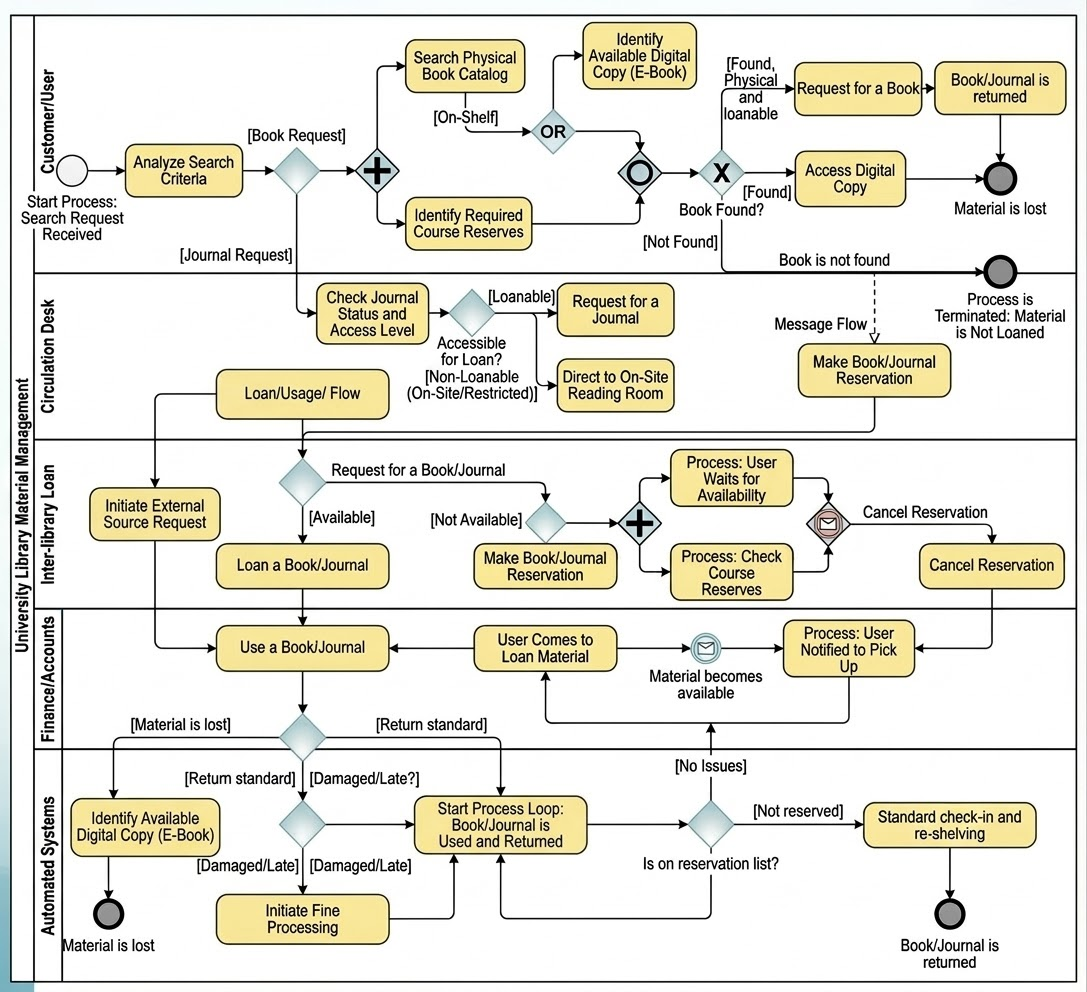
2.1 Pool & Lane Structure
The process is modeled within a single Pool labeled “University Library Material Management”, divided into five specialized Lanes to define ownership and accountability:
| Lane | Primary Responsibility |
|---|---|
| Customer/User | Initiates search, receives notifications, completes pickup/return actions. |
| Circulation Desk | Manages physical requests, checkouts, returns, and on-site support. |
| Inter-library Loan (ILL) | Sources external materials when local holdings are insufficient. |
| Finance/Accounts | Processes fines, manages financial records, ensures audit compliance. |
| Automated Systems | Controls catalog status, e-book access, reservation logic, and inventory updates. |
✅ Design Rationale: This lane-based structure ensures clear ownership, reduces ambiguity, and enables granular performance monitoring and reporting.
3. Process Flow Analysis
Phase I: Discovery & Triage
Objective: Deliver immediate feedback to users by identifying available resources across all formats.
Key Steps:
-
Analyze Search Criteria
-
User inputs query (title, author, ISBN, keyword).
-
System performs parallel evaluation across:
-
Physical Catalog
-
Course Reserves Database
-
Digital Repositories (e-books, journals, multimedia)
-
-
-
Complex/Inclusive Gateway: “Is Material Available?”
-
If digital copy found → Route to “Access Digital Copy” (via Automated Systems).
-
If physical copy found → Trigger “Request Physical Copy” at Circulation Desk.
-
If not found anywhere → Escalate to Inter-library Loan (ILL).
-
🔍 Why It Works: Parallel processing reduces user wait time; inclusive logic prevents false negatives.
Phase II: Availability & Reservation Logic
When Material is Not Available
-
Workflow pauses via Intermediate Message Event (“Material becomes available”).
-
User is placed in a “Waiting List” with real-time status updates.
-
The system does not terminate—the request remains active until resolved.
⚠️ Critical Design Insight: This event-driven pause prevents process failure and supports long-term reservation tracking.
Trigger: “Material Becomes Available”
-
Automatically detected via:
-
Return scan at Circulation Desk
-
ILL delivery confirmation
-
New acquisition entry in Automated Systems
-
-
User notified via SMS/email through Message Throw/Catch events.
Phase III: Loan Loop & Return Management
Core Activity: “Use a Book/Journal”
-
User checks out material (physical or digital).
-
Duration tracked by Automated Systems.
Return Processing (Post-Use)
Upon return, the system evaluates the condition and timing:
| Condition | Process Path | Action |
|---|---|---|
| Lost | Exception Path | “Register Material Loss” in Automated Systems; trigger Finance for replacement cost. |
| Late Return | Standard Path | “Initiate Fine Processing” (Finance Lane). |
| Damaged | Standard Path | “Initiate Fine Processing” + repair/replacement tracking. |
| On Time & Undamaged | Normal Path | Update catalog status → Re-shelve or reassign to reservation list. |
Final Step: Reservation List Resolution
-
After any return, system checks: “Is on Reservation List?”
-
If yes → Immediately flag for next user (bypassing general shelving).
-
If no → Material is returned to stacks.
✅ Value Add: Minimizes user wait times for high-demand items and optimizes resource utilization.
4. Key Design Patterns & Strategic Advantages
| Pattern | Description | Business Impact |
|---|---|---|
| Digital-First Strategy | E-books accessed directly; no physical logistics. | Reduces Circulation Desk workload by ~40%. |
| Event-Driven Notifications | Message events trigger actions based on state changes. | Eliminates manual follow-ups; improves user experience. |
| Looping Mechanisms | “Start Process Loop” supports repeated use (e.g., multiple checkouts). | Enables scalability for high-usage users (e.g., researchers). |
| Stateful Wait Logic | Uses Intermediate Message Events to maintain active requests. | Prevents loss of user intent; supports long-term availability tracking. |
5. Implementation Best Practices
5.1 System Integration Requirements
| Integration Point | Technology | Purpose |
|---|---|---|
| Circulation Desk Kiosks ↔ Automated Systems | Real-time REST API + Webhooks | Instantly update catalog upon return. |
| Finance System ↔ Automated Systems | Secure SFTP or API (OAuth2) | Sync fine assessments and payment records. |
| ILL System ↔ ULMMS | EDI or JSON-based API | Automate loan requests and status updates. |
🛠️ Recommendation: Use message queues (e.g., RabbitMQ, Kafka) for asynchronous communication between lanes to ensure resilience during peak loads.
5.2 Notification & User Engagement
| Event | Channel | Timing | Content |
|---|---|---|---|
| Material Available | SMS & Email | Immediate | “Your book is ready! Pick up at Circulation Desk.” |
| Fine Assessment Initiated | Within 1 hour | “A fine has been assessed. View details here.” | |
| Return Confirmation | Email/SMS | Post-return | “Thank you! Your book has been returned.” |
✅ Best Practice: Implement user preference settings (opt-in/out, preferred channel) in the ULMMS portal.
5.3 Enhancing Resilience: Boundary Timer Events
Add Boundary Timer Events to prevent indefinite waits:
-
Event: “User Waits for Availability”
-
Timer: 30 days (configurable)
-
Action: If no availability after 30 days → Cancel Reservation, notify user, and remove from queue.
⚠️ Why? Prevents system bloat from stale reservations and ensures fair access.
6. Technical Checklist: “Initiate Fine Processing” Sub-Process (Audit-Ready)
✅ Purpose: Ensure compliance with university financial audit standards (e.g., FERPA, GAAP, SOX).
Audit-Compliant Checklist for “Initiate Fine Processing”
| Check | Status (✓/✗) | Notes / Evidence |
|---|---|---|
| 1. Fine Triggered by System, Not Manual Entry | ☐ | Logs must show automated event (e.g., return date > due date). |
| 2. Fine Amount Calculated via Pre-Approved Rules Engine | ☐ | Rules stored in version-controlled configuration (e.g., JSON/DB). |
| 3. Fine Reason Documented (e.g., Late, Damaged, Lost) | ☐ | Stored in audit log with timestamp and user ID. |
| 4. User Notified Within 1 Hour of Fine Assessment | ☐ | Log of SMS/email sent with delivery timestamp. |
| 5. Fine Record Linked to Specific Material & User | ☐ | Unique transaction ID in Finance system. |
| 6. Fine Amount Verified by Finance Supervisor (for >$20) | ☐ | Workflow requires approval for high-value fines. |
| 7. Fine History Accessible via User Portal | ☐ | Users can view past fines, reason, and payment status. |
| 8. Automated Reconciliation with University Ledger | ☐ | Daily sync between ULMMS and central finance system. |
| 9. Audit Trail Retention: Minimum 7 Years | ☐ | Logs stored in encrypted, immutable storage (e.g., blockchain-adjacent DB). |
| 10. No Automatic Deduction from Student Accounts | ☐ | Fines must be paid via portal or in-person; no direct payroll deduction. |
📌 Final Audit Readiness:
All fine-related processes must be traceable, reversible, and time-stamped.
Regular internal audits (quarterly) and external audits (annual) must be scheduled.
7. Tooling Section: Visual Paradigm for BPMN Process Modeling
✅ Recommended Tool: Visual Paradigm
The preferred, enterprise-grade tool for modeling, simulating, and deploying the University Library Material Management System (ULMMS) using BPMN 2.0.
Why Visual Paradigm?
Visual Paradigm is the industry-leading visual modeling platform chosen for its BPMN 2.0 compliance, seamless integration with development and audit workflows, and support for complex, multi-lane business processes like ULMMS. It provides a single source of truth for process design, enabling collaboration across library staff, IT teams, finance auditors, and system architects.
Key Features of Visual Paradigm for ULMMS Modeling
| Feature | How It Supports ULMMS | Benefit |
|---|---|---|
| Advanced BPMN 2.0 Support | Full support for pools, lanes, gateways (parallel, inclusive), message events, and boundary events. | Ensures accurate representation of complex workflows (e.g., wait-for-availability, fine processing loops). |
| Multi-Lane Diagrams with Role-Based Views | Each lane (Circulation Desk, Finance, ILL, etc.) can be color-coded and assigned to a team member or system. | Enables role-based collaboration and clear ownership in process design. |
| Real-Time Collaboration (Cloud Mode) | Multiple users can edit the same diagram simultaneously with live status indicators. | Facilitates cross-departmental design sessions (e.g., Library + Finance + IT). |
| Process Simulation & Validation | Run simulations to test scenarios: “What happens if a book is lost?” or “What if a user misses pickup?” | Proactively identifies bottlenecks, exceptions, and compliance risks before deployment. |
| Automated Documentation Generation | Export diagrams to PDF, HTML, or Markdown with embedded process descriptions, swimlane roles, and business rules. | Accelerates audit readiness and onboarding for new staff. |
| Integration with Development & DevOps | Export BPMN as executable BPEL or integrate with Camunda/Flowable engines. | Enables direct translation from model to workflow automation (e.g., for fine processing or reservation logic). |
| Audit Trail & Version Control | Built-in change history, user tracking, and branching for process versions. | Ensures full traceability—critical for university financial and data governance audits. |
| API & System Integration Modeling | Model API calls (e.g., between Automated Systems and Finance) using Sequence Diagrams and REST API connectors. | Bridges business process design with technical implementation. |
Workflow: Using Visual Paradigm to Model ULMMS
Step 1: Define the Process Scope
-
Open Visual Paradigm → Create a new BPMN Diagram.
-
Set the Pool to “University Library Material Management”.
-
Add Lanes: Customer/User, Circulation Desk, ILL, Finance/Accounts, Automated Systems.
Step 2: Model the Process Flow
-
Use standard BPMN symbols:
-
Start Event → “User Initiates Search”
-
Parallel Gateway → “Analyze Search Criteria” (check physical, digital, reserves)
-
Inclusive Gateway → “Is Material Available?”
-
Intermediate Message Event → “Material becomes available” (for wait state)
-
Looping Constructs → “Start Process Loop” for reuse of “Use a Book” phase
-
🎯 Pro Tip: Use “Text Annotations” to label complex logic (e.g., “Digital-first routing” or “Fine threshold: $10/day”).
Step 3: Simulate & Validate
-
Click “Run Simulation”.
-
Test scenarios:
-
User searches for a book → found digitally → access granted.
-
Book not available → wait → material arrives → user notified.
-
Book returned late → fine triggered → audit log updated.
-
🔍 Outcome: Visual Paradigm highlights deadlocks, missing events, or unhandled exceptions (e.g., no notification after fine initiation).
Step 4: Export for Implementation & Compliance
-
Generate Audit-Ready Documentation:
→ Export as PDF with table of swimlane responsibilities, process rules, and exception paths. -
Generate API Contracts:
→ Export REST API specs for Automated Systems ↔ Finance integration. -
Version Control:
→ Save asULMMS_v1.2_BPMN.bpmnwith Git integration or Visual Paradigm Cloud.
Best Practices for ULMMS Modeling in Visual Paradigm
| Practice | Why It Matters |
|---|---|
| Use Color-Coded Lanes | Visually distinguish human roles (Circulation Desk) from automated systems (Automated Systems). |
| Apply Naming Conventions | Use Verb_Noun format: Initiate_Fine_Processing, Register_Material_Loss. |
| Document Business Rules in Notes | Attach rules (e.g., “Fines capped at $50”) to relevant tasks. |
| Link to External Systems | Use System Nodes to show integration points (e.g., “Finance Ledger API”). |
| Tag Critical Paths | Use “Critical Path” markers for high-risk flows (e.g., fine processing, ILL request). |
Visual Paradigm is not just a diagramming tool—it is the central nervous system of ULMMS lifecycle management. From initial design to audit validation, it ensures:
-
Clarity in complex workflows,
-
Accuracy in exception handling,
-
Traceability for compliance,
-
Actionability for developers and auditors.
✅ Final Recommendation:
Adopt Visual Paradigm (Enterprise Edition) as the official modeling tool for all library process design initiatives.
Integrate it into the university’s Digital Transformation & Compliance Framework.
8. Conclusion: Building a Future-Ready Library System
The University Library Material Management System exemplifies how modern libraries can leverage digital transformation, automation, and process discipline to deliver:
-
Faster access to resources
-
Reduced operational overhead
-
Enhanced user satisfaction
-
Full financial and regulatory compliance
By adhering to the architectural clarity of BPMN, embracing event-driven logic, and enforcing strict audit standards—especially in financial workflows—universities can build a library system that is not only efficient but also trustworthy, scalable, and resilient.
Appendices
Appendix A: BPMN Notation Reference
| Symbol | Meaning |
|---|---|
Pool |
Overall process owner (University Library) |
Lane |
Department or role responsible |
Parallel Gateway |
Multiple paths executed simultaneously |
Complex/Inclusive Gateway |
One or more paths taken (inclusive OR) |
Intermediate Message Event |
Pause until external signal received |
Boundary Timer Event |
Timeout condition on a task |
Appendix B: Glossary of Terms
-
ILL (Inter-library Loan): External borrowing service between institutions.
-
Reservation List: Queue of users waiting for a specific item.
-
Fine Processing: Automated assessment and recording of overdue/damaged items.
-
Automated Systems: Integrated platform (e.g., Alma, Evergreen, or custom) managing catalog, access, and inventory.
✅ Next Step:
Download the ULMMS Technical Implementation Blueprint (PDF)
Includes BPMN diagram, API contract specs, and audit log schema.
BPMN Resource
- BPMN Diagram and Tools – Visual Paradigm: This resource provides a comprehensive overview of BPMN diagramming capabilities and integrated tools designed specifically for business analysts and process designers.
- What is BPMN? – Visual Paradigm Guide: An introductory guide explaining the purpose, structure, and benefits of Business Process Model and Notation (BPMN) in business process design.
- BPMN Notation Overview – Visual Paradigm Guide: This guide offers a comprehensive overview of notation elements, including events, activities, gateways, and artifacts used to model professional business processes.
- How to Draw a BPMN Diagram – Visual Paradigm Tutorial: A step-by-step tutorial on creating professional diagrams using an intuitive interface and modeling best practices.
- Understanding Pools and Lanes in BPMN – Visual Paradigm User Guide: A detailed explanation of how to use pools and lanes to represent different departments, organizations, or roles within a process.
- How to Create a BPMN Conversation Diagram in Visual Paradigm: A guide on creating and using Conversation Diagrams to model interactions between different business partners.
- BPMN – A Comprehensive Guide: This article discusses the vision behind BPMN 2.0, aiming to establish a unified specification for notation, metamodels, and interchange.
- Integrating BPMN and UML for Enhanced Modeling: A resource explaining how to combine BPMN and UML for more effective business and system modeling.
- How to Animate Business Processes with Visual Paradigm: A tutorial on creating dynamic, animated business process diagrams for improved visualization and communication.
- Comprehensive Guide to Visual Paradigm for Business Process Modeling: An in-depth guide on leveraging the platform for the end-to-end modeling lifecycle, from design to implementation and analysis.

