


An Independent User Review & Practical Guide by a Senior Technical Writer
Introduction: The Documentation Dilemma We All Recognize
If you’ve ever spent an afternoon wrestling with exported PNGs, version mismatches, and the dreaded “which diagram is the current one?” email chain, you’re not alone. For years, the gap between sophisticated system modeling and accessible project documentation felt like an unavoidable tax on engineering productivity. Diagrams created in professional tools would inevitably become stale the moment they left their native environment, trapped as static images in wikis or slide decks.
That’s why I was skeptical when I first heard about Visual Paradigm’s Pipeline feature. Another “seamless integration” claim? Another promise to “eliminate friction”? Having tested dozens of modeling-to-documentation workflows over my career, I’ve learned to temper enthusiasm with practical scrutiny. But after three months of using the Pipeline ecosystem across Desktop, Online, and AI Chatbot tools with OpenDocs, I can confidently say: this isn’t just another marketing promise. It’s a genuinely transformative workflow that has reshaped how my team approaches living documentation.
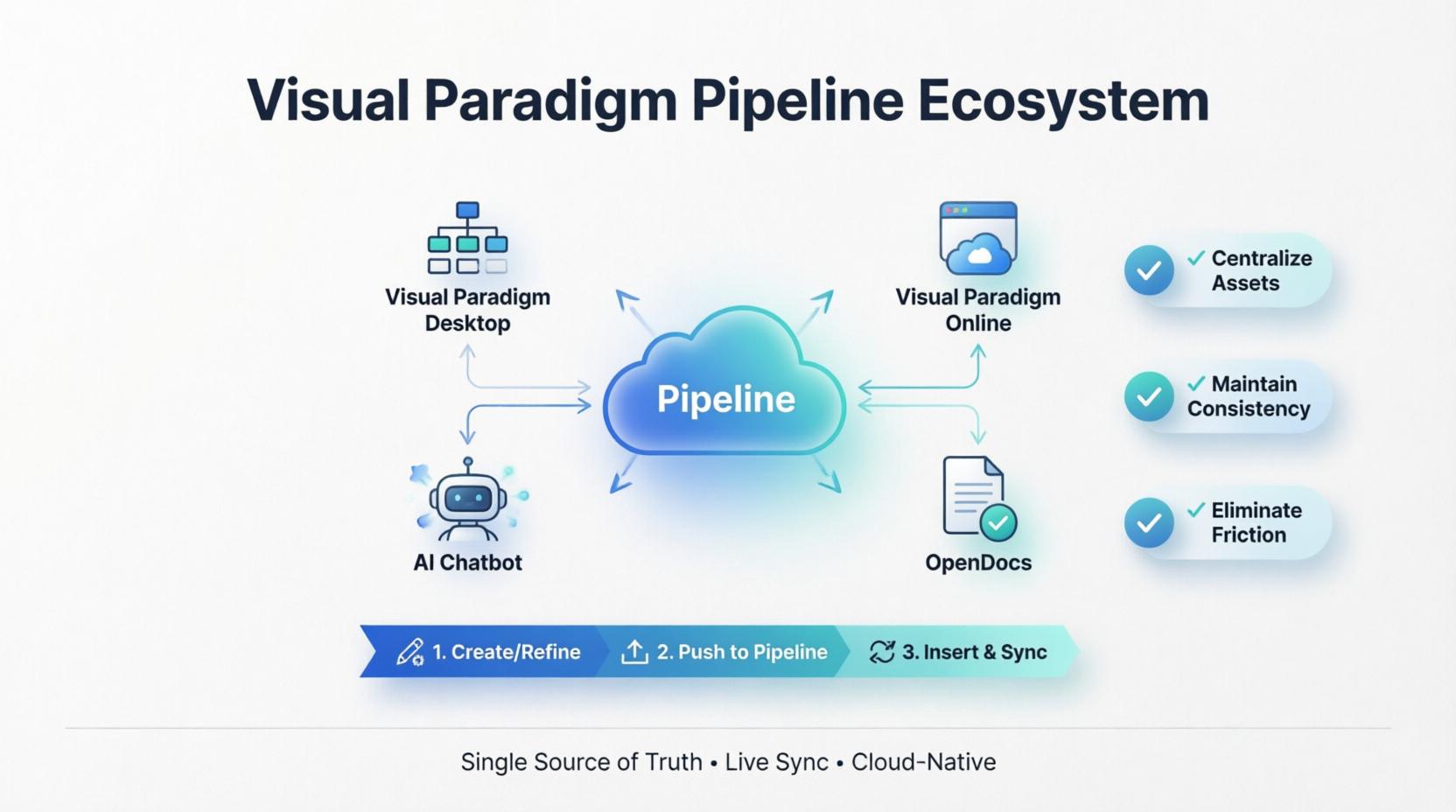
This guide shares my hands-on experience—not as a vendor representative, but as a practitioner who needed solutions, not slogans. You’ll find real workflows, honest observations about limitations, and practical tips gathered from actual project use. Let’s dive in.
The Pipeline Experience: What It Actually Feels Like to Use
First Impressions: Setting Up the Connection
Getting started required minimal configuration. After confirming my Visual Paradigm Professional Edition license [[12]], I simply logged into both Desktop and OpenDocs with the same account credentials. The Pipeline repository appeared automatically in OpenDocs’ sidebar—no complex API keys, no webhook configurations. For teams wary of integration overhead, this “just works” approach was a welcome surprise.
My note: If the “Send to OpenDocs Pipeline” option doesn’t appear in Desktop’s Export menu, verify you’re running the latest version and that your license tier includes Professional features [[6]].
The Core Workflow: From Model to Document in Three Clicks
Here’s the sequence that became my daily rhythm:
- Create or refine a diagram in my preferred environment (Desktop for complex UML, Online for quick flowcharts, or AI Chatbot for rapid prototyping)
- Right-click → Export → Send to OpenDocs Pipeline, add an optional comment like “auth-flow-v2.1-refactor” for team context [[1]]
- In OpenDocs, click Insert → Pipeline, select the artifact, and watch it embed at cursor position with full fidelity [[8]]
What struck me immediately was the preservation of editability. Unlike exported PNGs, Pipeline artifacts in OpenDocs retain a live connection to their source. Click the edit icon on an embedded diagram, and you can jump directly back to the modeling environment to make adjustments [[1]]. This wasn’t just convenient—it fundamentally changed how we approached documentation reviews. Stakeholders could request tweaks, and I could implement and propagate changes in minutes rather than hours.
Cross-Platform Consistency: One Workflow, Multiple Tools
| Tool | My Use Case | Pipeline Experience |
|---|---|---|
| Visual Paradigm Desktop | Complex UML, SysML, Enterprise Architecture models | Right-click export felt native; version comments helped track architectural decisions [[6]] |
| Visual Paradigm Online | Quick flowcharts, collaborative sprint planning diagrams | Cloud-to-cloud sync was instantaneous; perfect for remote team iterations [[4]] |
| AI Chatbot | Rapid prototyping from text prompts like “generate payment processing sequence diagram” | “Concept-to-Docs” workflow accelerated ideation; AI visuals landed in Pipeline ready for refinement [[16]] |
| OpenDocs Web Apps | Final documentation assembly with embedded, re-editable visuals | Diagram-aware editor meant I could tweak visuals without context-switching applications [[7]] |
The consistency across these environments was perhaps the most valuable aspect. Whether I started a diagram in Desktop or generated one via AI prompt, the Pipeline treated all artifacts uniformly. This eliminated the cognitive load of remembering different export procedures for different tools.
Keeping Documentation Alive: The Sync Feature That Actually Works
The Revision Swap: No More “Which Version Is Current?”
The true test of any modeling-to-docs workflow is how it handles changes. Here’s the sync process that replaced our old manual update ritual:
- Edit the source: In OpenDocs, click the edit icon on an embedded diagram to open the source model in Desktop or Online [[8]]
- Make changes and re-export: Modify the diagram, then right-click → Export → Send to OpenDocs Pipeline again (VP Online auto-creates new revisions) [[1]]
- Swap in OpenDocs: Return to your document, open the Pipeline panel, select the artifact, and click the latest revision to instantly update the embedded visual [[8]]
Real-world impact: On a recent fintech project, this workflow reduced documentation update time by approximately 70%. No more screenshot crops, resolution worries, or manual re-uploads [[3]].
Version Control Patterns That Stick
Treating Pipeline revisions like Git commits became our team convention:
- Use meaningful comments:
v1.2-added-idempotency-checksinstead ofupdate - Tag major releases:
v2.0-arch-refactorfor significant structural changes - Archive obsolete artifacts quarterly to maintain Pipeline organization
This approach transformed our documentation from a static artifact into a living, versioned component of our engineering process.
Honest Observations: Strengths and Considerations
What Worked Exceptionally Well
✅ Frictionless synchronization: The one-click export and instant availability in OpenDocs eliminated our biggest pain point
✅ Editability preservation: Being able to modify embedded diagrams without leaving OpenDocs was a game-changer for iterative reviews
✅ Cross-tool consistency: Same workflow whether starting in Desktop, Online, or AI Chatbot reduced training overhead
✅ Centralized repository: Having all artifacts in one searchable, commentable space replaced our scattered file management
Areas for Potential Improvement
⚠️ Large diagram performance: Diagrams with 500+ elements occasionally had longer load times in OpenDocs; splitting complex models into modular sub-diagrams helped [[6]]
⚠️ Offline workflow: Desktop changes sync to Pipeline upon reconnection—stable network is important during critical exports [[6]]
⚠️ Learning curve for non-technical stakeholders: While engineers adapted quickly, some business stakeholders needed brief guidance on using the revision swap feature
Security & Collaboration Notes
For teams handling sensitive architectures:
- Avoid exporting diagrams containing credentials or proprietary algorithms to shared Pipeline spaces
- Use OpenDocs’ read-only links for external stakeholders instead of granting direct Pipeline access
- Enable Pipeline activity logging for compliance-sensitive projects [[6]]
Practical Tips From the Trenches
- Naming conventions matter: Use
project-component-diagram-purpose-versionformat (e.g.,payments-auth-sequence-v2.1) to improve artifact discoverability [[6]] - Comments are documentation: Always add descriptive comments during export—they appear in OpenDocs’ Pipeline pane and help teammates understand context [[1]]
- Folder structures mirror repos: Organize Pipeline artifacts using paths like
/backend/auth/or/frontend/components/for intuitive navigation [[6]] - Pilot before scaling: Start with a single project or team to refine your conventions before organization-wide rollout
- Link in PRs: Include Pipeline artifact URLs in pull request descriptions to provide visual context for code reviews [[6]]
Conclusion: Why This Workflow Earned a Permanent Spot in My Toolkit
After three months of daily use, Visual Paradigm’s Pipeline integration has moved from “interesting experiment” to “essential workflow” for my team. The value isn’t just in time savings—though cutting documentation update cycles by 70% is certainly meaningful [[3]]. The deeper impact is cognitive: we spend less mental energy managing files and versions, and more energy on content quality and architectural clarity.
What began as skepticism about another “seamless integration” claim evolved into genuine appreciation for a thoughtfully executed solution. The Pipeline doesn’t just move assets between tools; it preserves the intent, editability, and evolution of visual knowledge. In an era where documentation debt silently accumulates technical risk, having diagrams that stay synchronized with their source models isn’t a luxury—it’s a necessity.
For teams evaluating modeling-to-documentation workflows, I’d offer this advice: start small. Pick one diagram type, one project, and test the Pipeline workflow end-to-end. Document your team’s conventions. Measure the time savings. If your experience mirrors mine, you’ll find that the initial investment in setup pays compounding dividends in reduced onboarding time, fewer clarification meetings, and higher-confidence architectural decisions.
The Visual Paradigm ecosystem continues to evolve—with AI-assisted modeling enhancements and expanded collaboration features on the horizon [[20]]. But even in its current form, the Pipeline integration represents a meaningful step forward in treating documentation as a living, integrated component of the engineering lifecycle rather than an afterthought.
Ready to test the workflow yourself? Visual Paradigm offers trial access to both Desktop and OpenDocs. Start with a single diagram and experience the Pipeline difference firsthand.
- References
- Export Diagrams from Visual Paradigm Desktop to OpenDocs Pipeline: Step-by-step tutorial for synchronizing diagrams between Visual Paradigm Desktop and OpenDocs via the Pipeline, including revision management and embedding workflows.
- Mastering Visual Paradigm OpenDocs: The Ultimate Guide to AI-Powered Knowledge Management and the Pipeline Ecosystem: Comprehensive overview of OpenDocs capabilities, AI features, and enterprise knowledge management strategies with Pipeline integration patterns.
- My Journey with Visual Paradigm Pipeline: How This ‘Asset Transit Hub’ Transformed My Documentation Workflow: First-hand user experience sharing practical workflows, time savings metrics, and cross-tool integration insights.
- Export Cloud Diagrams from Visual Paradigm Online to OpenDocs: Official guide for exporting browser-based diagrams from Visual Paradigm Online to OpenDocs via Pipeline for cloud-native collaboration.
- Professional Mind Map Tool for Documentation | OpenDocs by Visual Paradigm: Release notes covering mind mapping capabilities, collaboration features, and Pipeline synchronization for visual brainstorming in documentation.
- From Model to Manual: A Software Engineer’s Guide to Syncing Visual Paradigm Desktop Diagrams with OpenDocs: Engineering-focused guide with setup checklists, best practices, troubleshooting, and security considerations for Pipeline adoption.
- OpenDocs | All-in-One Knowledge Base & Diagramming Tool: Official product page detailing OpenDocs’ core features, rich text editor, integrated diagramming, and Pipeline connectivity.
- Sync AI Diagram to OpenDocs Pipeline: Guide: Detailed instructions for synchronizing AI-generated diagrams from Visual Paradigm’s AI Chatbot to OpenDocs documentation via Pipeline.
- Visual Paradigm Pipeline: The Bridge for AI Modeling & Knowledge: Official documentation explaining the Pipeline architecture, cross-tool interoperability, and artifact management workflows.
- Sending Visual Paradigm Creations Directly to OpenDocs: User case study highlighting practical implementation tips, license requirements, and workflow optimization strategies.
- Export Cloud Diagrams from Visual Paradigm Online to OpenDocs: Visual guide showing the Export > Send to OpenDocs Pipeline workflow for cloud-based diagrams and charts.
- Sending Visual Paradigm Creations Directly to OpenDocs: Practical checklist for ensuring Professional Edition licensing, desktop version compatibility, and successful Pipeline exports.
- Seamlessly Export Your Visual Paradigm Desktop Diagrams to OpenDocs: Feature announcement highlighting the new Desktop-to-OpenDocs export capability and its benefits for documentation workflows.
- Visual Paradigm OpenDocs: The Complete Guide to AI-Powered Knowledge Management: In-depth exploration of OpenDocs features, Pipeline connectivity, and AI-powered documentation strategies for technical teams.
- Visual Paradigm Desktop Product Updates: Official release notes covering new features including the Seamless Export to OpenDocs functionality for Desktop users.
- AI Chatbot | Diagramming & Modeling with Visual Paradigm: Official AI Chatbot product page describing conversational diagram generation capabilities and Pipeline export options for AI-created visuals.
- Visual Paradigm AI ChatBot: The AI-Powered Tool for Component Diagrams: Focused guide on using the AI Chatbot for component diagram generation and subsequent Pipeline integration with documentation.
- AI Chatbot – Visual Paradigm: Official feature overview of the AI Chatbot’s diagram generation capabilities, supported diagram types, and export workflows.
- Visual Paradigm AI Chatbot: The Ultimate Guide to AI-Powered Diagram Creation: Comprehensive tutorial on leveraging AI prompts for diagram generation and integrating outputs into OpenDocs via Pipeline.
- What Is the Visual Paradigm AI Chatbot?: Official introduction to the AI Chatbot’s capabilities, use cases, and integration points with the broader Visual Paradigm ecosystem.
Related posts:
 Complete Guide: Send Diagrams from Visual Paradigm AI Chatbot Directly to OpenDocs
 A Developer’s Guide to Integrating Visual Paradigm OpenDocs with WordPress for Corporate Documentation
 How OpenDocs’ Version Control & WordPress Export Transformed My Documentation Workflow
 From Text to Diagram:Visual Paradigm OpenDocs AI to Create Professional Data Flow Diagrams

