


Introduction
In today’s rapidly evolving software development landscape, Unified Modeling Language (UML) has become an indispensable tool for system designers, software architects, and students alike. However, the cost of professional modeling tools often presents a significant barrier, particularly for students, educators, and independent developers working on non-commercial projects.
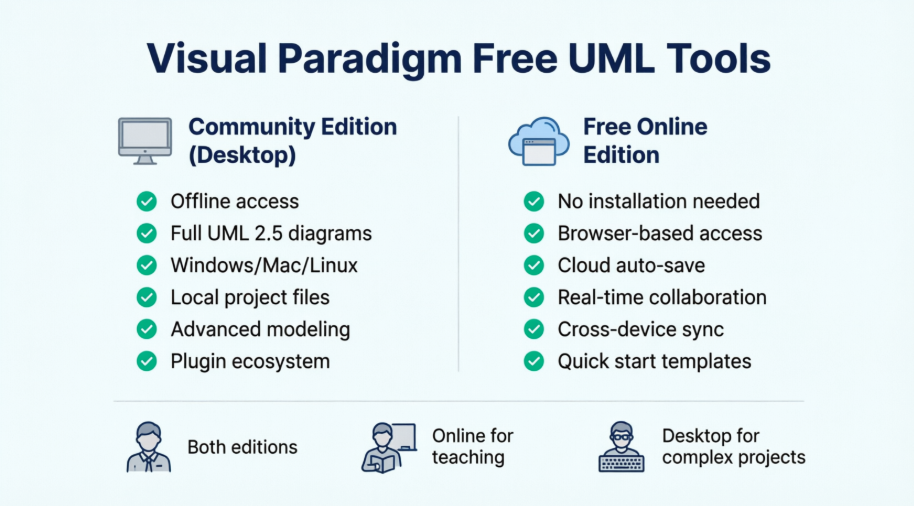
Visual Paradigm has emerged as a leading solution in this space, offering two distinct free editions: the Community Edition (Desktop) and the Free Online Edition. While both serve the non-commercial market, they cater to different workflows, technical requirements, and user preferences. This case study provides an in-depth analysis of both editions, examining their capabilities, limitations, and ideal use cases to help users make an informed decision about which tool best fits their modeling needs.
Executive Summary
Visual Paradigm has established itself as a trusted name in the modeling software industry since 2004, with over 1 million installations globally. The company’s commitment to providing free, high-quality UML tools for non-commercial use has made professional-grade modeling accessible to students, educators, and hobbyists worldwide.

This case study examines both free offerings to determine:
-
Which edition provides better value for different user types
-
How feature sets compare between desktop and cloud-based solutions
-
What trade-offs exist between offline capability and cloud convenience
-
Which edition aligns with specific project requirements
1. Visual Paradigm Community Edition (Desktop)
1.1 Overview
Launched in 2004, Visual Paradigm Community Edition represents one of the most comprehensive free UML tools available in the market. Designed specifically for non-commercial purposes, it serves as an entry point for users taking their first steps in UML modeling while providing robust features that rival commercial solutions.

1.2 Key Strengths
Comprehensive UML 2.x Support
The Community Edition supports all 13 UML 2.x diagram types, making it a complete solution for various modeling needs:
-
Use Case Diagrams
-
Class Diagrams
-
Sequence Diagrams
-
Communication Diagrams
-
State Machine Diagrams
-
Activity Diagrams
-
Component Diagrams
-
Deployment Diagrams
-
Package Diagrams
-
Object Diagrams
-
Composite Structure Diagrams
-
Timing Diagrams
-
Interaction Overview Diagrams
Advanced Modeling Capabilities
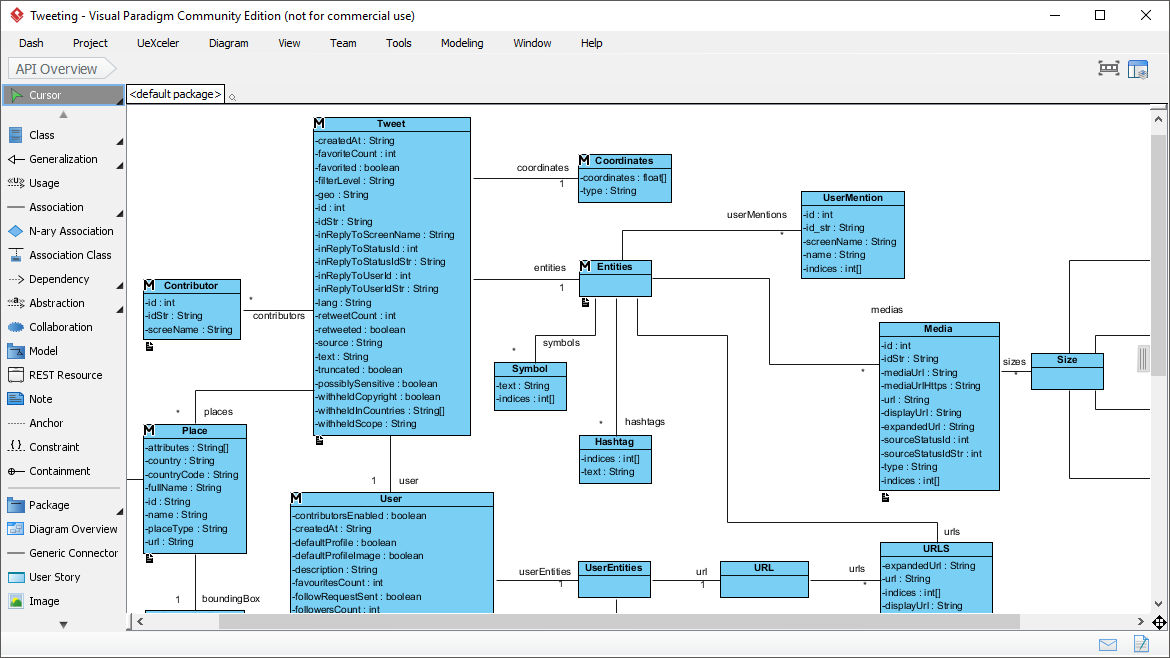
The desktop edition goes beyond simple diagramming to provide true modeling capabilities:
Real Modeling Tools: Unlike basic drawing tools, Visual Paradigm enables:
-
Reusable elements across different models
-
Syntax checking to ensure design correctness
-
Sub-diagrams for multiple levels of abstraction
-
References to design artifacts
-
Element referencing with external resources

Resource Catalog Feature: This productivity tool allows users to create stunning diagrams with just a few clicks, serving as a “secret weapon for maximum efficiency and top-notch quality.”

Element Referencing: The software establishes linkages among UML model elements and external resources like webpages and physical files, creating a comprehensive design ecosystem.

1.3 Technical Specifications
-
Platform Compatibility: Windows, Mac OS X, Linux (any Java-enabled platform)
-
Installation: Downloadable desktop application
-
Internet Requirement: Works completely offline after installation
-
Storage: Local file storage on user’s computer
-
Export Options: PNG, JPG (with watermark), printing capabilities (with watermark)
1.4 Target Audience
The Community Edition is ideal for:
-
Students working on academic projects requiring comprehensive UML compliance
-
Educators teaching software engineering and system design
-
Independent developers creating personal projects
-
Researchers needing offline access to modeling tools
-
Non-profit organizations with limited budgets
1.5 Limitations
-
Watermark: Single-lined watermark appears on printouts and exported images
-
Non-commercial Use Only: Strictly prohibited for commercial purposes
-
No Team Collaboration: Lacks cloud-based collaboration features
-
No BPMN/DFD: Business Process Modeling and Data Flow Diagrams unavailable
-
Local Storage Only: No cloud synchronization
2. Visual Paradigm Online (Free Edition)
2.1 Overview
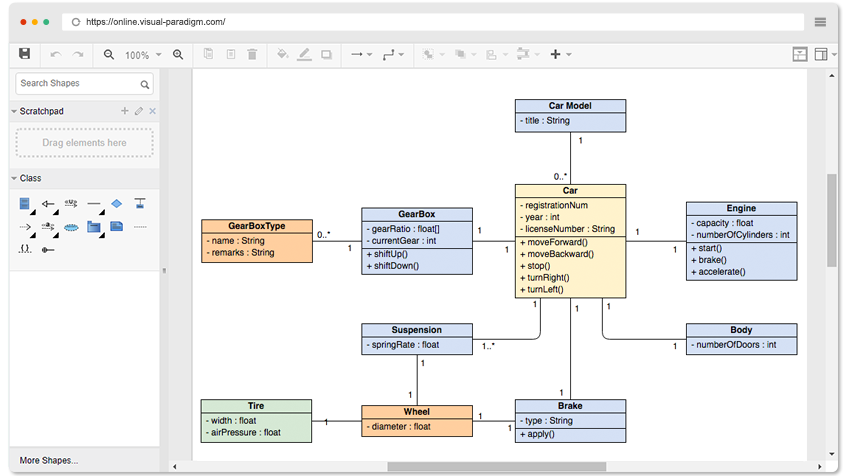
Visual Paradigm Online represents the cloud-based evolution of the desktop application, offering browser-based diagramming capabilities without the need for software installation. The Free Edition provides accessible, cross-platform modeling for users who prioritize convenience and collaboration.
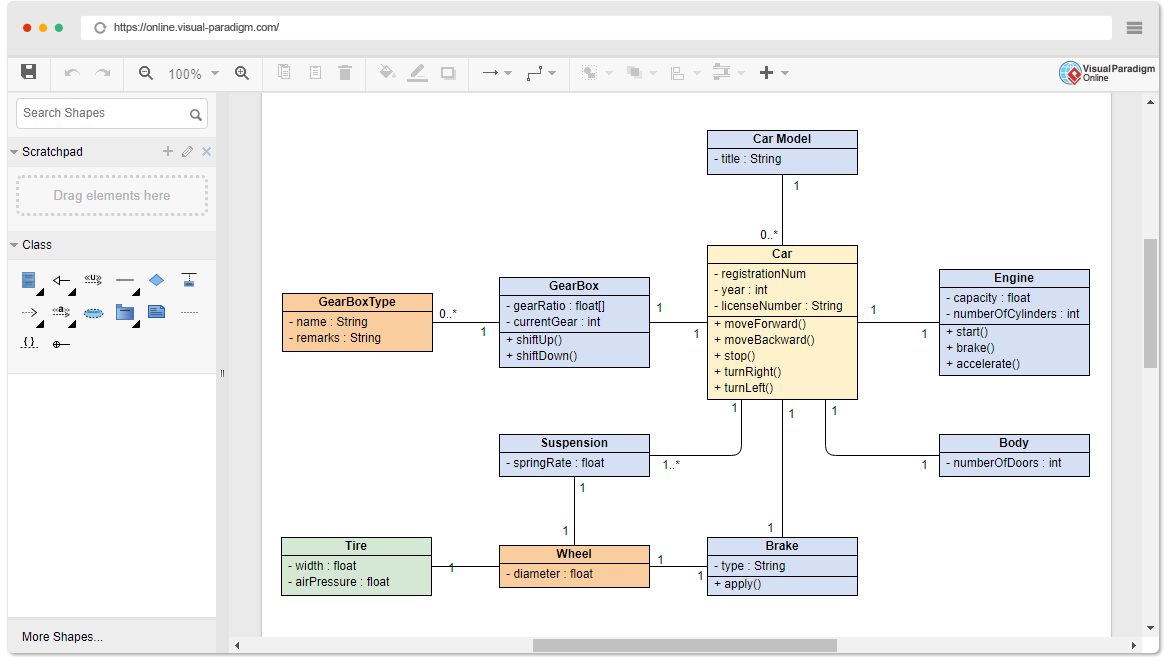
2.2 Key Strengths
Accessibility and Convenience
Absolutely Free Features:
-
Unlimited number of diagrams
-
Unlimited number of shapes
-
Unlimited accessing period
-
No advertisements
-
Multiple export formats (JPG, PNG, SVG, GIF, PDF)
Simple & Fast Interface:
-
Drag-to-create shape functionality
-
Well-attached connectors that never separate
-
Custom shape creation capabilities
-
Hundreds of diagram templates
Cross-Platform Compatibility
The online edition works seamlessly across:
-
All operating systems (Windows, Mac, Linux)
-
All modern web browsers
-
Any device with internet connectivity
Cloud-Based Advantages
Storage & Sharing:
-
Files saved to cloud workspace
-
Google Drive integration
-
Easy sharing with peers and collaborators
-
Access diagrams from anywhere
Key Features:
-
Apply different formatting options (shape and lines, solid and gradient paint)
-
40+ connector types
-
RTF caption support
-
Font options and shadow effects
-
Custom shape library creation
-
Text, notes, external images, and web links integration
-
Visio drawing and stencil import
2.3 Supported Diagram Types (Free Edition)
The Free Online Edition supports:
-
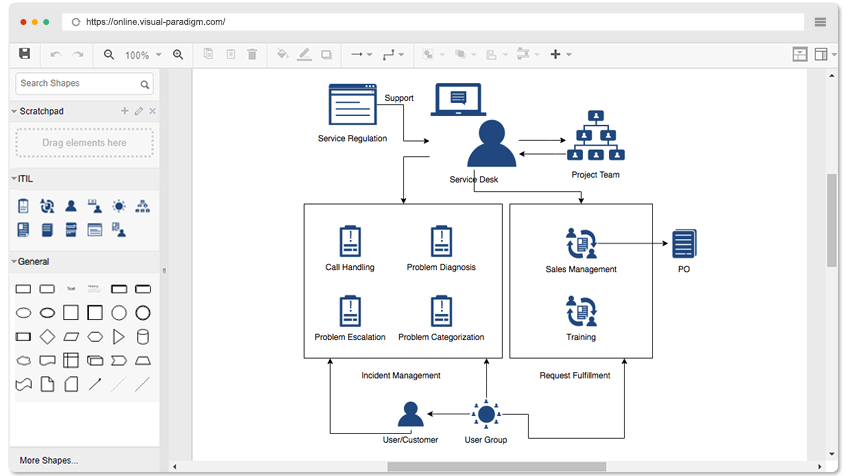
UML Diagrams: Class, Use Case, Sequence, Activity, Deployment, Component, State Machine, Package
-
ER Diagrams (ERD)
-
Organization Charts
-
Floor Plans
-
Business Concept Diagrams
-
ITIL Diagrams
2.4 Target Audience
Visual Paradigm Online Free Edition is perfect for:
-
Quick prototyping and visual mapping
-
Teams requiring easy diagram sharing
-
Users who work across multiple devices
-
Educators demonstrating concepts in classroom settings
-
Consultants creating ad-hoc diagrams for clients
-
Anyone preferring zero-installation solutions
2.5 Limitations
-
Internet Dependency: Requires active internet connection
-
Limited UML Coverage: Not all 13 UML diagram types available in free version
-
Reduced Modeling Depth: Fewer advanced modeling features compared to desktop
-
Cloud Storage Only: No offline access to diagrams
-
Browser Performance: Dependent on browser capabilities and internet speed
3. Comparative Analysis
3.1 Feature Comparison Matrix
| Feature | Community Edition (Desktop) | Free Online Edition |
|---|---|---|
| Platform | Windows, Mac, Linux (Java) | Any OS with web browser |
| Installation | Required | None (browser-based) |
| Internet Requirement | Offline capable | Always required |
| UML Diagram Types | All 13 UML 2.x diagrams | Limited selection |
| ERD Support | ✓ | ✓ |
| SysML Diagrams | ✓ (Requirement, Block Definition, Internal Block, Parametric) | ✗ |
| BPMN | ✗ | ✗ (paid only) |
| DFD | ✗ | ✗ (paid only) |
| Flowcharts | ✗ | ✗ (paid only) |
| Storage | Local files | Cloud workspace |
| Team Collaboration | ✗ | Limited (paid for full) |
| Export Formats | PNG, JPG (watermarked) | PNG, JPG, SVG, GIF, PDF |
| Printing | ✓ (watermarked) | ✓ |
| Google Drive Integration | ✗ | ✓ |
| Visio Import | ✗ | ✓ |
| Commercial Use | ✗ | ✗ |
3.2 Detailed Feature Analysis
Modeling Depth
 Desktop Edition Advantages:
The Community Edition provides true modeling capabilities beyond simple diagramming:
-
Syntax Checking: Ensures UML compliance and design correctness
-
Element Reusability: Create once, use across multiple diagrams
-
Sub-diagrams: Establish multiple levels of abstraction
-
Advanced Referencing: Link to external files and resources
Online Edition Approach:
Focuses on visual clarity and ease of use rather than deep modeling semantics, making it ideal for communication and documentation rather than rigorous system design.
Efficiency and Productivity
 Desktop Edition:
The desktop version emphasizes precision and efficiency:
-
Resource Catalog for rapid diagram creation
-
Keyboard shortcuts and advanced editing
-
Batch operations and bulk modifications
-
Customizable workspace
Online Edition:
Prioritizes simplicity and speed:
-
Drag-and-drop interface
-
Pre-built templates
-
Instant sharing capabilities
-
No learning curve for basic diagrams
Cross-Platform Considerations
 Desktop Edition:
-
Requires Java runtime environment
-
Consistent experience across platforms
-
Platform-specific optimizations
-
Local resource utilization
Online Edition:
-
True platform independence
-
No installation or updates required
-
Automatic feature updates
-
Device-agnostic access
3.3 Use Case Scenarios
Scenario 1: University Student Project
Requirements:
-
Create comprehensive UML documentation for capstone project
-
Work offline in library or dorm without reliable internet
-
Need all 13 UML diagram types
-
Budget: $0
Recommendation: Community Edition (Desktop)
Rationale: The student needs full UML compliance and offline access. The watermark is acceptable for academic work, and the comprehensive feature set supports complex system design.
Scenario 2: Startup Team Brainstorming
Requirements:
-
Quick diagram creation during meetings
-
Share diagrams with remote team members
-
Access from multiple devices (office, home, mobile)
-
Collaborate in real-time
Recommendation: Visual Paradigm Online
Rationale: Cloud-based access and easy sharing outweigh the need for advanced modeling features. The team can quickly create and iterate on ideas without installation barriers.
Scenario 3: Independent Researcher
Requirements:
-
Document software architecture for publication
-
Work in environments with limited internet
-
Create detailed, publication-quality diagrams
-
Long-term project spanning months
Recommendation: Community Edition (Desktop)
Rationale: Offline capability, comprehensive modeling features, and local file storage suit long-term research work. Diagrams can be refined over time without internet dependency.
Scenario 4: Business Analyst (Non-Commercial)
Requirements:
-
Create process diagrams for volunteer organization
-
Present to stakeholders in meetings
-
Need professional appearance
-
Occasional use, not daily
Recommendation: Visual Paradigm Online
Rationale: The variety of diagram types (Org Charts, Business Concept, ITIL) and professional output formats (PDF, SVG) meet presentation needs without software installation.
4. Industry Adoption and Trust
4.1 Enterprise Credibility
Visual Paradigm has gained widespread adoption among blue-chip organizations, IT companies, consultants, universities, NGOs, and government units worldwide.

This enterprise-level trust validates the quality and reliability of both free editions, as they share the same core technology as the paid versions used by major corporations.
4.2 Global Reach
With over 1 million installations globally and continuous growth, Visual Paradigm has established itself as the “#1 FREE UML Tool” in the market. This widespread adoption creates:
-
Extensive community support
-
Rich documentation and tutorials
-
Active user forums
-
Regular updates and improvements
5. Upgrade Path Considerations
Both editions offer clear upgrade paths to paid versions for users whose needs evolve:
Community Edition → Modeler Edition ($6/month)
Additional Features:
-
BPMN (Business Process Modeling Notation)
-
Data Flow Diagrams (DFD)
-
Flowchart maker
-
Team collaboration (Cloud/On-Premises)
-
Diagram review and commenting
-
Task management
-
Project glossary management
-
Textual Analysis
-
EPC diagrams
-
Process Overview diagrams
-
Organization charts
-
Network diagrams
-
Rack diagrams
-
Venn diagrams
-
Floor plan maker
-
No watermark on exports and prints
-
Commercial use permitted
Online Free → Online Paid Editions
Additional Features:
-
More diagram types (BPMN, Mind Map, ArchiMate, etc.)
-
Advanced collaboration tools
-
Increased storage capacity
-
Priority support
-
No watermarks
-
Commercial licensing
6. Decision Framework
Choose Community Edition (Desktop) If:
✓ You need all 13 UML 2.x diagram types
✓ You require offline access to your work
✓ You’re working on complex system design requiring syntax checking
✓ You need element reusability across multiple diagrams
✓ You prefer local file storage and control
✓ You’re a student or educator working on academic projects
✓ You need SysML diagrams (Requirement, Block Definition, etc.)
✓ Internet connectivity is unreliable or unavailable
Choose Visual Paradigm Online (Free) If:
✓ You prioritize ease of access from any device
✓ You need to share diagrams quickly with others
✓ You prefer zero installation solutions
✓ You work primarily with standard UML diagrams (Class, Use Case, Sequence)
✓ You value cloud storage and automatic backup
✓ You need multiple export formats (SVG, GIF, PDF)
✓ You want Google Drive integration
✓ You create ad-hoc diagrams for presentations or documentation
✓ You work in a team environment requiring easy collaboration
7. Technical Considerations
7.1 Performance Factors
Desktop Edition:
-
Pros: Utilizes local hardware resources, no browser limitations, faster for large diagrams
-
Cons: Requires sufficient local storage, platform-specific performance variations
Online Edition:
-
Pros: No local resource consumption, automatic scaling
-
Cons: Dependent on internet speed, browser performance limitations, potential latency
7.2 Security and Privacy
Desktop Edition:
-
Files stored locally with user-controlled security
-
No cloud exposure of sensitive designs
-
Suitable for confidential projects (non-commercial)
Online Edition:
-
Cloud storage with Visual Paradigm’s security measures
-
Data transmission over internet (HTTPS)
-
Google Drive integration adds another layer of cloud storage
7.3 Backup and Recovery
Desktop Edition:
-
User responsible for backup strategy
-
Can use external drives, cloud sync services manually
-
No automatic version history
Online Edition:
-
Automatic cloud backup
-
Google Drive integration provides additional backup
-
Version history depends on cloud service
8. Learning Curve and Support
8.1 Ease of Learning
Desktop Edition:
-
Moderate learning curve for advanced features
-
Comprehensive feature set requires time to master
-
Professional-grade tools demand understanding of UML semantics
-
Extensive documentation and tutorials available
Online Edition:
-
Minimal learning curve
-
Intuitive drag-and-drop interface
-
Immediate productivity for basic diagrams
-
Template-driven approach accelerates learning
8.2 Community and Support
Both editions benefit from:
-
Large user community (1+ million users)
-
Online documentation and tutorials
-
Active forums and user groups
-
Regular software updates
-
Educational resources for students and educators
Conclusion
Visual Paradigm’s dual approach to providing free UML tools demonstrates a deep understanding of diverse user needs in the modeling community. Neither the Community Edition nor the Online Free Edition is universally superior; rather, each excels in different contexts and serves distinct user profiles.
The Community Edition (Desktop) stands as the choice for serious modelers who require comprehensive UML 2.x compliance, offline accessibility, and advanced modeling features. It is particularly well-suited for academic environments, research projects, and individuals who value the depth of true modeling capabilities over convenience. The watermark limitation is a small price to pay for access to professional-grade tools that rival commercial solutions costing hundreds of dollars.
Visual Paradigm Online (Free Edition) represents the modern, cloud-first approach to diagramming, prioritizing accessibility, collaboration, and ease of use. It serves users who need to create professional diagrams quickly, share them effortlessly, and access their work from anywhere. While it sacrifices some modeling depth and offline capability, it gains tremendous convenience and cross-platform flexibility.
The Bottom Line:
For students, educators, and researchers working on complex projects requiring full UML compliance, the Community Edition is the clear winner. Its comprehensive feature set, offline capability, and true modeling tools provide everything needed for rigorous system design and analysis.
For professionals, consultants, and teams who need to create and share diagrams quickly across multiple devices, Visual Paradigm Online offers unmatched convenience and accessibility without compromising on quality.
Looking Forward:
Both editions serve as excellent entry points into the Visual Paradigm ecosystem, with clear upgrade paths to paid versions when commercial use or advanced features become necessary. The existence of these robust free editions democratizes access to professional modeling tools, enabling anyone with a computer and internet connection (for Online) or just a computer (for Desktop) to engage in professional-grade system design and documentation.
Ultimately, the choice between these two excellent free tools depends not on which is “better,” but on which better aligns with your specific workflow, technical requirements, and project goals. Users are even encouraged to try both, as they can complement each other in different phases of a project—using the Desktop edition for deep design work and the Online edition for quick sharing and collaboration.
Recommendations
-
For Educational Institutions: Deploy Community Edition on lab computers for comprehensive UML education while recommending Online Edition for remote learning and collaboration.
-
For Individual Learners: Start with Online Edition for quick familiarization with UML concepts, then graduate to Community Edition for deeper understanding and complex projects.
-
For Project Teams: Use Community Edition for core architecture design and Online Edition for stakeholder communication and documentation sharing.
-
For Long-term Projects: Maintain primary work in Community Edition for offline security while using Online Edition for periodic reviews and collaboration.
-
For Portfolio Development: Create detailed models in Community Edition and produce presentation-ready diagrams using Online Edition’s superior export options.
The availability of both options ensures that financial constraints never stand in the way of quality software modeling education and practice—a testament to Visual Paradigm’s commitment to the broader software development community.
References
- Comprehensive Case Study of Visual Paradigm’s Free UML Modeling Tiers: This article provides a detailed overview of the free tiers available for non-commercial use, explaining the limitations and features of Visual Paradigm’s UML modeling tools for educational and personal projects.
- Visual Paradigm UML Tool Solution: An overview of Visual Paradigm’s comprehensive UML tool solution, highlighting its capabilities for system modeling, diagram creation, and integration with development workflows.
- Exploring Visual Paradigm Online Diagramming Tool: A Comprehensive Guide to System Modeling Diagrams: A blog post guide that explores the online diagramming capabilities, focusing on how to create various system modeling diagrams using Visual Paradigm’s cloud-based tools.
- Visual Paradigm Ecosystem: AI-Supported UML Diagram Features: An analysis of how AI supports UML diagram features within the Visual Paradigm ecosystem, enhancing automation and accuracy in diagram creation.
- Visual Paradigm Online UML Tool Features: A detailed list of features available in the online UML tool, including collaboration, real-time editing, and support for various UML diagram types.
- Visual Paradigm Community Edition: Information about the Community Edition of Visual Paradigm, detailing its availability for students, educators, and individual users for non-commercial use.
- Visual Paradigm Features Overview: A general overview of the key features offered by Visual Paradigm, including requirements management, UML modeling, BPMN, and Agile planning tools.
- Matrix Diagram Guide: A user guide section explaining how to create and use Matrix diagrams in Visual Paradigm for analyzing relationships between data sets.
- Overview of the 14 UML Diagram Types: A comprehensive guide to the 14 standard UML diagram types, explaining their purposes and when to use each type in software design.
- Visual Paradigm Gallery: A showcase of diagrams and models created by users and professionals using Visual Paradigm, providing inspiration and best practices.
- Visual Paradigm Forum Documentation PDF: A PDF document from the Visual Paradigm forums, likely containing community-contributed tips, troubleshooting guides, or advanced modeling techniques.
- Visual Paradigm Free UML Design Tool: An introduction to the free UML design tool provided by Visual Paradigm, suitable for beginners and students looking to learn UML without cost.
