


Introduction
In today’s globalized tech industry, collaboration often crosses borders. You might be a developer in Berlin working with a product manager in Tokyo, or a system architect in São Paulo documenting processes for stakeholders in Paris. While code is universal, the documentation surrounding it—especially diagrams—is not.
For non-native English speakers or teams operating in multilingual environments, creating and maintaining architectural diagrams can be a significant hurdle. Traditionally, translating a diagram meant manually editing every label, title, and comment within the code. This process is not only time-consuming but also prone to errors. One misplaced bracket or forgotten quote mark while swapping text strings can break the entire diagram syntax, leading to frustration and wasted hours.
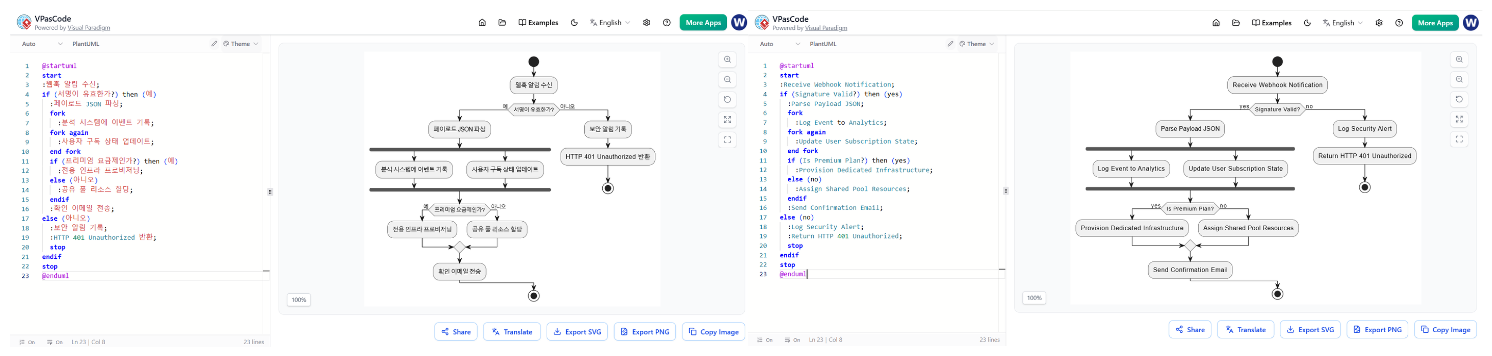
This case study explores how VPasCode, Visual Paradigm’s new diagram-as-code platform, solves this problem with its groundbreaking AI Diagram Translation feature. Designed with beginners and experienced users alike in mind, this tool allows you to translate your PlantUML, Mermaid, or Graphviz diagrams into any supported language with just two clicks, keeping your structural syntax perfectly intact. Whether you are new to diagram-as-code or a seasoned professional, this guide will show you how to streamline your global collaborations effortlessly.
The Challenge: Manual Translation is Tedious and Error-Prone
Imagine you have created a complex flowchart using PlantUML to explain a webhook notification process. The code looks something like this:
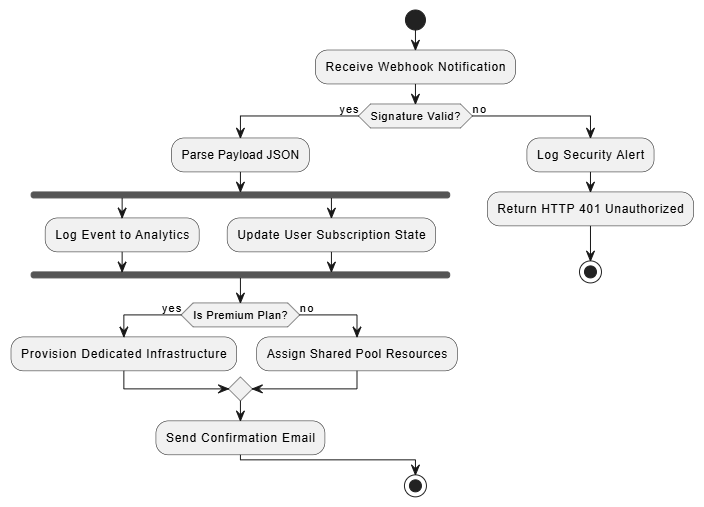
@startuml
start
:Receive Webhook Notification;
if (Signature Valid?) then (yes)
  :Parse Payload JSON;
  fork
    :Log Event to Analytics;
  fork again
    :Update User Subscription State;
  end fork
  if (Is Premium Plan?) then (yes)
    :Provision Dedicated Infrastructure;
  else (no)
    :Assign Shared Pool Resources;
  endif
  :Send Confirmation Email;
else (no)
  :Log Security Alert;
  :Return HTTP 401 Unauthorized;
  stop
endif
stop
@enduml
Now, imagine you need to present this same diagram to a team that primarily speaks Spanish. In the past, you would have to manually change “Receive Webhook Notification” to “Recibir Notificación de Webhook,” “Signature Valid?” to “¿Firma Válida?,” and so on. If you miss a semicolon or misplace a parenthesis during this edit, the diagram fails to render. For beginners, this syntactic fragility is a major barrier to adopting diagram-as-code tools.
The Solution: AI Diagram Translation in VPasCode
VPasCode introduces an AI-powered translation engine built directly into its core interface. This feature understands the difference between the structure of your diagram (the syntax that makes it work) and the content (the labels and text that humans read). It translates only the content, leaving the syntax untouched.
How It Works: Translate in 2 Easy Steps
The engineering team at Visual Paradigm has prioritized simplicity. You don’t need to install plugins, write scripts, or understand API keys. Here is how it works:
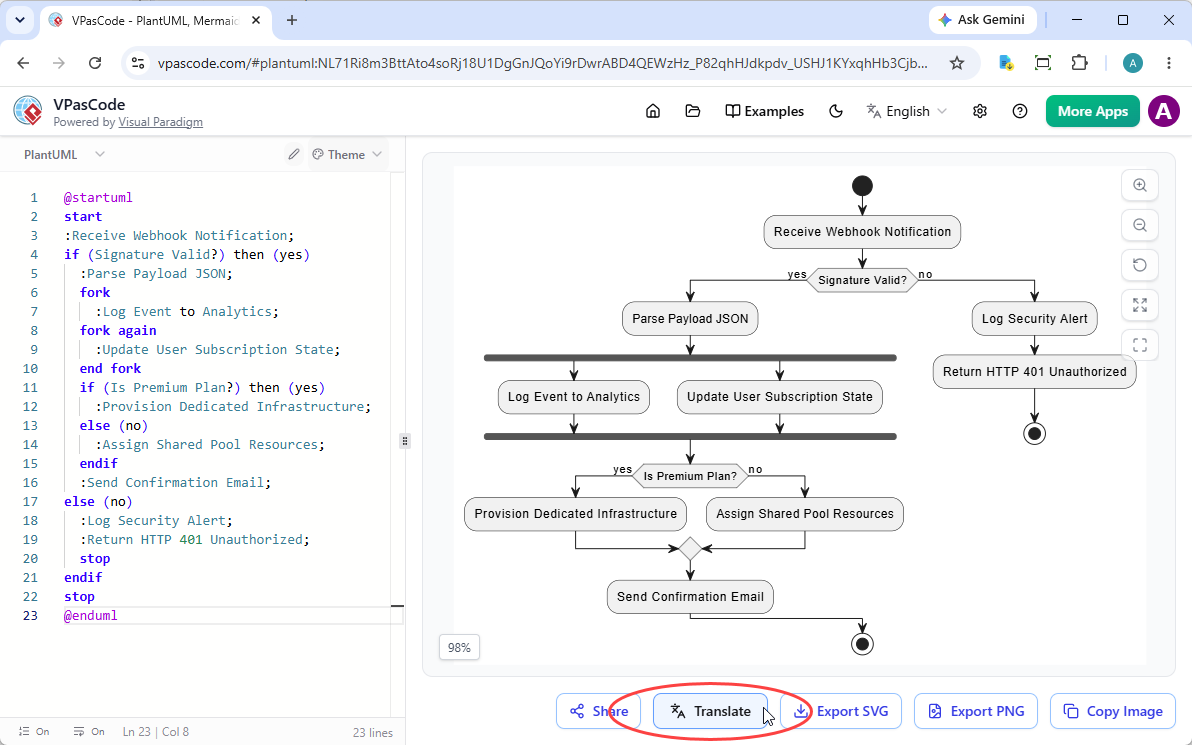
Step 1: Click the Translate Button
Once you have loaded your diagram script into the VPasCode editor, look at the right side of the screen below the diagram viewer. You will see a row of action buttons. The first is the Share button. The second is the Translate button, marked with an intuitive translation icon. Simply click on it to begin processing your active diagram script.
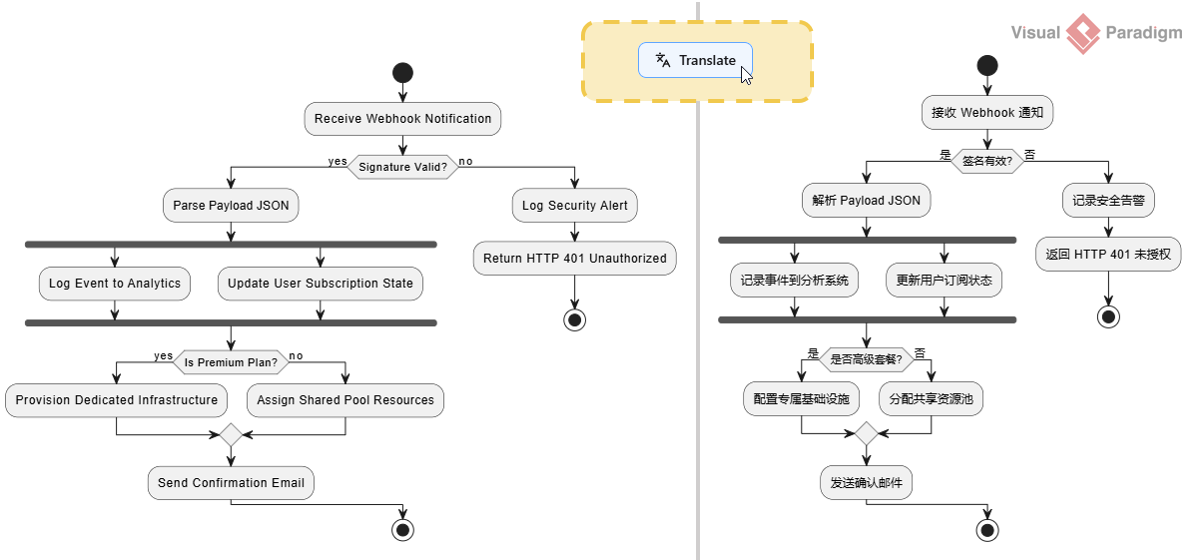
Step 2: Choose Your Target Language
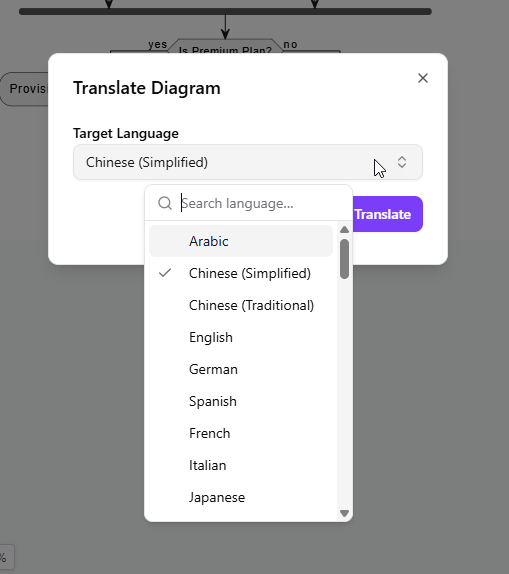
After clicking the button, a modal window appears. Here, you select your Target Language from a comprehensive dropdown list. VPasCode supports a wide range of languages, including Arabic, Chinese, English, German, Spanish, French, Italian, Japanese, and many more. Once you’ve made your selection, click the “Translate” button to confirm.
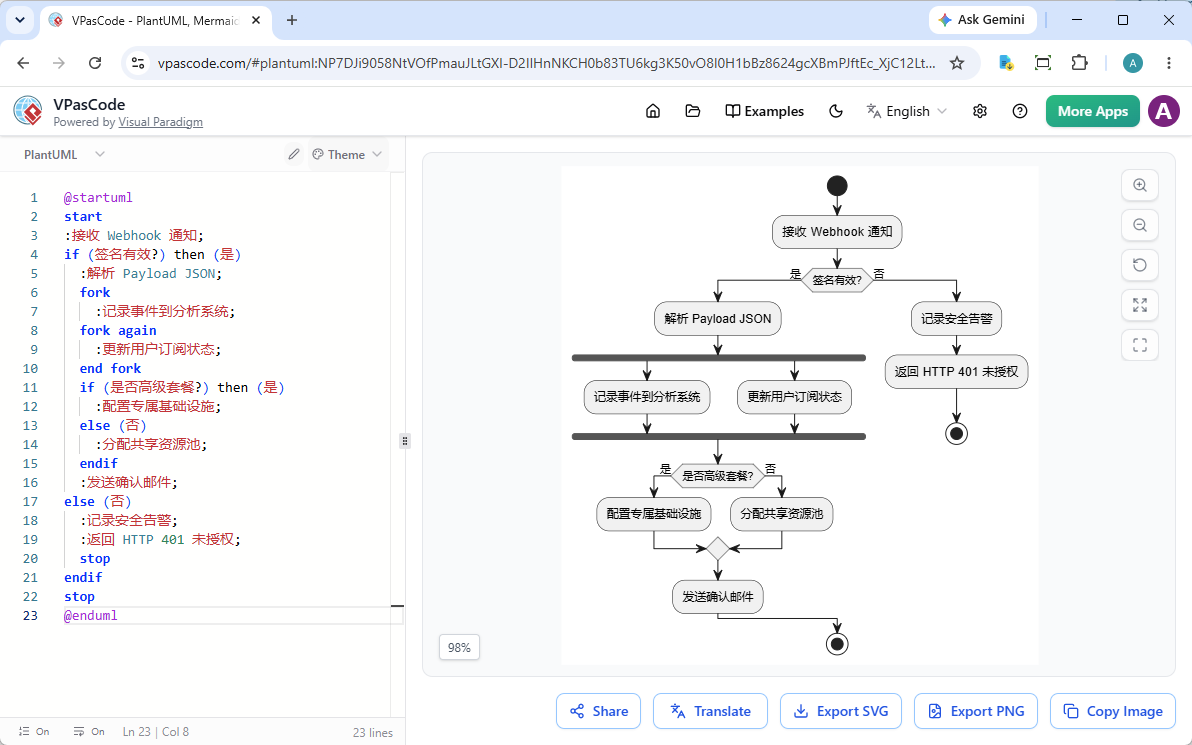
Instantly, the AI gets to work. The underlying code modifies itself to reflect the new language, and the real-time preview renderer updates your diagram on the fly. You can immediately see the translated labels and titles in your chosen language, ready for presentation or documentation.
Why This Matters for Beginners and Global Teams
For beginners, the biggest advantage is confidence. You no longer need to worry about breaking your diagram while trying to make it accessible to others. The AI handles the heavy lifting, ensuring that your syntax remains valid.
For global teams, the benefit is speed and consistency. Instead of spending hours manually rewriting code elements, you can localize entire documentation sets in seconds. This is particularly useful for:
-
Presenting application architecture diagrams to international engineering teams.
-
Localizing business process flowcharts for regional stakeholders.
-
Creating multi-lingual training materials without maintaining separate codebases.
Feature Availability
AI Diagram Translation is a premium capability designed to supercharge professional workflows. It is available as a paid feature within the following packages:
-
Visual Paradigm Online Combo Edition (or higher).
-
Visual Paradigm Desktop Professional Edition (or higher) with an active maintenance plan.
Pro-Tip for Desktop Users: If you are a Visual Paradigm Professional Edition (or higher) user with active maintenance, you are automatically granted full access to the web apps of VP Online Combo Edition. This means you can log right into VPasCode and start using the AI Translation feature today at no extra cost!
Try It Yourself
You don’t have to take our word for it. You can try the AI Translation tool right now by visiting vpascode.com. Log in to your Visual Paradigm account, load your diagram script, and click the Translate button.
You can also experiment with the example used in this article by clicking the Edit button below to open the PlantUML code in VPasCode:
Conclusion
Language barriers should never hinder technical collaboration. With VPasCode’s AI Diagram Translation, Visual Paradigm has removed one of the most tedious aspects of creating multi-lingual documentation. By automating the translation of labels, titles, and comments while preserving the integrity of your diagram code, VPasCode empowers beginners and experts alike to communicate their ideas clearly across borders.
Whether you are documenting a simple workflow or a complex microservices architecture, this feature ensures that your diagrams are as accessible as they are accurate. Stop spending hours on manual edits and start leveraging AI to break down language barriers natively. Log in to VPasCode today and experience the future of diagram-as-code collaboration.
Reference
- Comprehensive Guide to VPasCode by Visual Paradigm: A detailed overview of VPasCode features, including syntax handling and AI integration.
- Introducing VPasCode: The Ultimate Unified Text-to-Diagram Platform: Official release notes introducing VPasCode and its core capabilities.
- Clarity by Design: Streamlining Infrastructure Documentation with VPasCode and Graphviz: A guide on using VPasCode for infrastructure documentation with Graphviz support.
- Mastering VPasCode: The Ultimate Guide to AI-Powered Diagram as Code with Multi-Engine Support: An advanced guide covering AI features and multi-engine support in VPasCode.
- How the Visual Paradigm AI Chatbot and VPasCode Function as an Integrated Ecosystem for Diagramming: Insights into the integration between VPasCode and Visual Paradigm’s AI chatbot.
- VPasCode Features Overview: A summary of key features offered by VPasCode.
- Break Language Barriers Natively with VPasCode’s New AI Diagram Translation: Release notes on AI-driven diagram translation capabilities.
- Case Study: Accelerating Software Architecture Documentation with VPasCode – A Diagram as Code Revolution: A real-world case study demonstrating the impact of VPasCode on software architecture documentation.
