


Introduction
In the fast-paced world of enterprise architecture and agile development, documentation often becomes the bottleneck. Product managers, system architects, and business analysts frequently find themselves trapped in a cycle of manual exports, screenshot captures, and version control nightmares. The disconnect between dynamic modeling tools and static documentation platforms creates “documentation debt”—a growing gap between the actual state of a system and its recorded description.
This case study explores how Visual Paradigm’s new integration between Visual Paradigm Desktop and OpenDocs addresses this critical pain point. By introducing the Pipeline—a secure, cloud-based asset transit hub—Visual Paradigm promises a seamless “Concept-to-Docs” workflow. This review examines the practical application of this integration, evaluating its ability to eliminate friction, maintain vector-quality editability, and ensure that living documentation evolves in sync with complex system models.
What Is Visual Paradigm OpenDocs?
OpenDocs is not merely another documentation tool; it is a specialized knowledge management platform engineered for teams whose work revolves around diagrams. Unlike conventional platforms such as Confluence or Google Docs, OpenDocs offers native integration with a robust diagram editor. This allows users to insert diagrams into pages and, crucially, re-edit them later without ever leaving the document environment.
With the new support for exports from Visual Paradigm Desktop, OpenDocs has evolved into a central hub for professional modeling and documentation needs. This capability is particularly valuable for enterprise architects, business analysts, and development teams who require living documentation that evolves alongside their systems.
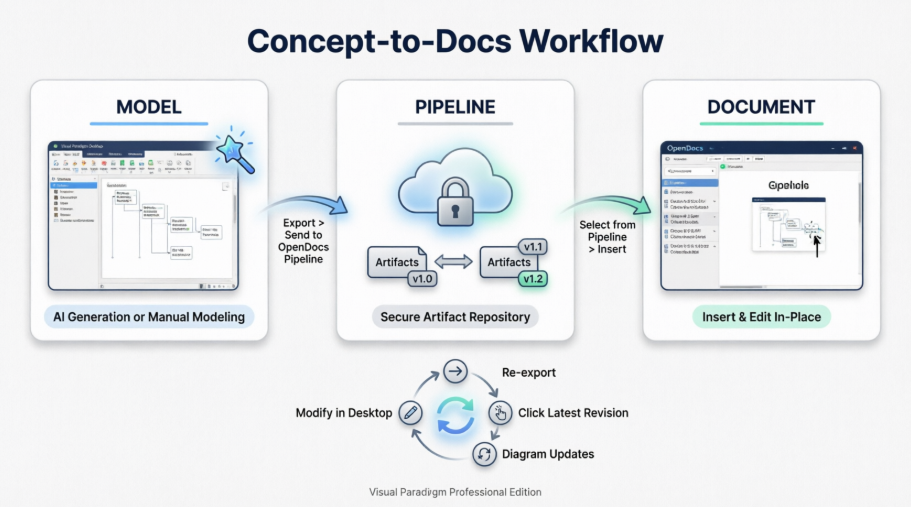
Understanding the Pipeline: The Connective Tissue
Before diving into the operational workflows, it is essential to understand the Pipeline. Think of it as a secure, centralized repository for “artifacts”—all the assets created across the Visual Paradigm ecosystem. Since Visual Paradigm tools cover everything from enterprise architecture to agile development, the Pipeline serves as the essential bridge to hold and transfer these artifacts.
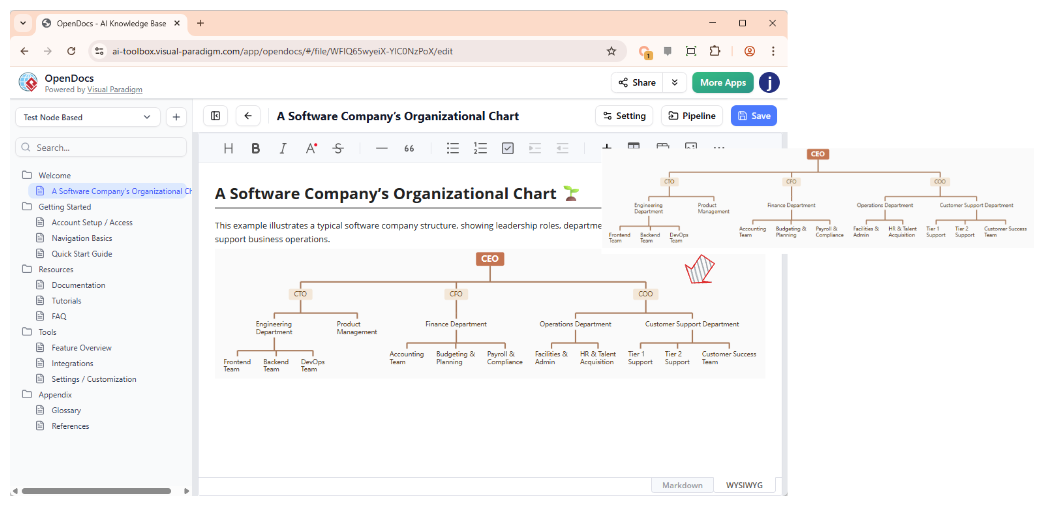
The core purpose of the Pipeline is to serve as a secure, cloud-based asset transit hub. It eliminates the friction of traditional documentation workflows by establishing a unified, automated pipeline that turns complex diagrams into synchronized documentation assets. The beauty of this system is that it allows the output from one tool (such as an AI-generated UML diagram) to become the input for another (such as a technical manual in OpenDocs). It is this seamless handoff that makes the integration so powerful.
Core Purpose & Business Value
-
Single Source of Truth: Centralizes visual assets so that all engineering, architecture, and business teams work from identical data.
-
Eliminates Documentation Debt: Replaces static, quickly outdated manual copy-pasting with a live, continuous link between design tools and knowledge bases.
-
Preserves Editability: Embedded graphics remain vector-quality and fully editable at their source rather than turning into flat, unalterable images.
My Workflow: Exporting Diagrams from Desktop to OpenDocs
Whether you have created your diagram manually or used Visual Paradigm’s AI generation tool, the export process to your documentation is refreshingly simple. Here is how the workflow operates in practice:
Step 1: Prepare Your Diagram
In Visual Paradigm Desktop, open the diagram you wish to send. In this case study, the subject was a use case diagram for a customer management system that had been modeled extensively.
Step 2: Initiate the Export
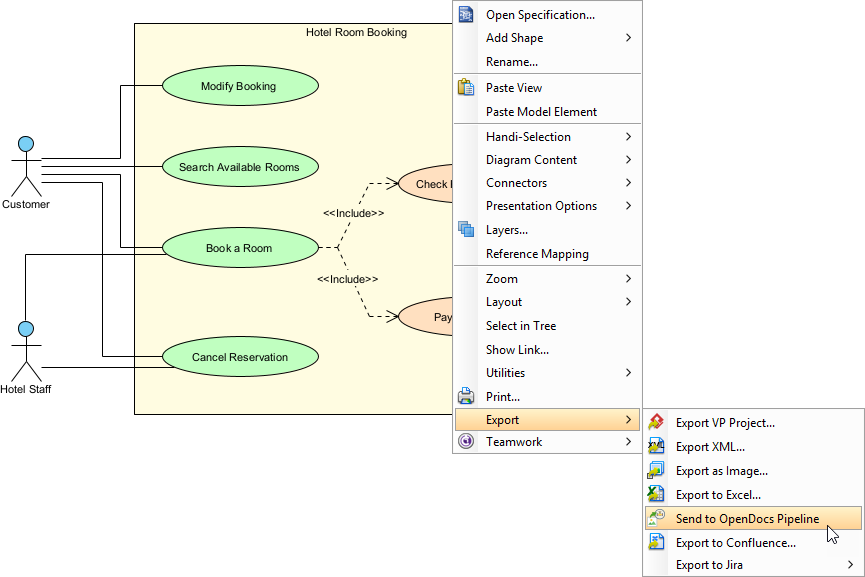
Right-click on the diagram and select Export > Send to OpenDocs Pipeline from the popup menu.
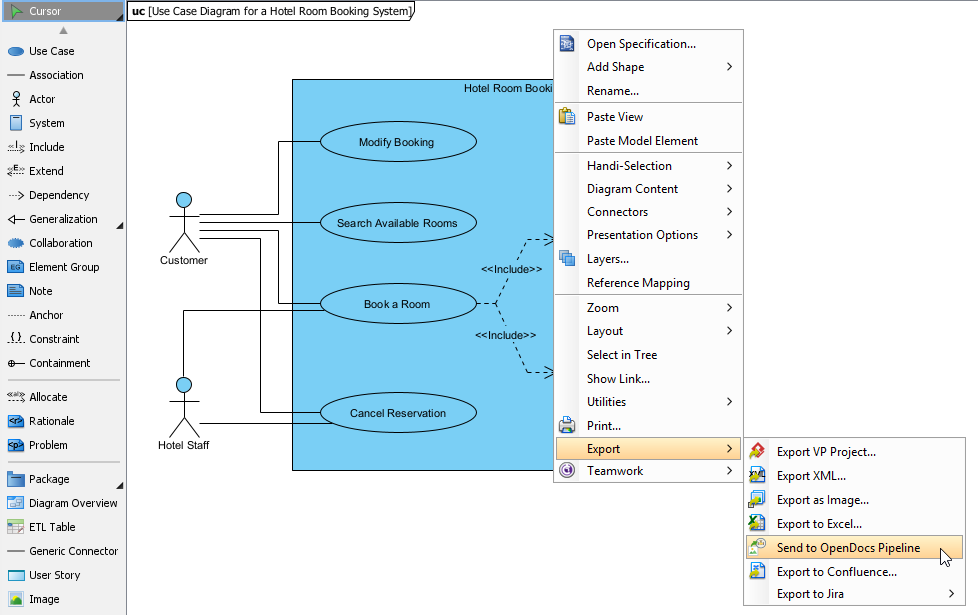
Step 3: Save and Add Context
When prompted, save the project by clicking OK. The system then provides an optional field to enter a comment. This comment appears in the Pipeline pane within OpenDocs and helps identify the version or purpose of the artifact. Using this feature is highly recommended for future reference.
Step 4: Confirm and Upload
Confirm the export, and the diagram is uploaded to the cloud. The entire process takes less than 30 seconds.
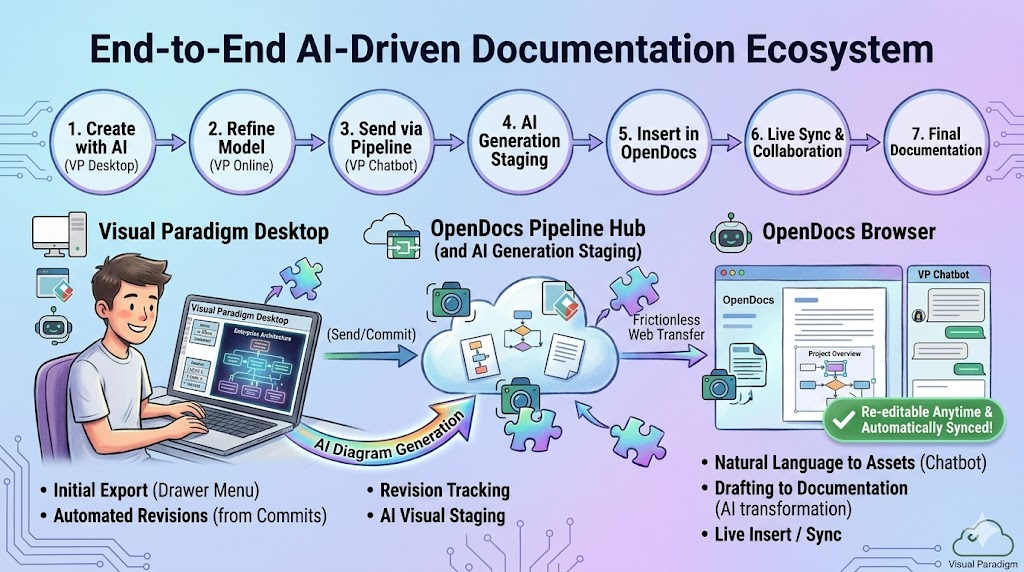
Inserting Artifacts Into Your Documentation
Once your diagram lands in the Pipeline, placing it in your knowledge base is straightforward:
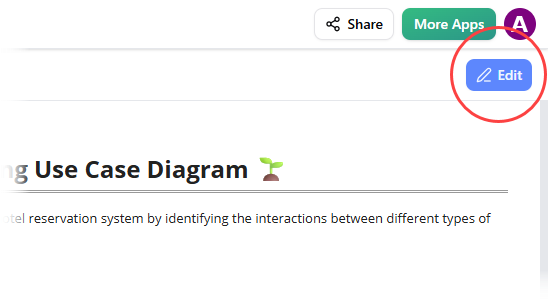
Step 1: Enter Edit Mode
Open the document page in OpenDocs and click the Edit button at the top right.
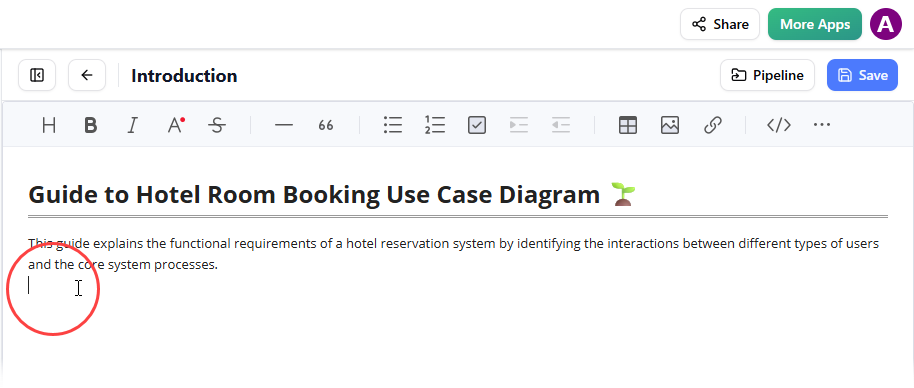
Step 2: Position Your Cursor
Click on the exact spot in the page where you want the diagram to appear.
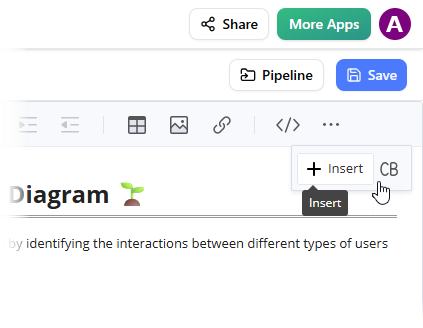
Step 3: Access the Insert Menu
On the toolbar, click Insert to open the insertion options.
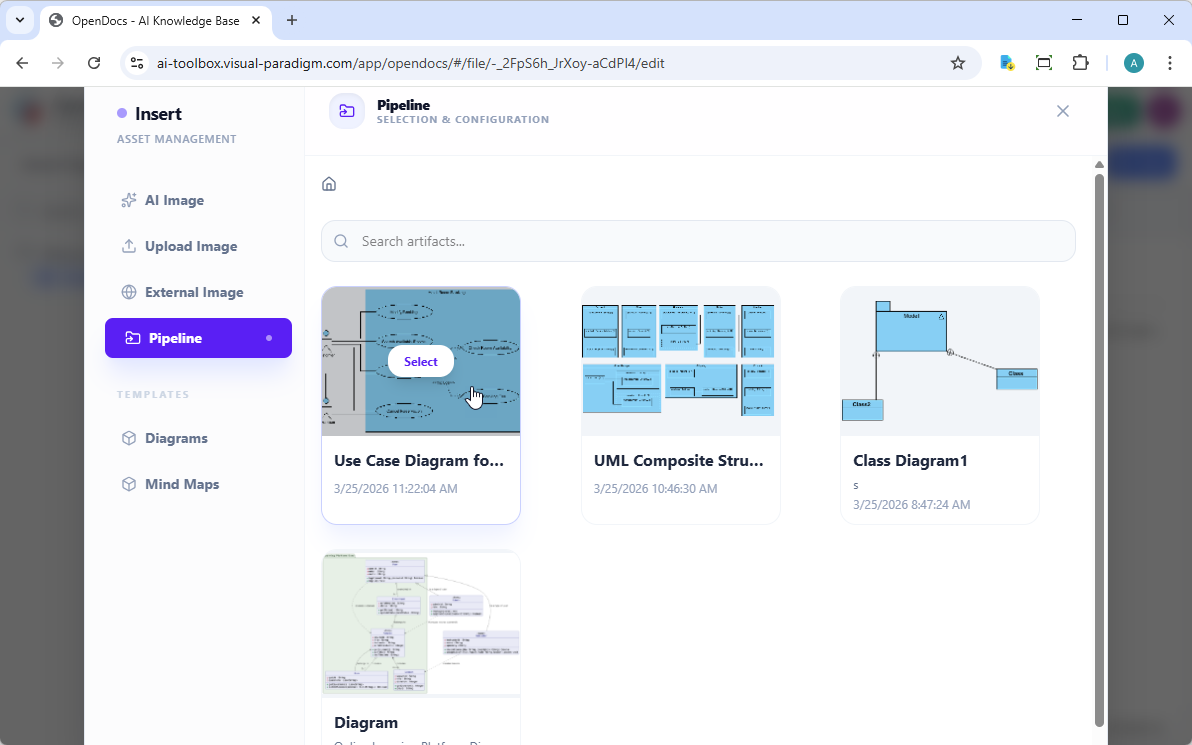
Step 4: Select from Pipeline
In the Insert window, select Pipeline from the left-hand sidebar. All sent diagrams appear here, ready for use.
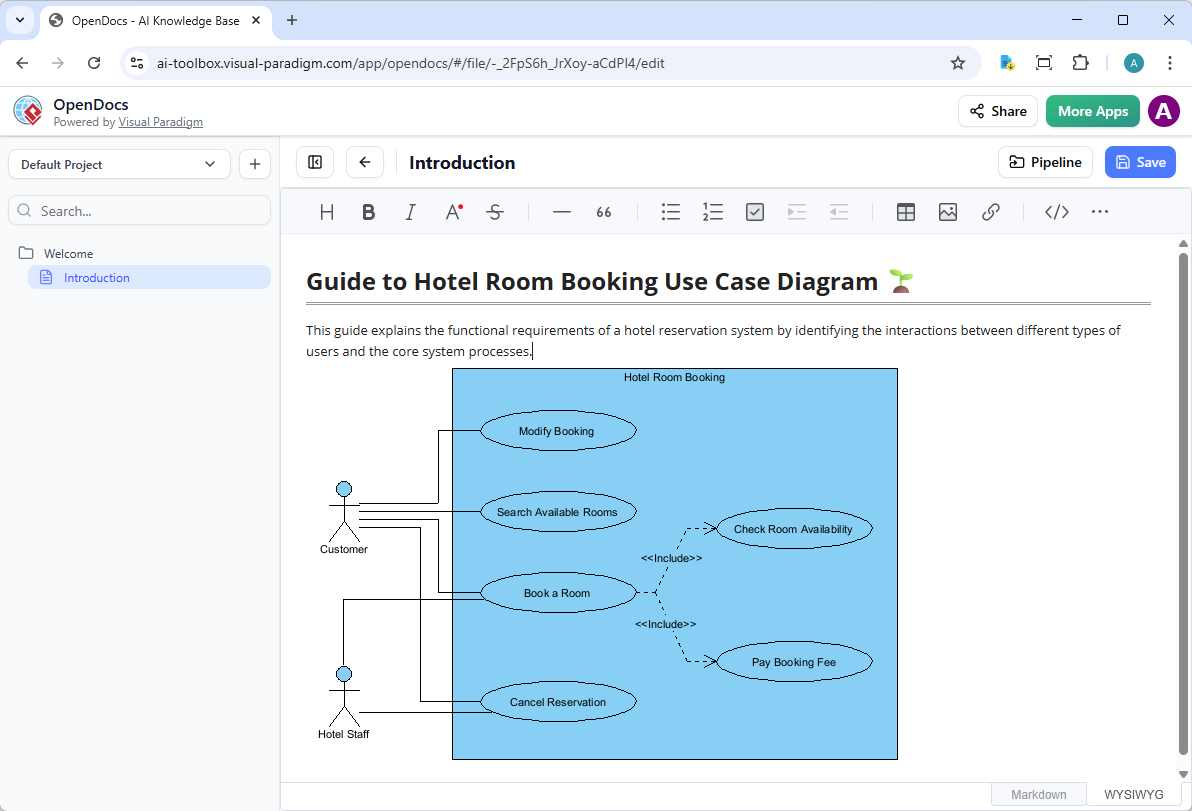
Step 5: Insert the Diagram
Click on the desired diagram, and it is inserted directly at the cursor position. The image quality is crisp, and the diagram remains fully interactive.
The Game-Changer: Keeping Documentation in Sync
Documentation is never static, and neither are models. The ability to update documentation as models evolve without starting from scratch is invaluable. Here is the process for keeping everything synchronized:
Step 1: Open the Source Diagram
In OpenDocs, click the Edit icon at the top right of the diagram image to open the Edit Diagram window.
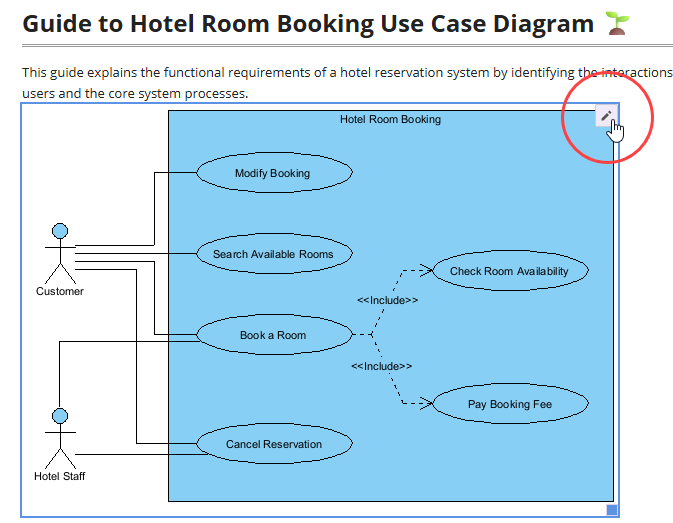
Copy the provided diagram link. Back in Visual Paradigm Desktop, go to Project > Open, paste the link, and the software opens the source model automatically. If the project is already open, this step can be skipped.
Step 2: Edit and Re-send
Make modifications to the diagram in Visual Paradigm Desktop. Once finished, right-click the diagram and select Export > Send to OpenDocs Pipeline again. Alternatively, committing changes to VP Online automatically creates a new revision of the artifact.
Step 3: Swap to the Latest Revision
Back in the OpenDocs editor, click Pipeline at the top right to access the artifact manager.
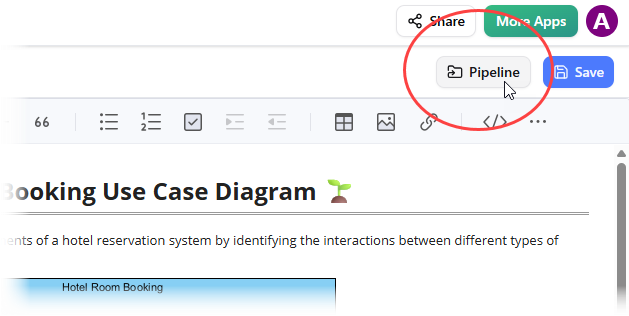
All artifacts currently used on that page are visible. Selecting the diagram reveals a list of revisions. With a single click on the latest revision, the old diagram is instantly swapped for the updated version.
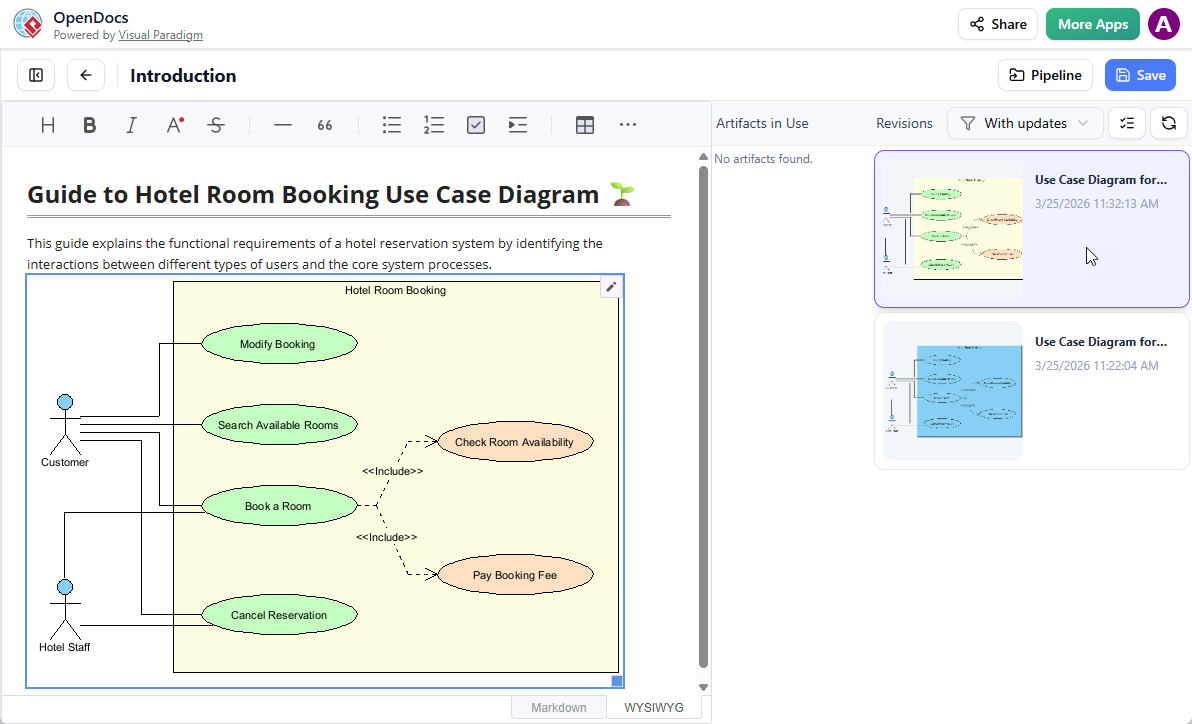
Detailed Usage & Integration Workflows
The Pipeline acts as a bidirectional bridge that connects separate environments across the Visual Paradigm Ecosystem:
[ VP Desktop / VP Online / AI Chatbot ] ──(Send/Commit)──> [ OpenDocs Pipeline Hub ] ──(Insert/Sync)──> [ Live OpenDocs Pages ]
1. Visual Paradigm Desktop ➔ OpenDocs Workflow
Designed for heavy-duty system architects, developers, and enterprise modelers who build complex engineering charts.
-
Initial Export: Users open a diagram inside the desktop app, slide out the right-hand utility drawer, and click “Send to OpenDocs Pipeline”.
-
Automated Continuous Revisions: After that initial manual push, the Pipeline hooks into the project repository. Every subsequent project commit in the desktop application automatically pushes a new, tracked revision to the cloud pipeline without further user intervention.
2. Visual Paradigm Online ➔ OpenDocs Workflow
Tailored for web-first agile teams collaborating live on business process mapping, flowcharts, or infographics.
-
Frictionless Web Transfer: While collaborating on the cloud canvas, users click Export ➔ “Send to OpenDocs Pipeline”.
-
Real-time Asset Capture: The latest cloud canvas configuration is immediate, bypassing the need to download local image formats or rely on shared folders.
3. AI Chatbot ➔ OpenDocs Workflow
Built for rapid concept discovery, brainstorming, and instantly generating technical assets via natural language text prompts.
-
Instant Visual Staging: Once the integrated AI chatbot outputs a flowchart, UML structure, or mind map, clicking Export to Pipeline saves it instantly.
-
Drafting to Documentation: The AI generation transforms from a quick chat message response into a structured, production-ready asset available for official document deployment.
Operational Features Inside OpenDocs
Once assets arrive in the central hub, users manage and display them using built-in document controls:
-
Inline Insertion: Technical writers open a page in Visual Paradigm OpenDocs, enter edit mode, click Insert, select Pipeline, and instantly place the visual artifact wherever their cursor sits.
-
Change Synchronization Alerts: If an architect edits an underlying model in the desktop application, a clear Update Indicator flags the change inside the OpenDocs panel. Document managers can review the fresh design changes and sync the text page to the live schema with a single click.
-
Granular Version Control: Every artifact transmission tracks contextual notes (e.g., “v2.1 – Updated authentication flow”). Teams can view chronological change logs, compare revisions side-by-side, or explicitly choose to stick to an older historical revision if a project document requires it.
Honest Review: The Good, The Great, and The Considerations
What I Loved
1. Time Savings: What used to take 15-20 minutes (export, upload, replace, reformat) now takes under a minute. Over a project lifecycle, this adds up to hours saved.
2. Version Control: The revision system in the Pipeline is intuitive. Users can see the history of changes and roll back if needed, which prevents embarrassing documentation errors.
3. AI Integration: Using Visual Paradigm’s AI diagram generation to quickly prototype, then sending directly to OpenDocs for stakeholder review, has streamlined initial design phases significantly.
4. No Quality Loss: Unlike screenshot workflows, the diagrams maintain their vector quality and remain editable. This is crucial for professional documentation.
Areas for Improvement
1. Learning Curve: While the workflow is logical, team members unfamiliar with Visual Paradigm’s ecosystem needed about a week to become comfortable with the Pipeline concept.
2. Professional Edition Requirement: This feature is only available to Visual Paradigm Professional Edition users and above, which may be a barrier for smaller teams or individual consultants.
3. Internet Dependency: Since this is cloud-based, a stable internet connection is required. Offline work requires a different workflow.
Who Should Use This?
This integration is ideal for:
-
Enterprise architecture teams maintaining living documentation
-
Agile development teams who need to keep technical specs current
-
Business analysts creating process documentation
-
Consultants delivering professional modeling artifacts to clients
Conclusion
After several weeks of daily use, it is evident that Visual Paradigm’s Desktop-to-OpenDocs integration delivers on its promise to bridge the gap between modeling and documentation. The “Concept-to-Docs” workflow is not just a marketing slogan—it is a genuine productivity enhancer that eliminates the manual friction that has plagued modelers for years.
The ability to use AI diagram generation, refine models professionally, and send them directly to a knowledge management platform with full editability and version control is transformative. While the Professional Edition requirement may limit accessibility for some users, for teams already invested in the Visual Paradigm ecosystem, this integration is a no-brainer.
Documentation is now more accurate, more current, and takes less time to maintain. In a world where technical debt often includes outdated documentation, this tool helps ensure that knowledge bases evolve alongside systems. For those serious about maintaining living documentation that reflects actual architecture and processes, this integration is worth exploring.
Final Verdict: 4.5/5 stars. A powerful, time-saving integration that delivers real value to professional modeling teams.
References
-
A Case Study on Streamlining Knowledge Management with Visual Paradigm OpenDocs Pipeline: An in-depth look at how organizations use the Pipeline to centralize assets and reduce documentation debt.
-
Mastering Visual Paradigm OpenDocs: The Ultimate Guide to AI-Powered Knowledge Management and the Pipeline Ecosystem: A comprehensive guide to integrating AI tools with OpenDocs for enhanced knowledge management.
-
From Concept to Knowledge Base: A Third-Party Review of Visual Paradigm’s OpenDocs Workflow: An external review highlighting the efficiency of the Concept-to-Docs workflow.
-
Visual Paradigm’s Pipeline: Hands-On Review of Visual Paradigm’s Desktop to OpenDocs Integration: A practical review focusing on the integration between desktop modeling tools and OpenDocs.
-
A Case Study on Streamlining Knowledge Management with Visual Paradigm OpenDocs Pipeline: Further insights into real-world applications of the Pipeline for streamlining team workflows.
-
From Model to Manual: A Software Engineer’s Guide to Syncing Visual Paradigm Desktop Diagrams with OpenDocs: A technical guide for engineers on syncing desktop diagrams with documentation.
-
Mastering the Pipeline in Visual Paradigm OpenDocs: A Complete Guide to Streamlined Knowledge Management: A complete guide to mastering the Pipeline features for efficient knowledge management.
-
Visual Paradigm Pipeline Tutorial Video: A video demonstration of the Pipeline workflow and features.
-
Visual Paradigm Online to OpenDocs Tutorial Video: A video guide on sending Online creations directly to OpenDocs.
-
Solving the Documentation Chaos: How Visual Paradigm’s Pipeline Creates a Frictionless Concept-to-Docs Workflow: An analysis of how the Pipeline resolves common documentation challenges.
-
New Feature Alert: Send Diagrams from Visual Paradigm AI Chatbot Directly to OpenDocs!: Official release notes detailing the AI Chatbot to OpenDocs integration.
-
New Feature Alert: Send Diagrams from Visual Paradigm AI Chatbot Directly to OpenDocs!: Additional details on the AI-driven documentation workflow.
-
Visual Paradigm’s Pipeline: Hands-On Review of Visual Paradigm’s Desktop to OpenDocs Integration: Further hands-on insights into the desktop integration features.
-
My Journey with Visual Paradigm Pipeline: How This Asset Transit Hub Transformed My Documentation Workflow: A personal account of implementing the Pipeline in a professional setting.
-
New Feature: Seamlessly Export Visual Paradigm Desktop Diagrams to OpenDocs: Official guide on exporting desktop diagrams to the OpenDocs Pipeline.
