


By an Independent Visual Paradigm User & Documentation Specialist
Introduction: Why Version Control in Documentation Actually Matters
After spending the last six months integrating Visual Paradigm’s OpenDocs platform into my team’s workflow, I’ve learned one hard truth: sharing documentation is easy; sharing the right documentation at the right time is the real challenge.
If you’ve ever sent a stakeholder a link only to realize they’re looking at outdated diagrams, or struggled to archive a “final” version while your team keeps iterating, you know exactly what I mean. That’s why Visual Paradigm’s dual sharing modes—Static Snapshot and Live Update—along with their Pipeline ecosystem, represent more than just features. They’re a thoughtful response to real-world documentation pain points.
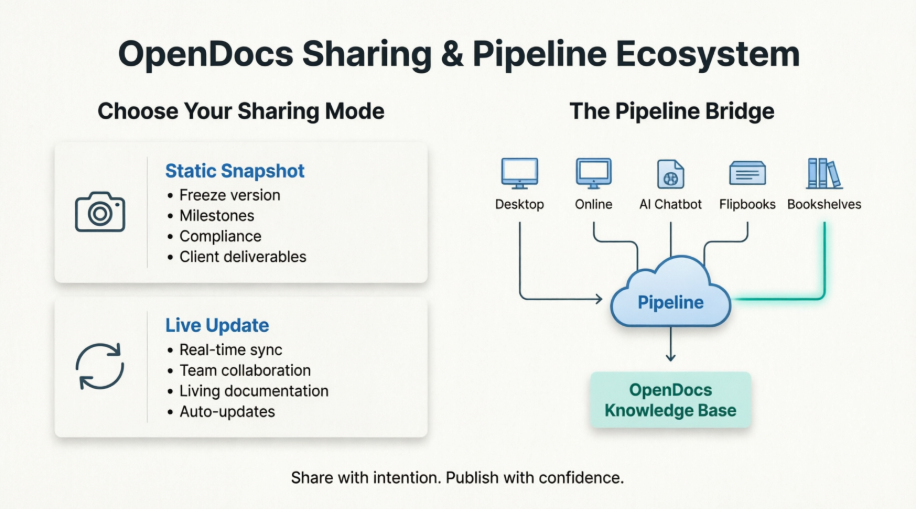
In this hands-on guide, I’ll walk you through how these tools work from a practitioner’s perspective, share workflow tips I’ve learned the hard way, and help you decide which approach fits your next project. No marketing fluff—just what actually works when you’re trying to ship quality documentation under deadline pressure.
Part 1: Static vs. Live Sharing — What Works When (From the Trenches)
The Static Snapshot: Your “Time Capsule” for Critical Deliverables
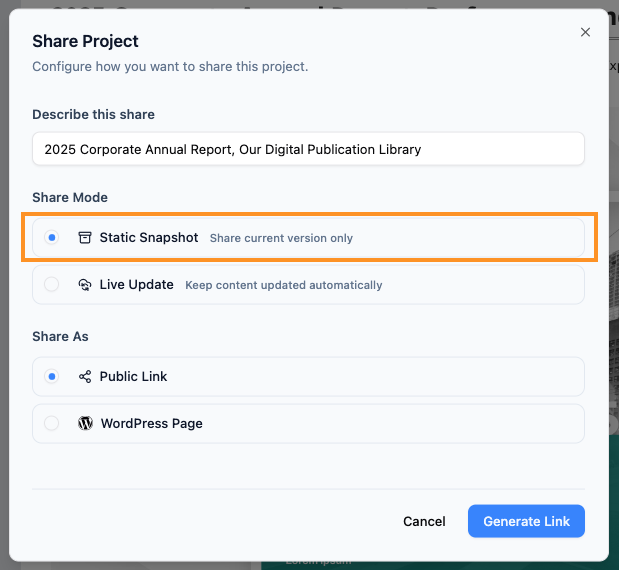
In my experience, the Static Snapshot feature is the unsung hero of client-facing work. Think of it as hitting “save as PDF” but with all the interactive benefits of a web link.
How it actually works in practice:
-
You curate your pages, finalize your diagrams, and click “Share as Static Snapshot.”
-
The system generates a unique URL that locks the content exactly as it appears at that moment.
-
Even if you spend the next week revising the source project, anyone with that link sees only the frozen version.
When I reach for Static Snapshot:
✅ Client proposals and sign-off milestones: I once shared a Static Snapshot of a system architecture for executive review. While the engineering team continued refining details internally, leadership reviewed a stable, unchanging version—eliminating confusion about “which version is final?”
✅ Compliance and audit trails: For regulated projects, having an immutable record of documentation at specific approval gates is non-negotiable. Static Snapshots provide that paper trail without extra export steps.
✅ Training materials with version control: When onboarding new team members, I share Static Snapshots of “Version 1.0” processes. This ensures everyone learns from the same baseline before we introduce iterative updates.
One caveat I learned: Static Snapshots don’t auto-update. If you discover a typo post-share, you’ll need to generate a new link. I now add a version number to the document title (e.g., “Q3 Architecture – v1.2 Static”) to avoid ambiguity.
The Live Update: Your Dynamic Window into Active Projects
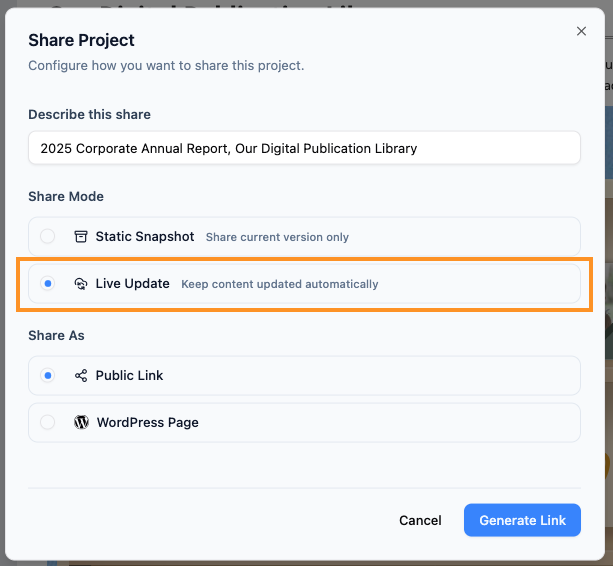
If Static Snapshot is a photograph, Live Update is a live video feed. This mode creates a persistent link that reflects every saved change in your OpenDocs project.
Real-world workflow impact:
-
I use Live Update for our internal engineering wiki. When a developer updates a API diagram, the change appears instantly for the entire team—no “did you see the new version?” Slack messages required.
-
For agile sprint documentation, Live Update means our retrospectives always reference the most current user stories and acceptance criteria.
Ideal use cases I’ve validated:
✅ Cross-functional collaboration: Product, design, and engineering teams stay aligned because everyone views the same evolving source of truth.
✅ Living technical documentation: When documenting a microservice architecture that changes weekly, Live Update ensures runbooks never drift from implementation.
✅ Rapid prototype feedback loops: Share a Live Update link with stakeholders during discovery phases. Their comments apply to the current state, and you can iterate without managing link versions.
Pro tip from experience: Live Update demands discipline. I establish a “publishing window” with my team—e.g., “No major structural changes after 3 PM on review days”—to prevent stakeholders from seeing half-finished work. For sensitive edits, I still use Static Snapshot for the final review cycle.
Quick Decision Framework: Which Mode Should You Choose?
| Scenario | Recommended Mode | Why It Works |
|---|---|---|
| Client deliverable requiring sign-off | Static Snapshot | Prevents scope confusion; creates audit trail |
| Internal team wiki or knowledge base | Live Update | Reduces sync overhead; always current |
| Regulatory documentation | Static Snapshot | Immutable record for compliance |
| Agile sprint artifacts | Live Update | Matches iterative development pace |
| Training materials (baseline version) | Static Snapshot | Ensures consistent learning experience |
| Brainstorming or discovery phase | Live Update | Supports rapid iteration and feedback |
Part 2: The Pipeline Ecosystem — Connecting Your Modeling Tools to Publication
What the Pipeline Actually Solves (Beyond the Hype)
Before discovering Visual Paradigm’s Pipeline, my workflow looked like this: create a diagram in Desktop → export as PNG → upload to Confluence → manually update when changes occurred. Rinse, repeat. It was fragile, time-consuming, and prone to version drift.
The Pipeline changes that equation. At its core, it’s a secure cloud repository that acts as the connective tissue between Visual Paradigm’s modeling tools and OpenDocs. But the real value isn’t technical—it’s cognitive. By eliminating manual export/import steps, the Pipeline lets you focus on content rather than file management.
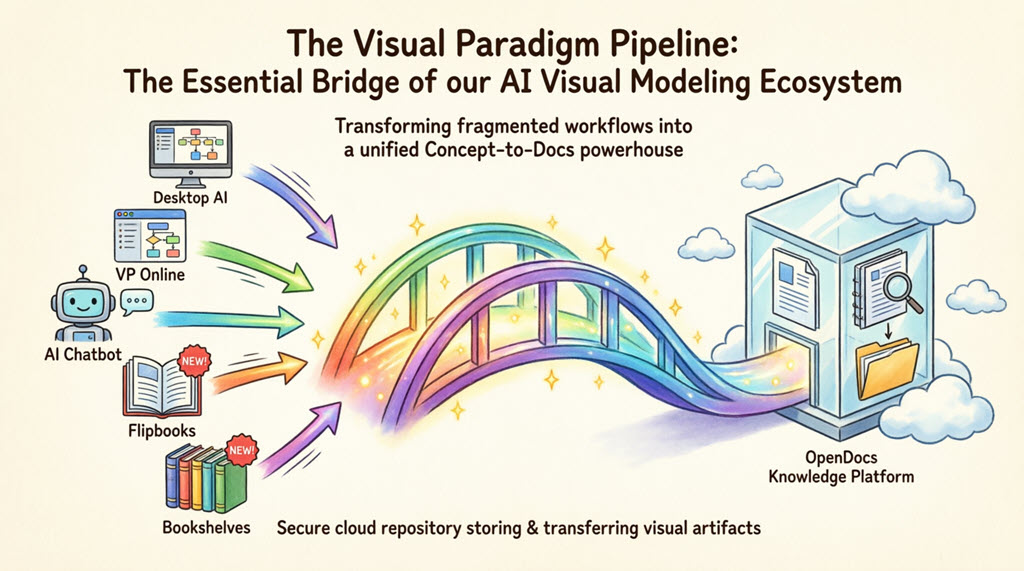
The “aha” moment for me: When I updated a BPMN diagram in Visual Paradigm Desktop and saw it automatically reflect in my OpenDocs process manual—without re-uploading anything—I realized this wasn’t just convenience. It was a fundamental shift toward living documentation.
The 5 Core Connections: Hands-On Walkthroughs
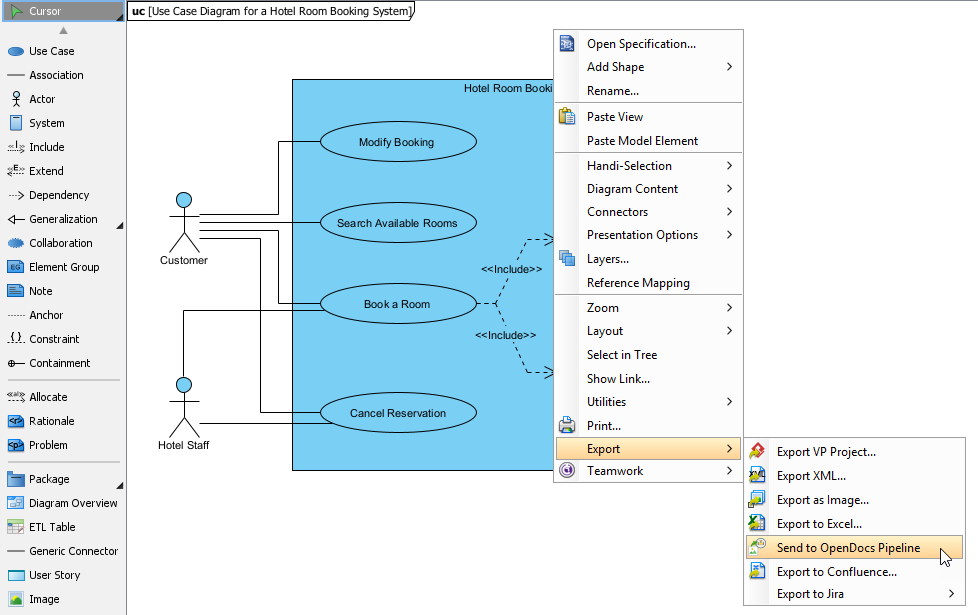
1. Visual Paradigm Desktop → OpenDocs: For Power Users Who Need Precision
This integration is my go-to for complex system architectures. The ability to send editable UML, BPMN, or SysML diagrams directly from Desktop to OpenDocs preserves modeling fidelity in a way that PNG exports never could.
My step-by-step workflow:
-
In Visual Paradigm Desktop, finalize the diagram you want to share.
-
Right-click the diagram canvas → Export > Send to OpenDocs Pipeline.
-
Save your project when prompted (this ensures the Pipeline captures the latest state).
-
(Optional but recommended) Add a descriptive comment like “Q3 Auth Service – Post-Refactor” to help future-you identify the artifact.
-
Confirm export. The diagram now lives in your Pipeline repository.
-
In OpenDocs, edit any page → click Insert → select Pipeline from the sidebar → choose your diagram.
Why this matters: Unlike static images, Pipeline artifacts remain editable. If a stakeholder requests a change, I update the source diagram in Desktop and push a revision—no re-embedding required.
Extended Reading: New Feature: Seamlessly Export Visual Paradigm Desktop Diagrams to OpenDocs
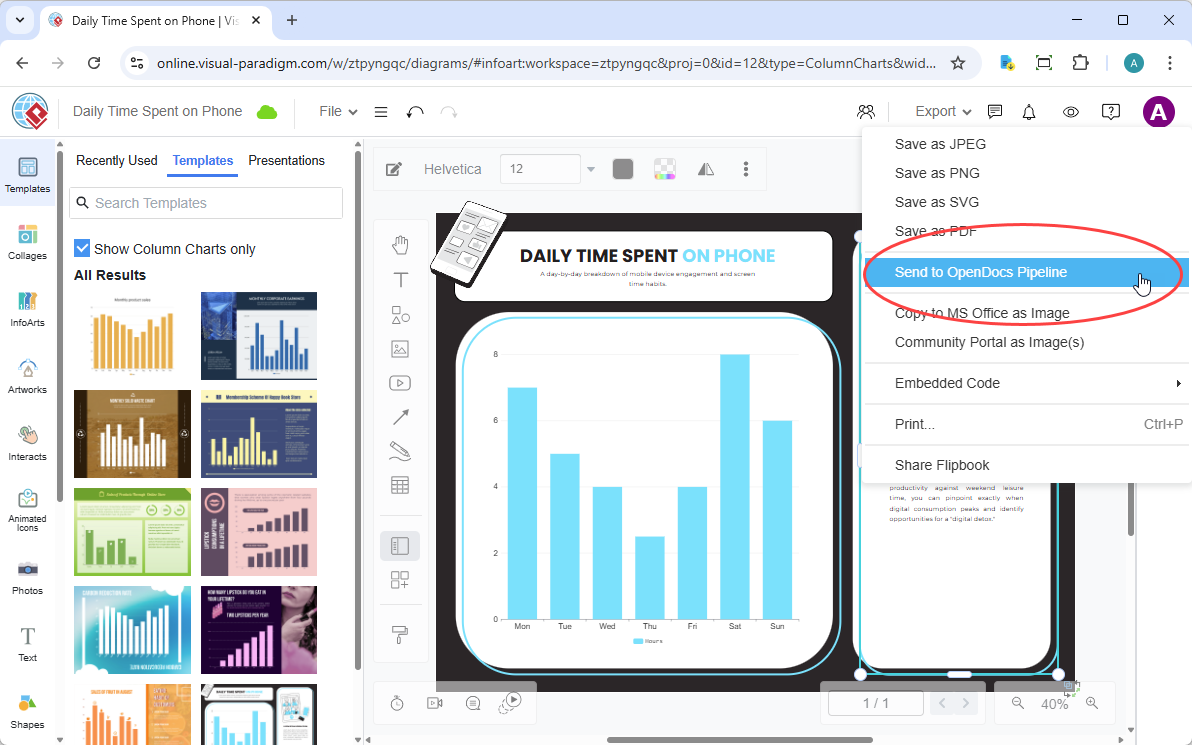
2. Visual Paradigm Online → OpenDocs: The 100% Cloud Workflow
For quick diagrams or collaborative sessions, Visual Paradigm Online + Pipeline is my lightweight alternative. No desktop install, no file transfers—just browser-based creation to published documentation.
My streamlined process:
-
Create or edit your diagram in Visual Paradigm Online.
-
Top menu → Export > Send to OpenDocs Pipeline.
-
Add context in the comment field (e.g., “User Journey Map – Draft for UX Review”).
-
Confirm export.
-
In OpenDocs, insert via Pipeline sidebar as above.
Real-world win: During a remote workshop, I sketched a process flow in VP Online, sent it to Pipeline, and embedded it in our OpenDocs meeting notes—all within 10 minutes. Participants could comment on the live diagram, and I refined it in real-time.
Extended Reading: New Feature: Send Your Visual Paradigm Online Creations Directly to OpenDocs
3. AI Chatbot → OpenDocs: When You Need Speed Without Sacrificing Quality
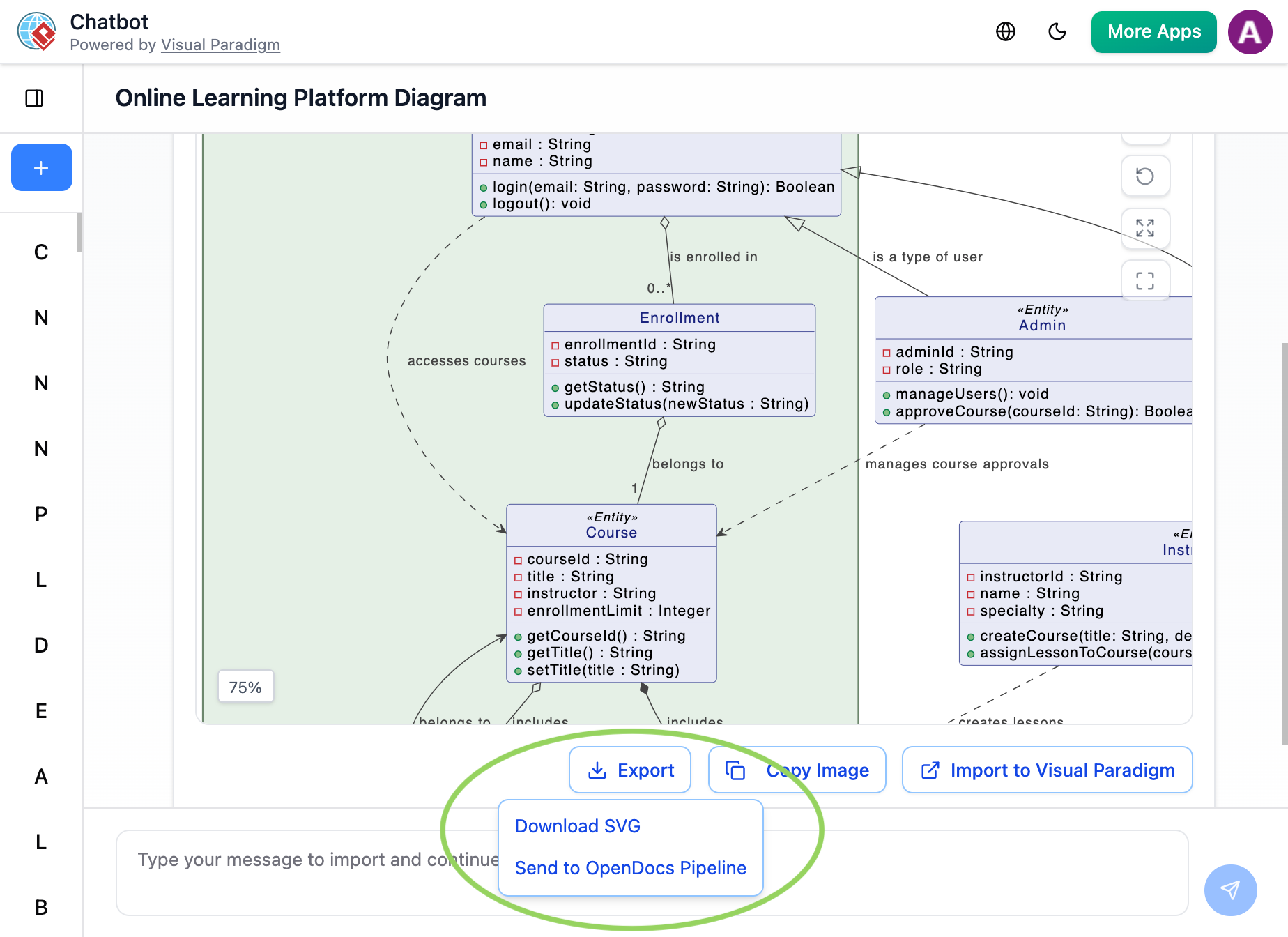
This is where the ecosystem feels genuinely futuristic. I use the AI Chatbot to rapidly prototype diagrams, then push validated outputs directly to documentation.
My AI-assisted workflow:
-
Prompt the AI Chatbot: “Generate a class diagram for an online learning platform with User, Course, and Enrollment entities.”
-
Review and refine the AI-generated diagram within the chat interface.
-
Click Export → Send to OpenDocs Pipeline.
-
In OpenDocs, insert via Pipeline sidebar.
Practical insight: I treat AI-generated diagrams as “first drafts.” Sending them to Pipeline lets me embed them quickly for team feedback, then iterate in the source tool before finalizing. The key is using AI for speed, not as a replacement for domain expertise.
Extended Reading: New Feature Alert: Send Diagrams from Visual Paradigm AI Chatbot Directly to OpenDocs!
4. Flipbooks → OpenDocs (New!): Interactive Content, Seamlessly Embedded
This recent addition transformed how I share visual-heavy content. Instead of linking to external flipbooks, I now embed them directly in OpenDocs pages via Pipeline.
Use case that clicked for me: Creating a product catalog for sales enablement. I designed interactive flipbooks in Visual Paradigm Online, sent them through Pipeline, and embedded them in our OpenDocs sales playbook. Reps can now flip through product specs without leaving our knowledge base.
5. Bookshelves → OpenDocs (New!): Curated Libraries at Scale
For organizations managing dozens of documents, Bookshelves + Pipeline is a game-changer. I use this to publish themed collections—like “Onboarding Resources” or “Compliance Guides”—as navigable libraries within OpenDocs.
Implementation tip: I organize Bookshelves by audience (e.g., “Engineering,” “Product,” “Leadership”) rather than by project. This makes discovery intuitive for new team members.
Traditional Workflow vs. Pipeline Workflow: A Side-by-Side Reality Check
| Pain Point | Old Way | Pipeline Way |
|---|---|---|
| Sharing a diagram | Export PNG → Upload to wiki → Hope it’s the latest version | One-click “Send to Pipeline” → Insert in OpenDocs |
| Updating content | Re-export, re-upload, notify team | Update source → Push revision → Auto-sync in OpenDocs |
| Maintaining editability | Lose vector data in PNG export | Preserve full modeling fidelity for future edits |
| Finding assets | Search local drives or email attachments | Centralized Pipeline repository with comments and version history |
Part 3: Making It Work for Your Team — Lessons Learned
After integrating these tools across three projects, here are my hard-won recommendations:
🔹 Start with Live Update for internal work, Static for external. This hybrid approach gives your team agility while providing clients with stability.
🔹 Use Pipeline comments as metadata. That optional comment field? Treat it like Git commit messages. “Refactored auth flow per security review – 2026-04-10” saves hours of future searching.
🔹 Establish a “Pipeline hygiene” ritual. Once a week, I review my Pipeline repository to archive outdated artifacts and rename ambiguous ones. A little maintenance prevents repository sprawl.
🔹 Train your team on the “why,” not just the “how”. When colleagues understand that Static Snapshot prevents version confusion and Pipeline reduces manual busywork, adoption soars.
🔹 Leverage AI Chatbot for exploration, not final output. I’ve found the best results come from using AI to brainstorm diagram structures, then refining them manually before sending to Pipeline.
Conclusion: Documentation That Evolves With Your Work
Visual Paradigm’s OpenDocs sharing modes and Pipeline ecosystem aren’t just feature checkboxes—they’re a philosophy of documentation that respects how modern teams actually work.
The choice between Static Snapshot and Live Update isn’t about which is “better.” It’s about intentionality: Do you need to freeze a moment for accountability, or create a living window into ongoing work? And the Pipeline? It’s the quiet infrastructure that makes both approaches sustainable by eliminating the friction that typically separates modeling from publishing.
In my experience, teams that master these tools don’t just produce better documentation—they reduce cognitive load, minimize version-related errors, and free up time for the work that truly matters: solving problems, not managing files.
If you’re evaluating Visual Paradigm for your documentation workflow, my advice is simple: Start small. Pick one project, try Live Update for internal notes and Static Snapshot for a client deliverable, and send one diagram through the Pipeline. The time you save on version management will quickly compound—and you’ll wonder how you ever documented without it.
Reference
- Share Digital Bookshelf to OpenDocs: Step-by-step tutorial on publishing curated flipbook collections to OpenDocs via the Pipeline integration.
- Share Visual Paradigm Flipbooks to OpenDocs: Official guide for embedding interactive flipbooks created in Visual Paradigm Online directly into OpenDocs documentation.
- A User’s Hands-On Review of Visual Paradigm’s OpenDocs Flipbook Integration: Independent practitioner review covering real-world implementation, usability, and workflow benefits.
- Visual Paradigm Updates Blog: Official release notes, feature announcements, and tutorials for all Visual Paradigm products including OpenDocs and Flipbook Maker.
- A Practitioner’s Review of Visual Paradigm’s OpenDocs Flipbooks WordPress Workflow: In-depth analysis of the end-to-end publishing workflow from flipbook creation to WordPress deployment.
- Publish as Flipbooks Feature: Product page detailing flipbook conversion capabilities, supported formats, and interactive features.
- How to Create a Digital Bookshelf: General best practices for organizing digital publications into thematic collections (conceptually aligned with Visual Paradigm Bookshelves).
- OpenOffice Doc to Flipbook Converter: Tool-specific guide for converting OpenOffice documents into interactive flipbooks using Visual Paradigm.
- Visual Paradigm for Microsoft Office Add-in: Microsoft Store listing for the Office add-in that enables diagram insertion directly into Word, PowerPoint, and Outlook.
- From Model to Manual: A Software Engineer’s Guide to Syncing Visual Paradigm Desktop Diagrams with OpenDocs: Technical walkthrough for integrating architecture diagrams and models into living documentation.
- Showcase My Flipbook with a Bookshelf: Blog tutorial on theming, organizing, and presenting flipbooks using the virtual bookshelf feature.
- Virtual Bookshelf Feature Overview: Official documentation for the bookshelf functionality, including supported formats and sharing options.
- Visual Paradigm’s Flipbook Maker: A Game Changer for Interactive Content: Editorial piece highlighting use cases, ROI, and creative applications of the flipbook tool.
- Introducing Visual Paradigm Flipbook Maker: Your Ultimate Choice in Digital Publishing: Third-party announcement and feature spotlight on the flipbook maker launch.
- Visual Paradigm Online Platform: Main product hub for the cloud-based diagramming and content creation suite.
- Introducing the AI Flipbook Generator: Release post detailing AI-assisted content creation, outline generation, and illustration features.
- AI Flipbook Generator Launch Announcement: Official launch coverage with use cases, prompts guide, and integration notes.
Related posts:
 Complete Guide: Sending Visual Paradigm Online Creations to OpenDocs
 The Complete Guide to Visual Paradigm’s OpenDocs Pipeline
 Complete Guide: Send Diagrams from Visual Paradigm AI Chatbot Directly to OpenDocs
 From Text to Diagram:Visual Paradigm OpenDocs AI to Create Professional Data Flow Diagrams

